Sunday, March 12, 2023

Zabbix migrations, in place / out of place

I've had Zabbix running on PostgreSQL for over a year now it seems, and during that time Zabbix has released a couple major updates, and I've tried to build the newest servers and agents I could on a variety of BSD and Linux flavors. My go-to platform, NetBSD, doesn't have the latest and greatest of every app out there, so I moved on to FreeBSD as the primary Zabbix home base, er at home.

I've had 2 levels of the Zabbix server on NetBSD, once on i386 and once on Arm but for this post I'll ignore those branches and focus on 2 FreeBSD directions for data and applications with the history ramifications.

When I started Zabbix 5 server was the best I could manage; as I tried other variations I had 6.2 up and running eventually. I figure out that exporting and importing history/trends from one Zabbix box to another is simple but time consuming as valuable data feeds increase.

Platform 1: Upgrade database in place; conform to schema changes

In early 2022, I started monitoring with Zabbix en masse, as they say.

-rw-r--r--  1 root  wheel  20385599 Aug  8  2022 postgresql-11.17.tar.bz2

-rw-r--r--  1 root  wheel  22132996 Aug  8  2022 postgresql-14.5.tar.bz2

While upgrading, I needed both versions 11 and 14; FreeBSD would not install one if the other was already. Hence, skipping the "make clean" part meant slightly quicker re-installs.

Installing zabbix62-server-6.2.3...
pkg-static: zabbix62-server-6.2.3 conflicts with zabbix54-server-5.4.9 (installs files into the same place).

===>  zabbix62-frontend-php74-6.2.3 conflicts with installed package(s):
      zabbix54-frontend-php74-5.4.9_1

===>  Installing for zabbix62-server-6.2.3
===>  Checking if zabbix62-server is already installed
===>   zabbix62-server-6.2.3 is already installed

 Installed packages to be REMOVED:
        zabbix62-server: 6.2.3

Starting version (2022):

  • Jan 30 21:58:37 freebsd1 pkg-static[69272]: postgresql11-server-11.14 installed

Upgrade phases (2023):

  • Feb 20 15:46:38 freebsd1 pkg[11293]: postgresql11-server-11.17 deinstalled
  • Feb 20 16:59:17 freebsd1 pkg-static[65464]: postgresql11-server-11.17 installed
  • Feb 20 17:14:14 freebsd1 pkg[69391]: postgresql11-server-11.17 deinstalled
  • Feb 20 17:15:10 freebsd1 pkg-static[69814]: postgresql14-server-14.5 installed


The "deinstalls" probably include the pre-packaged server version that only supports mysql/mariadb.

FAIL:


Configuration file error

    DB type "POSTGRESQL" is not supported by current setup. Possible values MYSQL.

PHP


Feb  3 23:17:58 freebsd1 pkg-static[89086]: php80-pgsql-8.0.15 installed
Feb  3 23:57:55 freebsd1 pkg-static[15828]: php80-pgsql-8.0.15 deinstalled
Feb  4 02:51:20 freebsd1 pkg-static[52566]: php74-pgsql-7.4.27 installed

This sequence shows the installed package mix failed to include PHP 8.0; this limit was something I searched for in early installs. Zabbix didn't work with PHP 8 on the systems I could muster.

Data changes

Along the way, Zabbix changed history table keys so newer versions may not deal with older versions if there is redundancy (as I understand it). So history needed to be dumped and reloaded, being renamed along the way so that there was a fall back. If it worked.

  38636366 Jan 17 03:14 backup_zabbix_history_text.sql
 302137397 Jan 17 03:15 backup_zabbix_history_uint.sql

 174197724 Jan 17 03:16 backup_zabbix_trends.sql
 101438770 Jan 17 03:16 backup_zabbix_trends_uint.sql


=> select count(*) from history_old;
  count
---------
 9281308

Platform 2: New database, import hosts and templates, manually import history.

Database Server versions

(2022)
May 12 15:13:26 freebsd2 pkg[11749]: postgresql14-server-14.5 installed
May 12 15:49:32 freebsd2 pkg[14127]: postgresql14-server-14.5 deinstalled
May 12 16:13:38 freebsd2 pkg[15371]: postgresql14-server-14.5 installed

My notes aren't clear on why 2 tries, but at least that's still correct on the Zabbix application server side. I moved the database in 2023 to a different system meaning no need to upgrade the original host unless I need to do a refresh there sometime (mmm, backups).

Feb 18 23:17:41 freebsd3 pkg-static[33301]: postgresql15-server-15.1_1 installed
Feb 18 23:26:00 freebsd3 pkg[42270]: postgresql15-server reinstalled: 15.1_1 -> 15.1_1
Feb 18 23:40:46 freebsd3 pkg[45979]: postgresql15-server-15.1_1 deinstalled
Feb 18 23:47:06 freebsd3 pkg-static[64934]: postgresql15-server-15.1_1 installed

I struggled a bit here with getting the package/port to include PostgreSQL. If I slipped, the make had to be re-done with particular incantations to forget my previous mistake. So I won't do it again, it's [ make rmconfig ].

Hammer time

20230220:143137.337 Unable to start Zabbix server due to unsupported PostgreSQL database version (11.17).
20230220:143137.337 Must be at least (13.0).
20230220:143137.337 Use of supported database version is highly recommended.
20230220:143137.337 Override by setting AllowUnsupportedDBVersions=1 in Zabbix server configuration file at your own risk.

=# INSERT INTO history SELECT * FROM history_old ON CONFLICT (itemid,clock,ns) DO NOTHING;
INSERT 0 9281304

[...]
COPY 1357
COPY 3828
COPY 0
COPY 18
COPY 1
COPY 9311373
COPY 5024
COPY 0
COPY 0

=> select count(*) from history;
  count
---------
 9311373
(1 row)

=> select count(*) from history_old;
  count
---------
 9281308

PHP

Here, unlike the legacy system, the PHP 8 version is working with Zabbix.


(2022)
May 12 15:50:41 freebsd2 pkg[14127]: php82-pgsql-8.2.0.r2 installed
May 12 16:12:16 freebsd2 pkg[15371]: php82-pgsql-8.2.0.r2 deinstalled
(2023)
Jan 10 20:20:05 freebsd2 pkg-static[50148]: php81-pgsql-8.1.14 installed

Data migration

To have a faster response time, I used system 3 as a database server, and installed PostgreSQL 15 over the previously running version 14.

Basic export import steps follow, along with dump size.

  1. Shutdown Zabbix application server
  2. Run a database export
  3. Set up target system at least the same database version
  4. Create database and schema as needed
  5. Run database import
  6. Shutdown original database
  7. Alter Zabbix server configuration
  8. Viola (ha)

2023-02-19 06:25:02.997 UTC [9256] FATAL:  terminating connection due to administrator command


-rw-r--r--  1 postgres  postgres  562198532 Feb 19 06:01 /dump/zabbix_freebsd2.dump

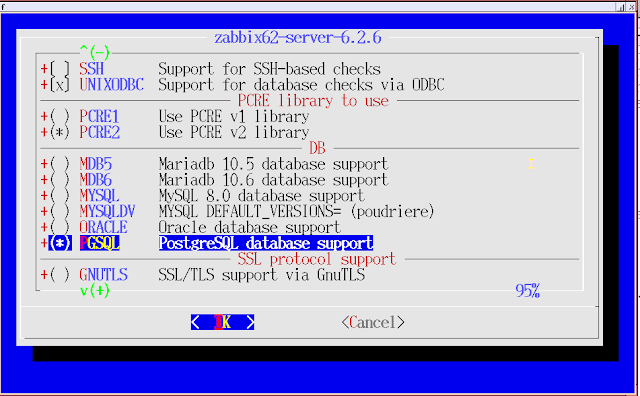
This is the wholly grail; if I miss this screen or fail to check the right box, it's not show time, it's dump and reload time.


From then to now:

-rw-r--r--  1 freebsd  freebsd  24382685 Dec 23  2021 zabbix-5.4.9.tar.gz
-rw-r--r--  1 freebsd  freebsd  24510838 Jan 31  2022 zabbix-5.4.10.tar.gz
-rw-r--r--  1 freebsd  freebsd  41038757 Dec  5 08:44 zabbix-6.2.6.tar.gz

Meanwhile 6.2.7 and 6.2.8 are probably out, on some platforms at least.

History results (from platform 1):


The gaps are due to sensors or test systems going offline or elsewhere.


Deltas

What did I find most different after trying the upgraded platform and the fresh platform? One obvious nicety is the delivery of open street maps in the base server. This only shows up for me in the fresh install, though.


Next big difference is the change from a single agent status level to seeing two of them, squeezed into one lamp.


Perhaps multiple interfaces may be configured to show here, though my first tries to add second adapters didn't pan out.

Option: HeartbeatFrequency is available on later agent versions, so check if this needs to be set (missing means an earlier configuration file).

This dash display works simply enough:


Groups and other metadata containers/tags have changed somewhat from the earliest versions I've used (5).


Which way for future upgrades? It depends, as usual. If the keys change, that's doable. Larger data collections are unlikely at my pace; for others trends would need to be analyzed. Avoiding "database unsupported" is always a good idea.

Ephemera


Along the way, I found this bug (hit it myself):

ZBX_NOTSUPPORTED: Cannot obtain a descriptor to access kernel virtual memory.


Although the question refers to NetBSD 8 and Zabbix 4 (both outdated in 2023), the error may still hit if you use an older agent software base. NetBSD patches to get an agent the correct system internal metrics are out there, maybe on package source work-in-progress, and maybe in a distribution near you. I went through each system I test to get a Zabbix 6.2.6 agent running, so they'd match the server version and not have quirks with features absent or deformed.

The FreeBSD kernel limited the import speed, I presume.

Feb 20 17:40:48 freebsd1 kernel: Limiting open port RST response from 223 to 200 packets/sec
Feb 20 17:40:50 freebsd1 kernel: Limiting open port RST response from 224 to 200 packets/sec
Feb 20 17:41:24 freebsd1 kernel: Limiting open port RST response from 220 to 200 packets/sec


References:


Wednesday, February 8, 2023

NetBSD 10 Beta installs and testing from i386 to ARM

I've run NetBSD for quite some time, going back to the days of Dr. Dobbs magazine and the release of the BSD4-based 386BSD (which I installed from floppy disks...). The chance of beta testing the newest release came at the end of December 2022. I had installed NetBSD-current on Raspberry Pi platforms, and also had different levels of NetBSD 9 on systems.

This story is on my attempts to upgrade or install fresh operating systems "in house". Rather than strict chronological order, the sections below are by CPU architecture, starting with the older i386 then going to Arm processors. I have not upgraded an AMD-based system (yet), and will add notes at the end when I can.

i386

I had a running 32-bit small system where I've had different releases of NetBSD over the years, starting with spinning disk and now with solid state. After going through more hurdles than I expected, that "Atom" powered machine is on 10-Beta and being tested ("h1"). Then I remembered a donated PC that would support NetBSD, although I either fumbled the boot tracks or the BIOS is just not BSD-friendly. That machine ("h2") got a fresh install from the ISO image.

H1 BEFORE:

Jan  1 20:16:19 h1 /netbsd: [   1.0000000] NetBSD 9.3 (GENERIC) #0: Thu Aug  4 15:30:37 UTC 2022

H1 AFTER:

Jan  1 21:22:51 h1 /netbsd: [   1.0000000] NetBSD 10.0_BETA (GENERIC) #0: Sat Dec 31 04:55:53 UTC 2022

NetBSD h1 10.0_BETA NetBSD 10.0_BETA (GENERIC) #0: Sat Dec 31 04:55:53 UTC 2022  mkrepro@mkrepro.NetBSD.org:/usr/src/sys/arch/i386/compile/GENERIC i386

H2 AFTER:

Jan 29 16:08:18 h2 /netbsd: [   1.0000000] NetBSD 10.0_BETA (GENERIC) #0: Mon Jan 23 16:02:49 UTC 2023

NetBSD h2 10.0_BETA NetBSD 10.0_BETA (GENERIC) #0: Mon Jan 23 16:02:49 UTC 2023  mkrepro@mkrepro.NetBSD.org:/usr/src/sys/arch/i386/compile/GENERIC i386

The first install took longer than I wanted because I first tried to use a CD-ROM disk for the install image, but unfortunately the standard distribution size has now grown pas 640MB for i386. Then I installed to a clean external drive via a USB adapter before managing to lay down the correct OS image and all of the parts.

One self-imposed problem was, using sysupgrade as a novice, making the fstab file empty or wrong. Fortunately, somehow got around this using the other boot drive to repair the goof.

$ ls -trl fst*
-rw-r--r--  1 root  wheel   348 Jan  2 13:48 fstab-10-fail
-rw-r--r--  1 root  wheel  1100 Jan  2 14:05 fstab-10-almost
-rw-r--r--  1 root  wheel   953 Jan  2 14:18 fstab

About 3 weeks elapsed between the first i386 kernel build to the second, so some slight changes have occurred it seems.

-rwxr-xr-x  1 root  wheel  25611864 Dec 31 04:55 /netbsd
-rwxr-xr-x  1 root  wheel  25611940 Jan 23 16:02 /netbsd


Typically the first package I'd install not in the base distribution is the bash shell, requiring steps to initiate a package source/executable tree. To get up-to-date, I refreshed pkgsrc via CVS on both; the first box has almost 2000 top-level distfile items and the second just 100 so far. For more complex packages with extensive dependencies I've ended up with pre-built packages generally. More below.
 

Entropy


Jan 11 18:03:44 h1 /netbsd: [ 176217.1118082] entropy: pid 19289 (python) blocking due to lack of entropy

Stuck on this for a while until I noticed the screen message. Repaired. Didn't happen on the second, newer, machine, with a quite different CPU (Intel Atom versus AMD A8).

Packages


The most glaring omissions below the first tier (64-bit) systems on NetBSD I've run into are web browsers, audio software, and the LibreOffice package. Thunderbird is another with a massive compile time is you do it yourself.

Zabbix 6.2 server and agents weren't there in pkgsrc and I've installed them from source across the NetBSD architectures I have. Most common hurdle has been the Perl regular expression library pcre which seems like it should have trivial build or run requirements (i.e. ldd works).

The net.c file needed to be pulled in from the pkgsrc "work in progress"

$ ls -l  zabbix-6.2.6/src/libs/zbxsysinfo/netbsd/net.c*
-rw-r--r--  1 me  us  9245 Jan 27 00:57 zabbix-6.2.6/src/libs/zbxsysinfo/netbsd/net.c
-rw-r--r--  1 me  us  8129 Dec  1 07:47 zabbix-6.2.6/src/libs/zbxsysinfo/netbsd/net.c.orig

Alas, pkgsrc.se went away quite recently, so I cant backtrack to the source; maybe this will help:


"zabbix62-*: Update Zabbix to 6.2.7"

Oh, right, this:


lynx sometimes shows

SSL error:unable to get local issuer certificate-Continue? (n) 

then works:

    Linkname:LYNX - The Text Web-Browser                                                       URL:https://lynx.invisible-island.net/
     Charset:us-ascii                                                                      Server:Sucuri/Cloudproxy                                                                Date:Sat, 04 Feb 2023 14:37:40 GMT                                                Last Mod:Wed, 03 Apr 2019 08:25:24 GMT 

Firefox loads and runs.

Thunderbird doesn't like 32-bit on my attempts.
no such installed package thunderbird-78.12.0nb9

For fill-ins of lost regexp parts:

Benchmarks


I should have run times from a lot of historic tests, except those under NDA (nondisclosure agreements) or other reasons. The BYTE benchmark is one of the oldest, and I probably ran "sieve" tests in the 1980s for C compilers.
The package source runs the older 4.x version (5.x is in the FreeBSD ports tree).

$ ls -l /var/bytebench/report 
-rw-r--r--  1 root  wheel  3792 Jan 31 14:28 /var/bytebench/report

Dhrystones: 2,285,582 h1
            4,820,219 h2

AMD:
           64,565,735 (ryzen 6-core)

Old times, good times:

Dhrystones:   570,441 (pentium ~2005)
            3,437,974 (pentium ~2005)
            3,484,307 (pentium ~2007)
            7,126,944 (opteron ~2007)


Benchmark Run: Sat Jun 26 2010 20:06:15 - 20:06:15
192 CPUs in system; running 192 parallel copies of tests

Even older:

-rwxr--r--  1 377  wheel   63570 Mar 11  1997 DHRY1ND.EXE
-rwxr--r--  1 377  wheel   59570 Mar 11  1997 DHRY1OD.EXE
-rwxr--r--  1 377  wheel   67466 Mar 11  1997 DHRY2ND.EXE
-rwxr--r--  1 377  wheel   67598 Mar 11  1997 DHRY2OD.EXE

hbench


I began collecting results from the hbench-os package because I've used it in the past and had rough ideas what values might be expected on high-end processors. Lower end modules like the Pi Zero 2W show degradation in the results.

I snagged on remote OS calls in the run sequence, and commented them out in a rough way.

$ cat  /usr/pkg/share/hbench/Results/netbsdelf10.0-i386/h1.1/lat_syscall_sbrk
0.0259
0.0257
0.0275

I guess Byte bench should write to /usr/pkg instead of /var.

$ cat  /usr/pkg/share/hbench/Results/netbsdelf10.0-i386/h2.1/lat_syscall_sbrk
0.0160
0.0157
0.0156
0.0148
0.0160

(the 9.x amd system shows):

$ cat  /usr/pkg/share/hbench/Results/netbsd9.2-x86_64/amd.3/*sbrk
0.0024
0.0024
0.0024

test suite

For whatever reason I had not previously looked at the /usr/tests suite of system tests that have been included in NetBSD for far longer than I would have guessed. I can't find a lot of cross references so just dug into the docs and tried things out. Many tests failed when /usr/sbin or /sbin wasn't in the PATH, and a few others I have checked work if logged in as root. Though I don't have enough experience with this suite, getting values from all the systems I could access made sense in trying to help isolate either test or system faults.

i386
Failed test cases:
    include/t_paths:paths, kernel/kqueue/t_empty:sock_tcp, 
    kernel/t_magic_symlinks:realpath, 

spurious artifacts

[ 104957.413584] WARNING: pid 19263 (t_futex_robust) lwp 7568: exhausted robust futex limit


ARM

NetBSD a1 10.0_BETA NetBSD 10.0_BETA (GENERIC) #0: Fri Jan 13 19:15:32 UTC 2023  mkrepro@mkrepro.NetBSD.org:/usr/src/sys/arch/evbarm/compile/GENERIC evbarm

NetBSD a2 10.0_BETA NetBSD 10.0_BETA (GENERIC) #0: Fri Jan 13 19:15:32 UTC 2023  mkrepro@mkrepro.NetBSD.org:/usr/src/sys/arch/evbarm/compile/GENERIC evbarm

NetBSD a3 10.0_BETA NetBSD 10.0_BETA (GENERIC64) #0: Fri Jan 13 19:15:32 UTC 2023  mkrepro@mkrepro.NetBSD.org:/usr/src/sys/arch/evbarm/compile/GENERIC64 evbarm

Like one of the i386 upgrades, I made errors using sysupgrade, with the worst problem being removal of necessary security files. When normal groups came up as "not found" I began to worry. With some backups, the majority of issues were fixed eventually. The workaround was again, mounting the flawed install elsewhere and updating the gaps.


One fix didn't catch immediately; setting the last touched time to "now" did the right thing.

(not supposed to be zero:)
-rw-------  1 root  wheel     0 Jan 17 16:38 

Clean install on a Pi Zero 2W


One oddity I found was date stamps on the upgrade sets. On the website the dates were nearly identical but the cached versions differ.

$ ls -l /var/cache/sysupgrade/

-rw-r--r-- 1 root wheel 37548220 Jan 16 10:22 base.tar.xz
-rw-r--r-- 1 root wheel 54971904 Jan 16 10:26 comp.tar.xz
-rw-r--r-- 1 root wheel   447912 Dec 20 00:56 dtb.tar.xz
-rw-r--r-- 1 root wheel   495604 Dec 23 00:04 etc.tar.xz
-rw-r--r-- 1 root wheel  2614024 Jan 16 10:20 games.tar.xz
-rw-r--r-- 1 root wheel  1103864 Jan 14 22:43 gpufw.tar.xz
-rw-r--r-- 1 root wheel  7566312 Jan 16 10:21 man.tar.xz
-rw-r--r-- 1 root wheel  4135072 Jan 16 10:20 misc.tar.xz
-rw-r--r-- 1 root wheel  6185508 Jan 16 10:20 modules.tar.xz
-rw-r--r-- 1 root wheel  7852529 Jan 14 22:37 netbsd-GENERIC64.gz
-rw-r--r-- 1 root wheel  2694436 Jan 16 10:20 rescue.tar.xz
-rw-r--r-- 1 root wheel 10290016 Jan 16 10:20 tests.tar.xz
-rw-r--r-- 1 root wheel  1900648 Jan 16 10:20 text.tar.xz
-rw-r--r-- 1 root wheel  6021116 Dec 31 21:03 xbase.tar.xz
-rw-r--r-- 1 root wheel  6026656 Jan 14 22:44 xcomp.tar.xz
-rw-r--r-- 1 root wheel    27840 Jan  4 15:11 xetc.tar.xz
-rw-r--r-- 1 root wheel 28997008 Jan 16 10:21 xfont.tar.xz
-rw-r--r-- 1 root wheel 21325496 Jan 16 10:21 xserver.tar.xz


Packages

Firefox isn't entirely working for me on the arm systems. Still checking options.
LibreOffice, PostgreSQL and Thunderbird work in all tests so far. 

Thunderbird email header:

User-Agent: Mozilla/5.0 (X11; NetBSD evbarm; rv:78.0) Gecko/20100101 Thunderbird/78.12.0

Zabbix agents are at 6.2 with local compiles. I had a Zabbix server working on NetBSD current which is not set up at the moment.

catclock: yes

One of the cooler packages to get running is minidlna, which can share out media from MP3s to MP4s. Well, that's not many types. Probably M4A and WAV and more too. FreeBSD shines here as well.

[2023/01/13 04:28:01] minidlna.c:1121: warn: Starting MiniDLNA version 1.2.1.

VLC

pkgin search vlc
cleaning database from https://cdn.netbsd.org/pub/pkgsrc/packages/NetBSD/aarch64/9.0/All entries...
reading local summary...
processing local summary...
processing remote summary (https://cdn.netbsd.org/pub/pkgsrc/packages/NetBSD/aarch64/10.0/All)...

pkgin search vlc-3
vlc-3.0.17.4nb8 <    VideoLAN media player and streaming server

=: package is installed and up-to-date
<: package is installed but newer version is available
>: installed package has a greater version than available package

ctwm

I made local "dot" ctwm rc files after seeing the NetBSD X standard change. If I use the system defaults with no local dot file, I get application menus from pkgsrc. But with my local tweaks I can't find a way to run that menu. The CTWM app doesn't make a lot of noise, which is generally good.


Benchmarks


Pi0
Dhrystones: 2087553 a1
Dhrystones: 2207961 a2
Pi4
Dhrystones: 8777214 a3


hbench


sbrk pi 4
0.4160
0.4468
0.4161
0.4132


pi0:
pkgin search hbench
No results found for hbench

Still trying to run this particular flavor


bash-5.1$ file  bin/netbsd10.0-evbarm/lat_pipe
bin/netbsd10.0-evbarm/lat_pipe: ELF 32-bit LSB executable, ARM, EABI5 version 1 (SYSV), dynamically linked, interpreter /usr/libexec/ld.elf_so, for NetBSD 10.0, compiled for: earmv7hf, not stripped

These will make more sense with legends. The old way I created these was with ploticus, which meanwhile has evolved such that my old configurations do not work.

test suite


Failed test cases:
    include/t_paths:paths, kernel/kqueue/t_empty:sock_tcp,
    kernel/t_magic_symlinks:realpath,
[...]


Network adapter failure(s)

I opened a PR after getting repeated reboots when using an external ethernet adapter with a Pi 02W. After several days/weeks, I installed a second system. That had no problems with a second adapter. Then I switched the hardware, and surprise, no problems. Oof.


Jan 16 09:06:50 a1 /netbsd: [ 12626.1912013] Skipping crash dump on recursive
 panic
Jan 16 09:06:50 a1 /netbsd: [ 12626.1912013] panic: lock error: Mutex: mutex_
vector_enter,516: assertion failed: !cpu_intr_p(): lock 0x90d7087c cpu 0 lwp 0x9
0af8040

(last one seen as of 04-Feb-2023)


messages:
Jan 16 05:37:46 a1 /netbsd: [   3.9488398] ure0: Realtek (0x0bda) USB 10/100/1000 LAN (0x8153), rev 2.10/31.00, addr 4
Jan 27 20:16:13 a1 /netbsd: [   2.9264624] ure0: Realtek (0x0bda) USB 10/100 LAN (0x8152), rev 2.10/20.00, addr 3


End notes


In getting ancient "Byte Benches" to run, I found a few obstacles and retreaded some old territory. In reviewing the test conditions, I realized only the Linux variants on the Pi4 were modifying the CPU clock dynamically. NetBSD had the clock set to 1500 MHz, and FreeBSD 600 MHz.

Also wondering which tests used all 4 cores, given the evolved benchmarks that run 4 parallel tests when 4 cores are detected.


Found the kernel control for CPU clock throttling on FreeBSD with powerd, while NetBSD has a package called estd. I have both running, though the FB activity seems to be a see-saw from high to low, while the NB box just keeps running at top speed. In future tests I will add more load and also watch the CPU temperatures (only the Raspbian box has no fan right now).

I opened problem reports for kernel crashes and the entropy hangs. The other issue, if I can document it, is the audio faults after a period of time. It's great to have music work out the headphone jack, as well as HDMI, as earlier builds of non-Raspberry OS had issues.

AMD64 - future path to upgrade will either be a live USB or a CD-ROM. Probably I'll test with the latter first since the i386 image outgrew ye olde 640MB disk size.


Saturday, January 21, 2023

Another Zabbix chapter: software upgrade, hardware downgrade.

I started using Zabbix about a year ago, trying to get it running on the Raspberry Pi "platform." I wanted to deploy a different OS than the standard Raspbian, and went through tests on NetBSD, FreeBSD, and another Linux flavor before settling on FreeBSD and Zabbix 5.4.

Building out an intra-home data aggregator

After running that system for some time, I decided a second system would be nice, for redundancy and for some development in parallel. I built the most recent version that I could find on the NetBSD package source, ending up with Zabbix 4 on a Pi 4 and 5.0 on an i386 (not really Pi). Minor version differences such as XML file content for templates and hosts were small enough to ignore or workaround.


Then I found an available Raspberry Pi 3A, causing a domino effect where I ended up putting FreeBSD 13.1 on a Pi 3B (the working 5.2 is on a Pi 4).

OS, database, application deploy


  • FreeBSD 13.1 ELF 64-bit LSB executable, ARM aarch64
  • Postgres 14.5 (I missed 15.x by 1 or 2 dependent patch levels)
  • Zabbix 6.2.6

The first thing I tried, even though it hasn't worked in the past, was to use only FreeBSD packages, not compile anything. I was hoping for PostgreSQL support on the Zabbix server rather than MySQL as I can do either but prefer the former (for reasons).

pkg install zabbix62-frontend-php81
pkg install mod_php81

When I started, indications were Zabbix 6.2.3 was the packaged version, which supported PostgreSQL server 14 but not 15. So I deployed version 14. As it turned out, I needed to compile a newer version which should work with 15. I didn't feel like dropping and reloading the data yet; maybe a later upgrade will be feasible.

Traces from /var/log/messages of my package journey:

DateTimePackage information
May 1211:01:06zabbix5-agent-5.0.28 installed
May 1215:19:38zabbix62-frontend-php81-6.2.3 installed
May 1214:55:37zabbix62-server-6.2.3 installed
May 1215:49:31zabbix62-frontend-php81-6.2.3 deinstalled
May 1215:50:41php82-pgsql-8.2.0.r2 installed
May 1215:52:34mod_php82-8.2.0.r2_1 installed
Jan 1016:12:16php82-pgsql-8.2.0.r2 deinstalled
Jan 1003:29:27zabbix62-frontend-php81-6.2.3 installed
Jan 1003:48:51mod_php82-8.2.0.r2_1 deinstalled
Jan 1003:49:25mod_php81-8.1.12 installed
Jan 1018:48:59zabbix62-server-6.2.3 deinstalled
Jan 1018:49:39zabbix62-server-6.2.6 installed
Jan 1019:19:52zabbix62-frontend-php81-6.2.6 installed
Jan 1020:20:05php81-pgsql-8.1.14 installed


The date flip occurred once I noticed the ntp daemon was not running so the system date was from the image build time. Besides Zabbix server not supporting PGSQL as packaged, the PHP version needed to be adjusted to match the workable Zabbix and database parts. Hence the PHP 8.2 install then deinstall, for the httpd "mod" as well as the PHP<>PGSQL shim.

Too bad about the downgrade from PHP 8.2 to 8.1. On the plus side, earlier Zabbix servers were incompatible with PHP 8, and any system where PHP 7 was unavailable meant Zabbix was blocked.

Screen shot of the critical database choice moment: 


Screenshot of Zabbix install, with PostgreSQL highlighted. Other databases not highlighted.


Voila (I particularly like the new built-in map feature)


TRAIL HEAD

Out of the box, I already had a local agent (v5) running on the server, but it did not connect cleanly to the server. Minor adjustments and then the "Zabbix server values per second" went from under 1 to around 10, which is what I've seen in a home grid with roughly a dozen nodes.

The primary imports from running Zabbix systems included templates and hosts, in the required dependency order. I'd already set up shared folders with prior configuration migrations among other systems, making this exercise more familiar thus quicker.

Probably an opportunity for some refactoring.

The Zabbix server emitted messages warning about poller usage, indicating tuning needed on process counts in the zabbix_server.conf file.

> # Wed Jan 11 13:00:29 UTC 2023
> # 1:
> # StartPollers=10
> # 2:
> StartPollers=20
236a244,245
> # Wed Jan 11 13:00:55 UTC 2023
> StartPollersUnreachable=2

I bumped StartPollers first to 10, and then to 20, which at least made the messages stop.

ISSUES

pi slices

The message "mmcblk0: Disk read/write request responses are too high" is back. I found that on earlier installs as a result of running on SD cards rather than spinning disk or SSD. Funny enough, when I looked for the fix, I found my earlier post with the suggestion of where these macros are found.
 
A "CPU is throttling" message is also back on the Pi 3 (no fan); not yet on a Pi 4 (has fan). I researched this error message and believe it is misleading. The code "0x80000" from what I've read means the CPU had been throttled but is not now. I think I have 3 choices: (1) ignore this error; (2) correct the code; (3) add a fan to the Pi.

Red light/green light. Or grey light/green light.


middle

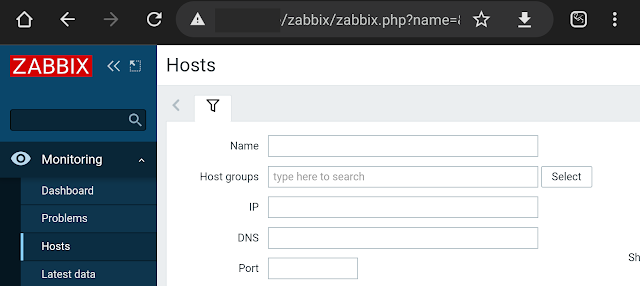
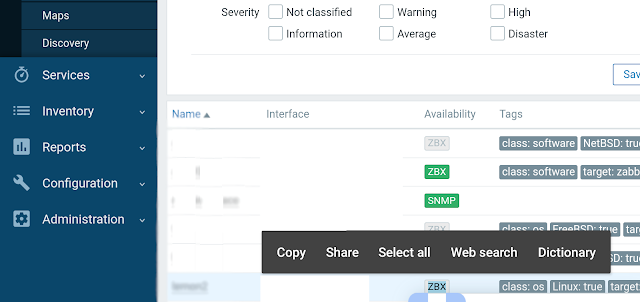
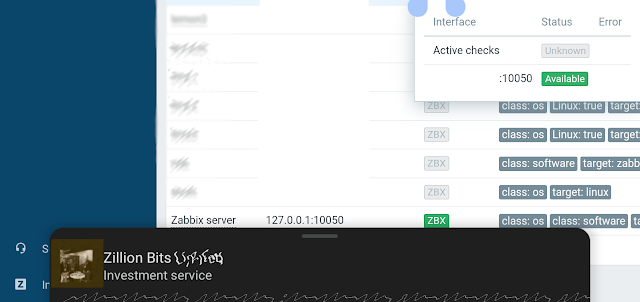
Above, a 3 piece snapshot of the Zabbix dashboard after loading a dozen or so nodes. A primary devolution is that host connections do not show as green except where there are no active checks. In that case, the "ZBX" icon is grey; hovering over it produces a pop-up with two status boxes. Active checks shows status "Unknown" and the host check shows "Available". Which is less helpful than earlier versions that simply showed green or red for connected or not.

The funny part here is that highlight the 3 letters triggered goog to display completely unrelated search results on screen.

One dollar gets you two dollars.

"Error $2 on $1"

Known error, "The $1, $2 macros were deprecated,"


Slower hardware (the downgrade)

"slow query"

36582:20230120:032637.691 
slow query: 3.138252 sec, 
"delete from history where itemid=10073 and clock<1673580394"

The first working Zabbix server I set up that stayed running was on FreeBSD using a Raspberry Pi 4 with 4GB RAM. This build is on a Pi 3B with 1GB. The former runs of an SSD while the latter has a micro-SD and a USB-3 for the database files. The 3 only has USB-2 speed.
My user experience is that the new platform feels slower but not maddeningly. If I can avoid adding a plugin interface and drive that would be preferable for look and feel.

MORE TO DO

dashboards

Would like to do more with the supplied features like dashboards, and new features to be discovered. This view of "room light" shows we're in winter with the short days. A health aide to avoid seasonal disorders perhaps?


history data moves


I've cobbled a Perl script to read from one Zabbix server and insert trending for one item into a second server, using a control table of "from" and "to" record IDs. Not bullet-proof but efficient enough even with row level commits to be a breeze. 


benchmark - Two Pi Zeros running NetBSD 10 beta:


There is one visible gap on the node with the troublesome USB to ethernet connectors.


The spike is from an install; working on setting up parallel benchmark tests on these for comparisons.

The bad ethernet behavior is noticeable as gaps in the red line...


Friday, December 9, 2022

Bengies Top 10 2022

 Bengies Top 10 2022

As in past years, I take a look at movies I've watched at the Bengies Drive-In near Baltimore. The theatre is a relic of the post-WW2 U.S. boom years, where cars and movies could live as one. The only drive-in left in Maryland, claiming to be the largest screen in the U.S.A, it can be a welcome escape from the small tube world to sit under the stars looking at the wide screen.

2021 ratings: (the longest season ever)

  1. https://jspath55.blogspot.com/2021/12/2021-longest-bengies-season-ever-part-1.html
  2. https://jspath55.blogspot.com/2021/12/2021-longest-bengies-season-ever-part-2.html

Each pick is one that I saw in person, though in some cases we didn't stay for the whole show/

Marquee with 2 Batmen

March opening.

The marquee picture for 2 completely different Batman movies was taken in last February 2022. I commented at the time that we had only been unable to attend the drive-in in about 2 months, since they operated through December 2021.
I consider the Lego Batman movie as not qualified for the "best of 2022" because it was also the season opener in 2017. (I didn't see it then, apparently, per my best of 2017).

Marquee

May

This marquee shot is misleading since we didn't get to the shows that weekend. I'm only including it because we saw both of the posted shows, just not on the same evening. I kind of liked the shot with the clouds. Doctor Strange was another escapist saga where the few seconds during or at the end of the credits was a memorable as any other segment in the production.

all at once

June

The epic "Everything Everywhere All At Once" almost got by us because we had other plans when it was showing, and then went off the bill. But it came back and I sat through Top Gun to then thoroughly enjoy the bizarrely surrealism of this unique creation. We had to rent it on DVD and watch a few scenes several times each in order to make a bit more sense. Of course, I rate this the top film of the year.

I had to ask Sean of the Bengies staff what was happening with the flipping from wide-screen to ultra-wide screen in different shots of Everything Everywhere; he said that was not a mistake but part of the edit. I guess I need to watch it one more time to try to see if the wide part is real, or fantasy. They got me!

I didn't get a shot of the marquee advertising a new documentary about the drive-in movie industry ("GOING ATTRACTIONS: BACK TO THE DRIVE-IN") though we we fortunate to be able to catch it an a preview. The upswing in outdoor movie attendance triggered by the pandemic allowed a few houses to continue operating, and a few people tried to jump start older or brand new locations. While an uplifting story, the financial realities may poke holes in a few plans. I didn't add this documentary into my "top 10" list as it's more a one-off.


July

Summer blockbuster season does not appear to have gone away due to the pandemic even if many schedules changed drastically. I noted about this marquee how many of the shows are sequels. Hint: 100%.
Thor rocked.
We didn't see the dinosaurs and didn't miss them though we did miss Minions.


September

Fortunately again this season the Bengies hosted the Scouts for a one-night camp-in. A double feature of kid-friendly picks, and good weather for once. One of my favorite events even if exhausting.
My remark a the time was I could not recall seeing a double feature that contained both D.C. and Marvel Comic franchises. Well done, teams.


November

Black Adam was refreshing.
We watched only the first reel of Till. I admit, given what we know of the story, and how times haven't changed enough, was sickening to the stomach. I can be a wincer.

I like the shot as I was able to get most of the rising moon intact if not flared.


December

Global climate change is bad; I try to prevent carbon consumption though am nowhere near 100% renewables. I sigh because it allows a drive-in to operate in these latitudes from March through December rather than the May through September of bygone times. We didn't need to rent an in-car heater and saw people with open hatches watching not through glass.


Drum roll for the top 10.

  1. Everything Everywhere All At Once
  2. Strange World
  3. The Woman King
  4. Black Panther Wakanda Forever
  5. Black Adam
  6. Thor (4)
  7. Doctor Strange and the Multiverse of Madness
  8. The Batman
  9. Spider-Man No Way Home
  10. Till
  11. D.C. League of Super-Pets

Yeah, it goes to 11 this year.

The "bottom 10" is pretty short this year. Top Gun takes 2 places, so jingoistic.

Thursday, October 13, 2022

Photo tracker revisited for Scout camp post Panoramio

 When I wrote The Scout reservation photo map tracker in 2010, I was on a roll with the now-closed Panoramio site. I would take pictures, geo-locate them, and share with the world. But Google shut down panoramio.com, hiding many if not most of my contributions. You can see them sometimes with Google maps or Google Earth (pro) if you look in the right places.

Even though I did a Google "takeout" to download my archives, the formerly useful geocodes were cplit from the image, which to be honest, not all even had in the JPEG metadata.

In 2018 I made efforts to re-share my content on another site since I still had the original images as well as lower-resolution ones Google coughed up, but put the project aside after posting one picture. And that image, on closer examination, was not placed in the right spot anyway. Locations can be tricky!

I was pleasantly surprised when searching for one of my original Panoramion shots to discover that the WayBak machine of archive.org had slurped out the Panoramio site, with much useful data, prior to it going away. So in the earlier post, if I shared this image:

  • Camp Saffran - US Mail drop

  • That link will give a "Thanks for stopping by" dead page when accessed. Fortunately, http://www.panoramio.com/photo/25164491 is easily read as including a record ID # ( 25164491 ) that can be used to find the same page as it was, in the archives, like:

    https://web.archive.org/web/20161014002503/http://www.panoramio.com/photo/25164491

    This transforms into:

    https://web.archive.org/web/20161013193141/http://www.panoramio.com/photo/25164491

    Using whatever glue code moves the time machine pointer to the right capture time. Panoramio pages were only archived once, it seems, but as nothing changed after the site freeze the inventory should be valid.


    And ta-da! The USPS ghost truck will be by to pickup those camp post cards home.

    Friday, June 17, 2022

    Zabbix server build trial and error

    After running Zabbix in house for a few months, I thought it prudent to set up a second server as a backup in case the primary system failed, being on a Raspberry Pi 4 with an external SSD drive 

    FreeBSD

    At first I looked at pre-built packages; but found postgres unsupported. As I preferred PostgreSQL I didn't use the package manager

    I built Zabbix 5.4 from source, over a few days. At that time, February 2022, FreeBSD had a port of 5.4 while NetBSD had 5.0. The build was easy enough, though would probably have taken longer if I only used an SD card.

    This system has been working since February; I've added a few targets as well as bringing in outside data such as temperate at the local airport using zabbix_get with traps.

    Original installation/configuration post: jspath55.blogspot.com/2022/02/building-out-intra-home-data-aggregator.html

    Since I've experimented with multiple different OS installs, I didn't have another FreeBSD image running, so looked at alternatives.

    Rock64

    I got this arm64 board via mail order from China, and while I intend to put NetBSD on there, I have not located a usable image. Meanwhile, to check out the performance, I went with a Linux distro; first was old kernel (4.x), second was "almost" good enough (5.x). The HDMI is a little choppy, but at least the headphone jack worked.

     For Zabbix, I again wanted a Postgres database; got that installed.

    rock64:/usr/share/zabbix-server-pgsql$ cat schema.sql  | sudo -u zabbix psql zabbix

    CREATE TABLE

    CREATE INDEX

    CREATE TABLE

    CREATE INDEX

    CREATE INDEX

    ...

     Next, I needed Apache; got that (but config is non-classic).


    The only PHP package available was 8.x

    rock64:/usr/share$ sudo apt install libapache2-mod-php8.1

    Reading package lists... Done

    Building dependency tree... Done

    Reading state information... Done

    libapache2-mod-php8.1 is already the newest version (8.1.2-1ubuntu2).


    And the frontend web backend  parts:

    Congratulations! You have successfully installed Zabbix frontend.

    Configuration file "/etc/zabbix/zabbix.conf.php" created.


     I got the install working up to initial screens; multiple fail messages ensued.

    Jun 14 18:13:35 rock64 apachectl[289859]: [Tue Jun 14 18:13:35.313693 2022] [php:crit] [pid 289859:tid 281472868511776] Apache is running a threaded MPM, but your PHP Module is not compiled to be threadsafe.  You need to recompile PHP.

    The workaround for threadsafe is known, except that didn't matter in the end. I bagged this install as compiling php7 was problematic compared to using an available built package.

    rock64:/etc/apache2/mods-enabled$ ls -l  /usr/lib/apache2/modules/libphp*

    -rw-r--r-- 1 root root 5246072 Apr  7 13:46 /usr/lib/apache2/modules/libphp8.1.so

    Pi 4 Open SUSE Linux

     I tried an install on an OpenSUSE system running on a Raspberry Pi 4. When I looked at the available packages, postgres database looked good. But the only Zabbix server package was 4.x (running 5.4 now, 6.x is available)

     I discarded this option as 4.x seemed a poor starting level, and I trusted pkgsrc given decades of familiarity, over yap or whatever the SUSE package manager is called.

      This was as far as I went:

    $ sudo apt install  zabbix-server-postgresql

    Retrieving: zabbix-server-4.0.39-1.5.aarch64.rpm ...[done]

    Pi 4 running NetBSD

    I had already started using this install with NetBSD-current from early 2022, with built packages. I  decided to build from /usr/pkgsrc if necessary, so did a CVS pull of pkgsrc from this year:

    # cvs checkout -r pkgsrc-2022Q1 -P pkgsrc

    The available Zabbix server package is still 5.0 but not 5.4, went ahead anyway. Hoping 5.4 (or later) is a work in progress.

    The postgres database got built and configured. And I had to reinstall earlier packages that were postgres 11 but not the same patch level. :(

    The program "postgres" was found by "/usr/pkg/bin/initdb" but was not the same version as initdb.

    # pkg_delete postgresql11-server postgresql11-11.12nb1

    The following files should be created for postgresql11-server-11.15:


    Tried to get ahead of myself and run the server with an empty database; that didn't work but the error message was plain enough.

     29883:20220615:154343.702 [Z3005] query failed: [0] PGRES_FATAL_ERROR:ERROR:  relation "users" does not exist

    The timezone error wasn't seen when I did the first install:

    Time zone for PHP is not set (configuration parameter "date.timezone").

    If you notice the times are different on the graphs included at the end of this post, you make notice both a skew in time (possible timezone) but also in the 12 hour versus 24 hour clock. Now that I have both I can decide which I prefer, or if having a discrepancy keeps the base differences more noticeable.

    This parameter is important, particularly if you use the zabbix_send operative to load external data. If not matched to the right timezone, you end up with skewing.

    See blogs.sap.com/2022/04/08/the-abap-detective-gets-their-clock-cleaned/ for more on the timezone for Zabbis database, sever, and data feeds.

    It started working after I configured Apache and PHP.

    [ server log snippet ]

      7166:20220615:155355.128 server #35 started [trapper #5]

      2705:20220615:155355.129 server #37 started [alert syncer #1]

      7015:20220615:155355.299 item "Zabbix server:zabbix[vmware,buffer,pused]" became not supported: No "vmware collector" processes started.

       111:20220615:155401.351 Zabbix agent item "system.cpu.num" on host "Zabbix server" failed: first network error, wait for 15 seconds

    The VMware message makes sense, but the CPU message is one of those works on Linux, maybe on FreeBSD, but not on NetBSD. No matter, as enough CPU and system metrics are being collected for my purposes. The clips below are from the 5.0 and 5.4 systems, with the former including a more readable (to me) font color change between time marks. I suppose that is out-of-the-box behavior since I didn't tweak anything customized for charts.

    I started to set up dual connect agents; realized "zabbix server" was a bad name choice, now. Each agent already is configure to believe the central system has that name, so I can't have 2 of them. I'll need to come up with a naming scheme and update all of the agents. I would have to do that anyway if I wanted to keep dual sources; this just makes it more challenging.