Showing posts with label Raspberry pi. Show all posts

Monday, July 29, 2024

Zabbix Front End Realignment After Downtime

Typical summer thunderstorms cause occasional power grid outages, some short, some long. With a battery backup a blip can have minimal repercussions, longer down times are opportunities to move hardware around, rewire, etc. A recent gap of several hours revealed one of my in-house Zabbix front-ends unusable. Probably self-inflicted by updating packages somewhere, and not having the database, server and front end web pieces all on one image.

I tried a few things, and among other errors, was told PostgreSQL was unsupported.

Configuration file error DB type "POSTGRESQL" is not supported by current setup.

A different fix path led to "almost" but no banana on the Pi, trying to set up 6.0 and 6.4 frontends on the same FreeBSD Pi.

The Zabbix database version does not match current requirements. Your database version: 6000000. Required version: 6040000. Please contact your system administrator.

Sigh. I tried to repair this on a NetBSD system, failed to launch there, then tried a full install on a Raspberry Pi OS, which stumbled around the Apache-PHP-SQL-HTTP part, and ended up promoting a Raspberry Pi 3 running NetBSD with a clean slate off front end whirly-gigs.

(0)

"The Zabbix database version does not match current requirements. Your database version: 6000000. Required version: 6040000. Please contact your system administrator."

(1)

 PHP Fatal error:  Uncaught Error: Call to undefined function mb_check_encoding() in /usr/pkg/share/httpd/htdocs/zabbix/include/validate.inc.php:234

\n

Stack trace:\n#0 /usr/pkg/share/httpd/htdocs/zabbix/include/validate.inc.php(356): check_type()\n#1 /usr/pkg/share/httpd/htdocs/zabbix/include/validate.inc.php(438): check_field()\n#2 /usr/pkg/share/httpd/htdocs/zabbix/include/validate.inc.php(462): check_fields_raw()\n#3 /usr/pkg/share/httpd/htdocs/zabbix/setup.php(72): check_fields()\n

#4 {main}\n  thrown in /usr/pkg/share/httpd/htdocs/zabbix/include/validate.inc.php on line 234, referer: http://am4.home/zabbix/setup.php


(2) 

$ pkgin in ap24-php83

  ap24-php83-8.3.8nb11 gimp-2.10.38nb1 ncurses-6.5 p5-DBD-SQLite-1.74nb1 p5-DBI-1.643nb5 pdal-lib-2.7.1nb4 py311-httpx-0.27.0

  php-8.2.20

  php82-bcmath-8.2.20 php82-gd-8.2.20nb8 php82-gettext-8.2.20 php82-ldap-8.2.20nb2 php82-mbstring-8.2.20 php82-sockets-8.2.20 php82-sysvsem-8.2.20

(yeah, wrong PHP version 8.2 != 8.3)
ERROR: Package accepts PHP8.2, but a different version is installed


(3)

 apt install zabbix-server-mysql zabbix-frontend-php zabbix-apache-conf zabbix-sql-scripts zabbix-agent

wrong

 apt install zabbix-server-pgsql zabbix-frontend-php zabbix-apache-conf zabbix-sql-scripts zabbix-agent

right?

After apache-2.4.3, --enable-mpms-shared='event worker prefork' is
passed to configure script, then these multi-process model is built
and you can select the model in configuraton file.

and


The mod_cgi.so module conflicts with non-prefork multi-process model,
and mod_cgi.so module is not built anymore.
You can use mod_cgid.so module instead.

yeah, fix that too.

(4)

Fourth times a charm

 pkgin in zabbix-frontend-postgresql

calculating dependencies...done.

1 package to refresh: [...]

12 packages to install:

  gd-2.3.3nb13 libimagequant-4.3.1 oniguruma-6.9.9 ... php82-ldap-8.2.20nb2 ...

  php82-mbstring-8.2.20 ... zabbix-frontend-postgresql-6.0.24nb1


Fix these once you get past the first checks:
    Minimum required size of PHP post is 16M (configuration option "post_max_size").
    Minimum required limit on execution time of PHP scripts is 300 (configuration option "max_execution_time").
    Minimum required limit on input parse time for PHP scripts is 300 (configuration option "max_input_time").
    At least one of MySQL, PostgreSQL or Oracle should be supported.

php82-pgsql-8.2.20: copying /usr/pkg/share/examples/php/pgsql.ini to /usr/pkg/etc/php.d/pgsql.ini

Save it as "/usr/pkg/share/httpd/htdocs/zabbix/conf/zabbix.conf.php"


/etc/rc.d/apache restart

References:


Smoke test:

http[s]://example.com/zabbix/zabbix.php?action=dashboard.view


Final checks: windshields up!

The gap on all charts was the local grid down; other holes are locally induced. Looking at you FIOS.


Monday, June 17, 2024

Wifi Coverage on BSD Raspberry Flavour

Now that NetBSD 10 is released (for a few weeks) I have been reviewing tests I ran, benchmarking and other studies, trying to fix the dangling problem reports I opened, and mainly using the OS for as many daily tasks as feasible. In that context are wireless network connections to the somewhat closed but open Raspberry Pi network drivers, as replicated in the BSD space instead factory-floor Linux.

When I checked the FreeBSD page, wifi shows as "unsupported", listing some chip or board IDs that must mean something ('brcmfmac43455-sdio").

Based on : https://wiki.freebsd.org/arm/Raspberry%20Pi we see:WiFi/Unsupported on the Pi series, including the 4, which would be the best available, until the 5 has been encompassed. Understood that wiki page documentation may lag development, and I haven't dug to far to see what is newer than the doc. To research one of the above bugs (overflow arithmetic) I installed a recent FreeBSD image on a Pi0W, only to find it crash hard with "unresolved symbols" or other architecture clashes as soon as I tried any command. So my hands-on with Pi and FreeBSD is limited to Pi3 and Pi4 models at hand. None of them show "bw" interfaces.

NetBSD can see the "bw" interface on the Pi4, and I definitely had that working during the long beta campaign. Except now I can't get it to work on the 10.0 release for reasons yet to be found. It would show up in ifconfig output:


bwfm0: flags=0x8c43<UP,BROADCAST,RUNNING,OACTIVE,SIMPLEX,MULTICAST> mtu 1500
        ssid "" nwkey *****
        powersave off
        address: __:...
        media: IEEE802.11 autoselect (DS1 mode 11g)
        status: no network
        inet6 ...%bwfm0/64 flags 0x8<DETACHED> scopeid 0x3

On the Pi3, NetBSD works great:

bwfm0: flags=0x8843<UP,BROADCAST,RUNNING,SIMPLEX,MULTICAST> mtu 1500
        ssid wIfI nwkey *****
        powersave off
        bssid ... chan 11
        address: __:...
        media: IEEE802.11 autoselect (HT mode 11ng)
        status: active
        inet6 ...%bwfm0/64 flags 0 scopeid 0x2
        inet .../24 broadcast ... flags 0

I can stream audio, at least locally. Video on the lower end systems is problematic.

On the Pi0 (W and 2W) I have mixed results with NetBSD. The Pi0W is working on wireless, but I've lost whatever mojo I had for the 2W before the beta ended.

bwfm0: flags=0x8843<UP,BROADCAST,RUNNING,SIMPLEX,MULTICAST> mtu 1500
        ssid wIfI nwkey *****
        powersave off
        bssid __:... chan 4
        address: __:...
        media: IEEE802.11 autoselect (HT mode 11ng)
        status: active
        inet6 ...%bwfm0/64 flags 0 scopeid 0x3
        inet .../24 broadcast ... flags 0


A recent list thread shared poor performance on the NetBSD wireless drivers, as presented on the Pi platform. I have not run stress or volume tests beyond listening to KALX Berkeley streaming radio.
Earlier beta images (or 9x) would block on audio processing at times, which I have not experienced on the 10 release. Some audio or video formats don't work with VLC as built, which is another kettle of babel fish.

Beta test view (3A/3B/4, no 0):

Post-Beta (and a little pre):

Seeing any color indicates *some* traffic on the wireless interface. The scale shows some large and some small throughputs, as if a trickle by mistake.

Chart, like the FreeBSD feature supported on Pi linked above:

Chart of Pi bake-off


Monday, March 25, 2024

NetBSD 10 Beta, RC1-6 and Pi Wifi and A/V

 Complex title, just to say how stable and feature-rich is NetBSD 10 on a Raspberry Pi (4)?

Pretty good, not bad, can't complain.


Wireless

At one time during RC (release candidate) testing I had wi-fi engaged on a Pi 3A, a 3B, and a 4. Beyond those, the Pi0W and Pi02W wireless has been unflappable on start-up, if a bit squeezed on speed, and an occasional miss of the beat. Since I took this screenshot, the 4 has lost the ifconfig (again), and the 2 3's are humming along. All of those are on the same GENERIC64 kernel.

Reply from 192.168.1.39: bytes=32 time=4ms TTL=255


Scanning color slides at 1600 dpi off a Pi:


I know there is a "symlink" fix supposed to repair the lost wireless interface; see below.

GOOD?:
Mar 11 15:06:54 arm64 /netbsd: [   1.4005357] bwfm0 at sdmmc0 function 1
Mar 11 15:06:54 arm64 /netbsd: [   2.8833895] bwfm0: Firmware file default:    brcmfmac43455-sdio.bin
Mar 11 15:06:54 arm64 /netbsd: [   2.8833895] bwfm0: Firmware file model-spec: brcmfmac43455-sdio.Raspberry Pi 4 Model B.bin
Mar 11 15:06:54 arm64 /netbsd: [   2.8833895] bwfm0: Found Firmware file: brcmfmac43455-sdio.bin
Mar 11 15:06:54 arm64 /netbsd: [   2.8905571] bwfm0: NVRAM file default:    brcmfmac43455-sdio.txt
Mar 11 15:06:54 arm64 /netbsd: [   2.8905571] bwfm0: NVRAM file model-spec: brcmfmac43455-sdio.Raspberry Pi 4 Model B.txt
Mar 11 15:06:54 arm64 /netbsd: [   2.8905571] bwfm0: autoconfiguration error: NVRAM file not available
Mar 11 15:06:54 arm64 /netbsd: [   2.8905571] bwfm0: CLM file default:    brcmfmac43455-sdio.clm_blob
Mar 11 15:06:54 arm64 /netbsd: [   2.8905571] bwfm0: CLM file model-spec: brcmfmac43455-sdio.Raspberry Pi 4 Model B.clm_blob


BAD:
Mar 21 22:05:32 nb4 /netbsd: [   1.3996878] bwfm0 at sdmmc0 function 1
Mar 21 22:05:32 nb4 /netbsd: [   3.6135988] bwfm0: Firmware file default:    brcmfmac43455-sdio.bin
Mar 21 22:05:32 nb4 /netbsd: [   3.6135988] bwfm0: Firmware file model-spec: brcmfmac43455-sdio.Raspberry Pi 4 Model B.bin
Mar 21 22:05:32 nb4 /netbsd: [   3.6197181] bwfm0: Found Firmware file: brcmfmac43455-sdio.bin
Mar 21 22:05:32 nb4 /netbsd: [   3.6197181] bwfm0: NVRAM file default:    brcmfmac43455-sdio.txt
Mar 21 22:05:32 nb4 /netbsd: [   3.6197181] bwfm0: NVRAM file model-spec: brcmfmac43455-sdio.Raspberry Pi 4 Model B.txt
Mar 21 22:05:32 nb4 /netbsd: [   3.6197181] bwfm0: autoconfiguration error: NVRAM file not available
Mar 21 22:05:32 nb4 /netbsd: [   3.6197181] bwfm0: CLM file default:    brcmfmac43455-sdio.clm_blob
Mar 21 22:05:32 nb4 /netbsd: [   3.6197181] bwfm0: CLM file model-spec: brcmfmac43455-sdio.Raspberry Pi 4 Model B.clm_blob

When it works:

genet0: flags=0x8843<UP,BROADCAST,RUNNING,SIMPLEX,MULTICAST> mtu 1500
        ec_capabilities=0x1<VLAN_MTU>
        ec_enabled=0
        address: []
        media: Ethernet autoselect (1000baseT full-duplex)
        status: active
        inet6 [] flags 0 scopeid 0x1
        inet 192.168.1.2/24 broadcast 192.168.1.255 flags 0
lo0: flags=0x8049<UP,LOOPBACK,RUNNING,MULTICAST> mtu 33624
        status: active
        inet6 ::1/128 flags 0x20<NODAD>
        inet6 fe80::1%lo0/64 flags 0 scopeid 0x2
        inet 127.0.0.1/8 flags 0
bwfm0: flags=0x8843<UP,BROADCAST,RUNNING,SIMPLEX,MULTICAST> mtu 1500
        ssid [] nwkey *****
        powersave off
        bssid [] chan 11
        address: []
        media: IEEE802.11 autoselect (HT mode 11ng)
        status: active
        inet6 []%bwfm0/64 flags 0 scopeid 0x3
        inet 192.168.1.1/24 broadcast 192.168.1.255 flags 0

Firmware/devices seems fresh:

$ ls -l /boot/dtb/broadcom/
-r-xr-xr-x  1 root  wheel  37735 Mar 12 10:19 bcm2711-rpi-4-b.dtb
-r-xr-xr-x  1 root  wheel  37679 Mar 12 10:19 bcm2711-rpi-400.dtb
-r-xr-xr-x  1 root  wheel  20741 Mar 12 10:19 bcm2837-rpi-3-a-plus.dtb
-r-xr-xr-x  1 root  wheel  21610 Mar 12 10:19 bcm2837-rpi-3-b-plus.dtb
-r-xr-xr-x  1 root  wheel  21142 Mar 12 10:19 bcm2837-rpi-3-b.dtb
-r-xr-xr-x  1 root  wheel  20465 Mar 12 10:19 bcm2837-rpi-cm3-io3.dtb

A recent mail message contains the sym-fix:
"
In this image, a symbolic link added

/libdata/firmware/if_bwfm:
ln -s brcmfmac43455-sdio.raspberrypi,4-model-b.txt "brcmfmac43455-sdio.Raspberry Pi 4 Model B.txt"
to avoid
bwfm0: autoconfiguration error: NVRAM file not available
"
But I get a wrong address range assigned, so not yet solved.

bwfm0: flags=0x8843<UP,BROADCAST,RUNNING,SIMPLEX,MULTICAST> mtu 1500
        ssid [] nwkey *****
        powersave off
        bssid [] chan 11
        address: []
        media: IEEE802.11 autoselect (HT mode 11ng)
        status: active
        inet6 []%bwfm0/64 flags 0 scopeid 0x3
        inet 169.254.x.y/16 broadcast 169.254.255.255 flags 0

Any tips welcome...

Audio/Video

Besides the ubiquitous VLC app (GUI and CLI), I've used mpg123 and mp3blaster on NetBSD systems as command line audio/video players. With a miniDLNA UPnP set-up and steaming internet radio stations I have good tunes at will. In the good old days. a SoundBlaster interface card was the way to go. Theses days, audio circuity is either built-in the system, or ready as easily as popping in a USB dongle. 

Prior versions of NetBSD on Raspberry Pi systems had challenges with the wired headphone circuit and with audio through HDMI (in some cases not the system fault but a lack of speakers in a monitor. The audio streams would play okay for a while but within a day or so various buffer/cache issues came up, causing no sound, or worse, choppy static.

Mar 21 21:59:01 nb4 /netbsd: [ 547447.7922531] audio0(vcaudio0): device timeout

Mar 21 22:07:30 nb4 /netbsd: [ 162.7814073] audio0(vcaudio0): setting play.port=0 failed: errno=22

Controls:

$ /usr/bin/mixerctl -w outputs.select=headphones
outputs.select: headphones -> headphones

$ /usr/bin/mixerctl -v -a
outputs.master=255,255 volume
inputs.dac=255,255 volume
outputs.auto=255,255 volume delta=13
outputs.headphones=255,255 volume delta=13
outputs.hdmi=255,255 volume delta=13
outputs.select=headphones  [ auto headphones hdmi ]

I'm getting about a week of playing, at intervals, before contention creeps in.


Wednesday, April 27, 2022

Raspberry Pi Zero 2 W NetBSD dmesg text

 Raspberry Pi Zero 2 W NetBSD dmesg text

Installed following brief notes here:

https://mail-index.netbsd.org/port-arm/2022/02/14/msg007592.html


Resulting dmesg output:


dmesg

[     1.000000] NetBSD 9.2_STABLE (GENERIC) #0: Mon Apr 25 12:39:27 UTC 2022

[     1.000000]         mkrepro@mkrepro.NetBSD.org:/usr/src/sys/arch/evbarm/compile/GENERIC

[     1.000000] total memory = 448 MB

[     1.000000] avail memory = 433 MB

[     1.000000] timecounter: Timecounters tick every 10.000 msec

[     1.000000] running cgd selftest aes-xts-256 aes-xts-512 done

[     1.000000] armfdt0 (root)

[     1.000000] simplebus0 at armfdt0: Raspberry Pi Zero 2 W Rev 1.0

[     1.000000] simplebus1 at simplebus0

[     1.000000] simplebus2 at simplebus0

[     1.000000] simplebus3 at simplebus1

[     1.000000] cpus0 at simplebus0

[     1.000000] simplebus4 at simplebus0

[     1.000000] cpu0 at cpus0: 600 MHz Cortex-A53 r0p4 (Cortex V8A core)

[     1.000000] cpu0: DC enabled IC enabled WB enabled EABT branch prediction enabled

[     1.000000] cpu0: 32KB/64B 2-way L1 VIPT Instruction cache

[     1.000000] cpu0: 32KB/64B 4-way write-back-locking-C L1 PIPT Data cache

[     1.000000] cpu0: 512KB/64B 16-way write-through L2 PIPT Unified cache

[     1.000000] vfp0 at cpu0: NEON MPE (VFP 3.0+), rounding, NaN propagation, denormals

[     1.000000] cpu1 at cpus0

[     1.000000] cpu2 at cpus0

[     1.000000] cpu3 at cpus0

[     1.000000] bcmicu0 at simplebus1

[     1.000000] bcmicu1 at simplebus1: Multiprocessor

[     1.000000] bcmcprman0 at simplebus1: BCM283x Clock Controller

[     1.000000] fclock0 at simplebus2: 19200000 Hz fixed clock (osc)

[     1.000000] bcmaux0 at simplebus1

[     1.000000] fclock1 at simplebus2: 480000000 Hz fixed clock (otg)

[     1.000000] gtmr0 at simplebus0: Generic Timer

[     1.000000] gtmr0: interrupting on local_intc irq 3

[     1.000000] armgtmr0 at gtmr0: Generic Timer (19200 kHz, virtual)

[     1.000000] timecounter: Timecounter "armgtmr0" frequency 19200000 Hz quality 500

[     1.000003] plcom0 at simplebus1: ARM PL011 UART

[     1.000003] plcom0: txfifo disabled

[     1.000003] plcom0: interrupting on icu irq 185

[     1.000003] com0 at simplebus1: BCM AUX UART, working fifo

[     1.000003] com0: console

[     1.000003] com0: interrupting on icu irq 157

[     1.000003] usbnopphy0 at simplebus0: USB PHY

[     1.000003] /soc/thermal@7e212000 at simplebus1 not configured

[     1.000003] /soc/dsi@7e209000 at simplebus1 not configured

[     1.000003] bcmgpio0 at simplebus1: GPIO controller

[     1.000003] bcmgpio0: pins 0..31 interrupting on icu irq 177

[     1.000003] bcmgpio0: pins 32..54 interrupting on icu irq 178

[     1.000003] gpio0 at bcmgpio0: 54 pins

[     1.000003] /soc/firmware/gpio at simplebus3 not configured

[     1.000003] bcmdmac0 at simplebus1: DMA0 DMA2 DMA4 DMA5 DMA6 DMA7 DMA8 DMA9 DMA10

[     1.000003] /soc/power at simplebus1 not configured

[     1.000003] mmcpwrseq0 at simplebus0autoconfiguration error: : couldn't get reset GPIOs

[     1.000003] bsciic0 at simplebus1: Broadcom Serial Controller

[     1.000003] iic0 at bsciic0: I2C bus

[     1.000003] bcmpmwdog0 at simplebus1: Power management, Reset and Watchdog controller

[     1.000003] bcmmbox0 at simplebus1: VC mailbox

[     1.000003] bcmmbox0: interrupting on icu irq 193

[     1.000003] vcmbox0 at bcmmbox0

[     1.000003] bcmsdhost0 at simplebus1: SD HOST controller

[     1.000003] bcmsdhost0: interrupting on icu irq 184

[     1.000003] bsciic1 at simplebus1: Broadcom Serial Controller

[     1.000003] iic1 at bsciic1: I2C bus

[     1.000003] /soc/pwm@7e20c000 at simplebus1 not configured

[     1.000003] sdhc0 at simplebus1: SDHC controller

[     1.000003] sdhc0: interrupting on icu irq 190

[     1.000003] bsciic2 at simplebus1: Broadcom Serial Controller

[     1.000003] iic2 at bsciic2: I2C bus

[     1.000003] /soc/vec@7e806000 at simplebus1 not configured

[     1.000003] /soc/hdmi@7e902000 at simplebus1 not configured

[     1.000003] dwctwo0 at simplebus1: USB controller

[     1.000003] dwctwo0: interrupting on icu irq 137

[     1.000003] /soc/gpu at simplebus1 not configured

[     1.000003] genfb0 at simplebus1: switching to framebuffer console

[     1.000003] genfb0: framebuffer at 0xde402000, size 1920x1080, depth 32, stride 7680

[     1.000003] wsdisplay0 at genfb0 kbdmux 1: console (default, vt100 emulation)

[     1.000003] wsmux1: connecting to wsdisplay0

[     1.000003] wsdisplay0: screen 1-3 added (default, vt100 emulation)

[     1.000003] vchiq0 at simplebus1: BCM2835 VCHIQ

[     1.000003] armpmu0 at simplebus0: Performance Monitor Unit

[     1.000003] gpioleds0 at simplebus0: ACT

[     1.000003] /soc/timer@7e003000 at simplebus1 not configured

[     1.000003] /soc/txp@7e004000 at simplebus1 not configured

[     1.000003] bcmrng0 at simplebus1: RNG

[     1.000003] timecounter: Timecounter "clockinterrupt" frequency 100 Hz quality 0

[     1.000003] cpu1: 600 MHz Cortex-A53 r0p4 (Cortex V8A core)

[     1.706895] cpu1: DC enabled IC enabled WB enabled EABT branch prediction enabled

[     1.736896] cpu1: 32KB/64B 2-way L1 VIPT Instruction cache

[     1.776900] cpu1: 32KB/64B 4-way write-back-locking-C L1 PIPT Data cache

[     1.806906] cpu1: 512KB/64B 16-way write-through L2 PIPT Unified cache

[     1.846909] vfp1 at cpu1: NEON MPE (VFP 3.0+), rounding, NaN propagation, denormals

[     1.876912] cpu2: 600 MHz Cortex-A53 r0p4 (Cortex V8A core)

[     1.916916] cpu2: DC enabled IC enabled WB enabled EABT branch prediction enabled

[     1.946920] cpu2: 32KB/64B 2-way L1 VIPT Instruction cache

[     1.986925] cpu2: 32KB/64B 4-way write-back-locking-C L1 PIPT Data cache

[     2.016928] cpu2: 512KB/64B 16-way write-through L2 PIPT Unified cache

[     2.056933] vfp2 at cpu2: NEON MPE (VFP 3.0+), rounding, NaN propagation, denormals

[     2.096938] cpu3: 600 MHz Cortex-A53 r0p4 (Cortex V8A core)

[     2.126941] cpu3: DC enabled IC enabled WB enabled EABT branch prediction enabled

[     2.166945] cpu3: 32KB/64B 2-way L1 VIPT Instruction cache

[     2.196950] cpu3: 32KB/64B 4-way write-back-locking-C L1 PIPT Data cache

[     2.236954] cpu3: 512KB/64B 16-way write-through L2 PIPT Unified cache

[     2.276958] vfp3 at cpu3: NEON MPE (VFP 3.0+), rounding, NaN propagation, denormals

[     2.426974] sdmmc0 at bcmsdhost0

[     2.426974] sdhc0: SDHC 3.0, rev 153, platform DMA, 200000 kHz, HS 3.3V, re-tuning mode 1, 1024 byte blocks

[     2.437171] sdmmc1 at sdhc0 slot 0

[     2.437171] dwctwo0: Core Release: 2.80a (snpsid=4f54280a)

[     2.437171] usb0 at dwctwo0: USB revision 2.0

[     2.477042] armpmu0: interrupting on local_intc irq 9

[     2.487042] uhub0 at usb0: NetBSD (0000) DWC2 root hub (0000), class 9/0, rev 2.00/1.00, addr 1

[     2.487042] uhub0: 1 port with 1 removable, self powered

[     2.527046] IPsec: Initialized Security Association Processing.

[     2.547047] sdmmc0: direct I/O error 5, r=6 p=0xa541bf2c write

[     2.617057] sdmmc1: sdmmc_mem_enable failed with error 60

[     2.627056] sdmmc1: autoconfiguration error: couldn't enable card: 60

[     2.647059] sdmmc0: SD card status: 4-bit, C4

[     2.657189] ld0 at sdmmc0: <0x03:0x5344:SS16G:0x80:0xa5864a9d:0x115>

[     2.657189] ld0: 15193 MB, 7717 cyl, 64 head, 63 sec, 512 bytes/sect x 31116288 sectors

[     2.697067] ld0: 4-bit width, High-Speed/SDR25, 50.000 MHz

[     3.207111] WARNING: 2 errors while detecting hardware; check system log.

[     3.217113] boot device: ld0

[     3.217113] root on ld0a dumps on ld0b

[     3.247116] root file system type: ffs

[     3.257117] kern.module.path=/stand/evbarm/9.2/modules

[     3.267117] vchiq0: interrupting on icu irq 194

[     3.267117] vchiq: vchiq_init_state: slot_zero = 0xa5880000, is_master = 0

[     3.267117] vchiq: local ver 8 (min 3), remote ver 8.

[     3.267117] vcaudio0 at vchiq0: auds

[     3.267117] WARNING: no TOD clock present

[     3.277120] WARNING: using filesystem time

[     3.284972] WARNING: CHECK AND RESET THE DATE!

[     3.297122] audio0 at vcaudio0: playback

[     3.297122] audio0: slinear_le:16 -> slinear_le:16 2ch 48000Hz, blk 7680 bytes (40ms) for playback

[     3.307121] spkr0 at audio0: PC Speaker (synthesized)

[     3.307121] wsbell at spkr0 not configured

[     5.787575] wsdisplay0: screen 4 added (default, vt100 emulation)

[     9.788463] uhub1 at uhub0 port 1: vendor 05e3 (0x5e3) USB2.0 Hub (0x608), class 9/0, rev 2.00/9.01, addr 2

[     9.798471] uhub1: single transaction translator

[     9.798471] uhub1: 4 ports with 4 removable, self powered

[    11.108627] ure0 at uhub1 port 2

[    11.118623] ure0: Realtek (0xbda) USB 10/100/1000 LAN (0x8153), rev 2.10/31.00, addr 3

[    11.128628] ure0: RTL8153 unknown ver 6010

[    11.198637] rgephy0 at ure0 phy 0: RTL8251 1000BASE-T media interface, rev. 0

[    11.198637] rgephy0: 10baseT, 10baseT-FDX, 100baseTX, 100baseTX-FDX, 1000baseT-FDX, auto

[    11.218636] ure0: Ethernet address 00:00:00:00:00:00

[    12.308752] uhidev0 at uhub1 port 3 configuration 1 interface 0

[    12.308752] uhidev0: Logitech (0x46d) USB Receiver (0xc52b), rev 2.00/12.11, addr 4, iclass 3/1

[    12.378765] ukbd0 at uhidev0

[    12.788796] wskbd0 at ukbd0: console keyboard, using wsdisplay0

[    12.788796] uhidev1 at uhub1 port 3 configuration 1 interface 1

[    12.798925] uhidev1: Logitech (0x46d) USB Receiver (0xc52b), rev 2.00/12.11, addr 4, iclass 3/1

[    12.978946] uhidev1: 8 report ids

[    12.978946] ums0 at uhidev1 reportid 2: 16 buttons, W and Z dirs

[    12.978946] wsmouse0 at ums0 mux 0

[    12.990544] uhid0 at uhidev1 reportid 3: input=4, output=0, feature=0

[    12.990544] uhid1 at uhidev1 reportid 4: input=1, output=0, feature=0

[    13.013252] uhid2 at uhidev1 reportid 8: input=1, output=0, feature=0

[    13.013252] uhidev2 at uhub1 port 3 configuration 1 interface 2

[    13.022501] uhidev2: Logitech (0x46d) USB Receiver (0xc52b), rev 2.00/12.11, addr 4, iclass 3/0

[    13.112515] uhidev2: 33 report ids

[    13.112515] uhid3 at uhidev2 reportid 16: input=6, output=6, feature=0

[    13.112515] uhid4 at uhidev2 reportid 17: input=19, output=19, feature=0

[    13.125073] uhid5 at uhidev2 reportid 32: input=14, output=14, feature=0

[    13.142920] uhid6 at uhidev2 reportid 33: input=31, output=31, feature=0

[    13.152996] uhub0: autoconfiguration error: illegal enable change, port 1

[  2146.262218] audio0(vcaudio0): setting play.port=0 failed: errno=22

[  2146.262218] audio0(vcaudio0): setting play.port=0 failed: errno=22

[  2391.675509] audio0(vcaudio0): setting play.port=0 failed: errno=22

[  2391.685588] audio0(vcaudio0): setting play.port=0 failed: errno=22

[  2731.793669] audio0(vcaudio0): setting play.port=0 failed: errno=22

[  2731.793669] audio0(vcaudio0): setting play.port=0 failed: errno=22


Monday, January 10, 2022

NetBSD on a Raspberry Pi 4, Current 2022

After more than one flub, I've gotten through the hoops to make NetBSD run on a Raspberry Pi 4. I had already gotten 2 different working versions on a Pi 3, but the 4 was giving me fits.

All credit goes to the very clear directions from Astro:

https://astr0baby.wordpress.com/2021/05/23/netbsd-current-on-rpi4-model-b-8gb-ram/

Those instructions are reasonably recent, 6 months or so, and the version I pulled down is NetBSD-current from just after New Year's 2022.

Pictures are at the end, as I've given up trying to make google-blogspot do the thing right.

UEFI Boot

I went through several passes of getting UEFI boot-code onto a micro-SD card that would then allow NetBSD install and reboot onto something other than the limited lifetime SD chip a few months back. OK, it was 2020, but probably also later.

Re: NetBSD/aarch64 on 8 GB Raspberry Pi 4B?

FreeBSD/ARM on the Raspberry Pi familyPi

This time for sure, Rocky.

=

user@pi:~ $ sudo mkfs.vfat /dev/sdb1 -n UEFI

mkfs.fat 4.2 (2021-01-31)

Install Source

user@pi:~/iso $ sudo dd if=NetBSD-9.99.93-evbarm-aarch64.iso  of=/dev/sda

Worked fine. In the past I've used the die-hard method of burning a CD-RW (or DVD-RW) from the ISO image, and finally evolved to using a USB stick. Alas, when I shopped for SD boot chips, I could not find anything smaller than 32GB, and that was the exact size of the source USB stick I picked out for this attempt. As mentioned in the instructions referenced above, different size devices make the steps easier. Otherwise, you'll do what I did and try to write the OS onto the install device.

I had a 128GB USB micro-stick (about as big as my thumbnail) ready for NetBSD but somewhere along the way that device had been partitioned or initialized in a way the install could not detect it. So, in a shortcut to avoid another shopping trip (or delay for shipping) I connected a 500GB SSD. The adapter is nice in that no extra power is needed, and the Pi supplies enough.

But, the Pi does not supply enough power for an SSD and a spinning external USB-powered CD drive; I saw overcurrent messages on the install startup. Also, don't try to plug in the CD drive after the install has started. It might work, but it might also generate spurious on-screen messages, fouling up the normal curses menu.


-rw-r--r--  1 me   users    11500 Jan  2 23:55 dmesg-netbsd-1.txt

[     1.000000] Copyright (c) 1996, 1997, 1998, 1999, 2000, 2001, 2002, 2003, 2004, 2005,
[     1.000000]     2006, 2007, 2008, 2009, 2010, 2011, 2012, 2013, 2014, 2015, 2016, 2017,
[     1.000000]     2018, 2019, 2020, 2021, 2022
[     1.000000]     The NetBSD Foundation, Inc.  All rights reserved.
[     1.000000] Copyright (c) 1982, 1986, 1989, 1991, 1993
[     1.000000]     The Regents of the University of California.  All rights reserved.

[     1.000000] NetBSD 9.99.93 (GENERIC64) #0: Sun Jan  2 23:46:21 UTC 2022
[     1.000000]         mkrepro@mkrepro.NetBSD.org:/usr/src/sys/arch/evbarm/compile/GENERIC64
[     1.000000] total memory = 2967 MB
[     1.000000] avail memory = 2863 MB
[     1.000000] entropy: ready
[     1.000000] timecounter: Timecounters tick every 10.000 msec
[     1.000000] Kernelized RAIDframe activated
[     1.000000] armfdt0 (root)
[     1.000000] armfdt0: using EFI runtime services for RTC
[     1.000000] simplebus0 at armfdt0: Raspberry Pi Foundation Raspberry Pi 4 Model B
...
[     1.000000] cpu1 at acpi0: Arm Cortex-A72 r0p3 (v8-A), id 0x1
...
[     1.000003] bcmmbox0 at acpi0 (RPIQ, BCM2849-0): mem 0xfe00b880-0xfe00b8a3 irq 65
[     1.000003] vcmbox0 at bcmmbox0
...
[     1.000003] brgphy0: 10baseT, 10baseT-FDX, 100baseTX, 100baseTX-FDX, 1000baseT, 1000baseT-FDX, auto
...


Tire Kicking

As the doc page mentions, X Windows install is broken in some way, and the workaround of un-tarring the distribution files is clear and unambiguous. 

The bash shell is one of the first packages I install on a new OS, and, surprisingly, this didn't work right, complaining about missing object libraries.

netbsd$ bash
bash: Shared object "libterminfo.so.1" not found

This error points to an evolution of the base OS from a prior release, where code progression may require newer support libraries, even something as anciently proscribed as terminfo. Fortunately, I have NetBSD running on pair of Pi 3s (one 9.2 and one -current) and pulled the missing libraries onto the newer system. I'm sure the technically correct method is to recompile the package from source rather than using pre-rolls. But so far, no bash failures.

Features

The usual apps that can be problematic on a new OS or platform include, or me, Firefox, LibreOffice, and VLC. The first 2 work great on the Pi with NetBSD, and the only fault is I haven't gotten audio to work, either through the HDMI or the audio jack (or even with a USB dongle, oddly, since that works on the Pi3).

Kicking off database interfaces through the OpenOffice/LibreOffice/StarOffice suite worked after a bit of wrestling with PostGreSQL knobs and a Java run-time library path. The screens are quite snappy.

Most application packages I tried to throw on the system worked via the pkg interfaces, after putting in a minimal bootstrap of the pkgsrc stack. 

Performance

I tried a few classic/legacy benchmark programs, after observing the basic capabilities of complex applications such as LibreOffice, browsing, and Audacity.

Byte script forked 8 shell scripts (I think I expected 4 because number of cores) but it cold be 32, I'm not sure.

########################################################
Shell Scripts (8 concurrent) -- 4 copies
 
The machine locked up on this test, where another Pi 4 running FreeBSD didn't glitch. I started looking at the Run script, which led to Perl scripts, and many many other dependencies. I like running these for historic reference ("this would take 4 hours on a Sparc 2"). And it confirms the look and feel of the interface.  On a second test, I got an error message and the chance to take the xload screenshot while the Pi was running.

Real world tests are kicking off YouTube or just browsing stack exchange for answers to questions at hand:


bash-5.1$ time /usr/pkg/java/openjdk8/bin/java jnt.scimark2.commandline

SciMark 2.0a

Composite Score: 13.172917614747846
FFT (1024): 5.155837817236967
SOR (100x100):   23.99097379633297
Monte Carlo : 2.0763881384178022
Sparse matmult (N=1000, nz=5000): 15.568224761205355
LU (100x100): 19.07316356054613

java.vendor: Oracle Corporation
java.version: 1.8.0_292-internal
os.arch: aarch64
os.name: NetBSD
os.version: 9.99.93

real    0m23.936s
user    0m22.768s
sys     0m0.101s

For comparison, a 6-core AMD amd64 system has much higher values on this ancient ruler [SciMark 2 from NIST].


$ time /usr/pkg/java/openjdk11/bin/java jnt.scimark2.commandline
Composite Score: 2676.381811111611
FFT (1024): 1141.1453612165665
SOR (100x100):   2196.586040880107
Monte Carlo : 1731.8416382934442
Sparse matmult (N=1000, nz=5000): 2580.1573979710483
LU (100x100): 5732.178617196888

I could not find a newer Java run engine higher than 8 for this base, so it isn't an exact test comparison.

Compiling


Some old-school trees didn't build but others dropped and ran with non-critical warnings.

...
cc  -o wermit  ckcmai.o ckclib.o ckutio.o ckufio.o  ckcfns.o ckcfn2.o ckcfn3.o ckuxla.o  ckcpro.o ckucmd.o ckuus2.o ckuus3.o  ckuus4.o ckuus5.o ckuus6.o ckuus7.o  ckuusx.o ckuusy.o ckuusr.o ckucns.o  ckudia.o ckuscr.o ckcnet.o ckusig.o  ckctel.o ckcuni.o ckupty.o ckcftp.o  ckuath.o ck_crp.o ck_ssl.o -lcurses -lcrypt -lm 
ld: ckcmai.o: in function `main':
ckcmai.c:(.text+0x1c6c): warning: warning: reference to compatibility time(); include <time.h> for correct reference
ckcpro.o: in function `wart':
ckcpro.c:(.text+0x8604): relocation truncated to fit: R_AARCH64_LDST64_ABS_LO12_NC against symbol `dest' defined in .bss section in ckcmai.o
ld: ckuusx.c:(.text+0x2548): warning: one possible cause of this error is that the symbol is being referenced in the indicated code as if it had a larger alignment than was declared where it was defined
*** Error code 1
Stop.
make[1]: stopped in /src/kermit
*** Error code 1
make: stopped in /home/jim/src-local/kermit
       88.93 real        81.54 user         5.50 sys

Kermit compiled partway through on FreeBSD on a Pi 4 in 2 minutes 14 seconds, and failed later in the make on the NetBSD Pi 4 in 89 seconds (45 seconds diff). The former still has a micro-SD but the latter benefits from SSD. As the failure was almost at the end, the time comparison is fair to me. If the install moves on, the wermit executable is renamed to be kermit.

/src/smpfbench/smpfbench
bash-5.1$ bin/smpfbench -n 4
smpfbench 0.5.12:
using 4 fork(s) and 10000 * 10000 loops, run each test 7 times
executing float_div: ....... Approx: 1.138 secs, loops/s: 351571878


ld: /tmp//cceUJ8Lh.o: in function `main':
dhry_1.c:(.text+0x2da): warning: warning: reference to compatibility time(); include <time.h> for correct reference


The temperature readings I found on the Pi 3 with earlier NetBSD kernels has doubled (from 1 metric to 2), as seen in the dmesg text above. The last 2 images below show these track pretty closely, maintaining a small delta.

I still like the bash scripts to create and view data via RRDtool, like this:

TEMP_READING=$(/usr/sbin/envstat -d acpitz0|/usr/bin/tail -1|/usr/bin/awk '{print $3}') ### netbsd

The X ScreenSaver app works on most of the bundled hacks, and is a noticeable load which I shut off when running benchmarks. 

I always think I should benchmark the hacks themselves, as sometimes the heat maps show one doing more CPU work than another. One day.

Java running under the project management suite GanttProject started up and ran without a hitch. Can't wait to see this on a large monitor and build out more details than the old monitor I used to get going.

To Do

  • Figure out font paths in VNC (works from an x86 system but not arm64)
  • Unpeel the perl onion surrounding the Byte benchmark and get valid results
  • Try 2 monitors. I guess you need to buy them in pairs now.
  • Locate a functional USB wi-fi dongle (have one on the 3)
  • Open problem reports if it seems fixable and/or important
  • Refactor shell scripts to perl/python
  • find the "Limit RAM to 3 GB" option and disable it.


END CRAWL


Figure 0: boot screen


Figure 1 and 2: photos of the Pi 4, external SSD and X on-screen, plus a USB receptacle.

Figure 1

Figure 2


Figures 3 and 4 are screenshots from the Pi4

Figure 3 via xpaint


Figure 4 xload

Figure 5: Ganttproject 2.x


 Figure 6 and 7 are RRD views of CPU metrics (vcmbox0 and acpitz0).

6
7


Thursday, June 3, 2021

Had at first one Raspberry Pi, now at four

 I started with one Raspberry Pi, now at four and counting. After I had the first one in 2019, a Pi 4 with 4GB, I ran only the vendor encouraged Raspian OS. After getting the second Pi 4 in 2020 (hey--8GB!) and reading docs on both NetBSD and FreeBSD I picked the latter as having made more progress in the install phase, if not more user friendliness.

[Previously:

https://jspath55.blogspot.com/2019/08/48-hours-with-raspberry-pi-4-4gb.html

https://jspath55.blogspot.com/2019/08/raspberry-pi4-quick-cooling-test.html

]

Pi4 running FreeBSD


I had used the first Pi for LibreOffice, VLC audio, web browsing, a bit of python, and at least 2 database platforms. The postgreSQL was my primary interest after not being as familiar as the gamut from Oracle to SQLServer to mysql with a smattering of DB2, Progress, and the OpenOffice-bundled HyperSQL. But I've been running NetBSD for decades, starting before that with 386BSD, and occasional FreeBSD, SUSE, and RedHat open source deployments.

As I moved from one OS to the next, backup and restore along with deploy from scratch techniques often changed incrementally. Honestly, the first 386BSD and NetBSD installations I brought up via floppy disk transfers. I've toasted more than one SSD drive, and struggled with boot sectors on some hand-me-down machines as I like to see how to bring a cast-off back into service. The last 2 major machines I used for NetBSD were an appliance-size 386 class, which has gone down “soft” due to fan noises that predict a future “hard” down. The newer platform is an AMD 64 bit NetBSD, last at 9.1; meanwhile I set up a NAS to keep backups and share a few file sets.

Back to the Pi story. FreeBSD 13, which was in "current" status when I first got it installed, started up on the Pi 4. It can access hardware primitives such as CPU clock frequency, and core temperature. Over the past year or so since I had the 2 pi 4s, FreeBSD has run with a growing set of apps, and is now at the 13-Release level. Each time I reinstalled the OS and deployed various packages, keeping note of the process (as Linux, NetBSD and FreeBSD use different deploy steps), and resolving conflicts whenever possible. 

One such conflict involves mysql and LibreOffice (which I use instead of OpenOffice for docs, sheets, and database access panels). BSD would not handle both in the package matrix, but could deal with the alternate mariadb.


# pkg_delete mysql-client
Package `mysql-client-5.7.34' is still required by other packages:
        libreoffice-7.1.2.2nb6

[4/11] Installing mysql57-client-5.7.32...

pkg: mariadb105-client-10.5.8 conflicts with mysql57-client-5.7.32 (installs files into the same place).  Problematic file: /usr/local/bin/mysql

Installed packages to be REMOVED:

        libreoffice6: 6.4.7_2

        mysql57-client: 5.7.32


Reading up on NetBSD, I decided perhaps the Pi 3 series would work best (in early 2021) so I got 2 of them, hoping to have one wired and one wireless, perhaps relegating FreeBSD from Pi 4 to the Pi 3 level if I could get NetBSD to run.

Pi3 running NetBSD wireless


I'll skip the dead end installs other than to acknowledge how complex the stack is, and how an alternate OS could even boot on the machine much less get to the point of running Firefox and even xscreensaver. Meanwhile as I was burning microSD cards and watching boot light shows, NetBSD 9.2 came out. My successful installs of NetBSD were from the -current code base, and as it turns out, a few tweaks there aren't yet in the 9.x path. Will have to wait for 10 it seems.


What tasks did I put these machines to?


A primary use is database servers, clients, and SQL data crunchers. I put household projects on one, and nutrition views in another. Even recipes, though that doesn't use a mainstream database. Secondary use is music track storage and display, after converting decades of CD collections to either MP3 or Itunes file. Spreadsheets with LibreOffice is a change of pace from MS Office or the borg-ish Google calc.


FreeBSD


One limit that's documented is the lack of "native" audio output. To me, that means I would have an audio server (minidlna) run on that pi but not use it for playback. I've learned DLNA players may be found in Roku sticks, BluRay/DVD players, and even on my Android phone and tablet. The phone has foobar2000 while the tablet can handle the perennial favorite VLC.


LibreOffice installs easily (other than the mysql conflict I found) and behaves well enough but as speedily as I'd like. Response time is good but startup, save, and shutdown not so good. Admittedly this is partly due to using an SD card only other than, so far, only NAS with slow but large spinning disks.


Hardware wise, I only played around a bit with connecting external disks through USB until I fried one SSD drive somehow. NFS makes that less of a local plug-in problem. I added a fan after looking at the temperature charts on the pi 4. When I tested FreeBSD on the pi 3, I saw a little heat relief with the case lid off, but as both of the pi 3 machines are now running NetBSD I left off getting more fans for the older and hopefully cooler boards,


I don't think there are drivers for the built-in Pi wifi yet, either 3 or 4. As I've gotten wireless to work on the pi3 with NetBSD, I didn't go further yet testing USB wifi on FreeBSD. I did get a couple USB sound "cards", one of which, happily, has a chip set that FreeBSD recognizes and I think it was the more expensive of the 2 ($25 instead of $10).

X11


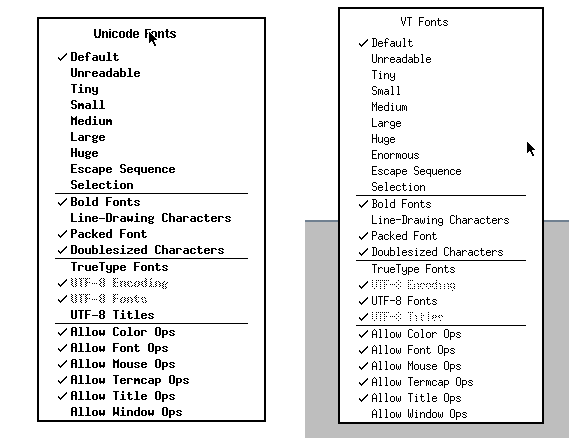
FreeBSD X Windows works just like earlier versions of X11, other than I have not been able to alter any fonts on xterm. In the NetBSD X11 connections, they work fine, even adding a new size in the menus (“Enormous”). One has Unicode, the other VT, probably because of the windows manager (/usr/X11R7/bin/ctwm versus twm)


Audio

I have 2 primary music source: an MP3/M4A library, and streaming source URLs (or XMLs). These depend on the audio hardware working, which on Linux is assumed but on BSD not so much. As I have audio output working on both BSD flavors, one control of interest is the route, whether HDMI or the 1/8 inch (3.5mm) jack. For NetBSD, I did this:

mixerctl -w outputs.select=headphones

On FreeBSD with an external USB audio dongle:

$ cat /dev/sndstat
Installed devices:
pcm0: <USB audio> (play/rec) default
No devices installed from userspace.

"Jazz hands":

> cvlc kcsm.xspf 
VLC media player 3.0.11.1 Vetinari (revision 3.0.11.1-0-g52483f3ca2)
[0000f03ec6b84380] dummy interface: using the dummy interface module...
[0000f03ec5d430c0] mpeg4audio demux packetizer: AAC channels: 1 samplerate: 22050


Packages


Bootstrapping pkg from pkg+http://pkg.FreeBSD.org/FreeBSD:13:aarch64/quarterly, please wait…


# pkg install mariadb105-server

# pkg install scribus

# pkg install xscreensaver


https://www.davidschlachter.com/misc/freebsd-usb-audio


https://wiki.freebsd.org/Sound


NetBSD


My main stumbling block has been getting the right install image for the machines I have. In one case (9.2), I burned the compressed OS image onto the microSD card, using the Raspberry Pi install software on Windows. It happily recognizes .gz install files as viable, even if the code won't boot up that way. I only speculate this based on a few failures of other NetBSD images, including ebijun’s and at least one -current. I even managed to get one as far as noting that X was not there, making a valiant effort to build it from pkgsrc, and giving up after too many swap failures.

Pi3 wired running NetBD


Swap is apparently pretty important for doing any complex compute work on the Pi 3. (1GB main memory rather than the 4 or 8GB on the Pi 4). The good news is with an external drive, even though USB-connected, greater things are possible For example, running minidlna for the first time pointing at an audio library takes some time (reading the files, associating album artwork if found, and writing a usable sqlite3 database). Without swap defined, in 9.2, the library build only made it to the "B"s.


[ 244273.226534] UVM: pid 16739 (minidlnad), uid 0 killed: out of swap
Jun  2 18:22:56 nib /netbsd: [ 558967.3390542] UVM: pid 12874 (dymaxionmap), uid 1000 killed: out of swap

After I started this post I decided I would try to add a swap device or file, then consulted https://www.netbsd.org/docs/misc/index.html#swap and decided to reuse a 2GB microSD card and a small USB adapter. I formatted it on the PC as FAT32, then added a disklabel, changing the type from MSDOS to swap, and then adding an entry in /etc/fstab. If that chip fails or gets pulled out I'm not sure the system will come up, but will deal with it then.


> swapctl -l
no swap devices configured

<fiddling occurs> 

> swapctl -l
Device      1K-blocks     Used    Avail Capacity  Priority
/dev/sd0e     1931196    35064  1896132     2%    0


For the -current image, I was pleasantly surprised to find that audio output works (but it doesn't directly in 9.2). I put the cheaper USB sound chip in the Pi with 9.2, and a USB wifi chip in the -current board.


# pkg_add mysql-server

# pkg_add mariadb-server

# pkg_add rrdtool

# pkg_add xli


> pkg_add raspberrypi-userland

pkg_add: no pkg found for 'raspberrypi-userland', sorry.

pkg_add: 1 package addition failed


uaudio0: <Antlion Audio Antlion USB adapter, class 0/0, rev 1.10/1.00, addr 2> on usbus0


After adding an SSD disk with a SATA/USB adapter to the first NetBSD system I got running, I put the pkg and pkgsrc directories there, then started adding other directories that would benefit from the faster I/O (and larger headroom). A home directory was easy enough, so I also created db, log, run, and tmp folders. To get builds to use the tmp directory there, rather than the one on SD card, I set TMPDIR to /usr/pkgsrc/tmp/. And put into a dot profile for persistence.

I took a chance to re-host the SSD drive with an "unpowered" USB adapter. For spinning disks, there is unlikely to be sufficient power without a separate feed besides the Pi, but that adds hardware and wires. The SSD has been fine so far, though I had a few mysterious halts prior to setting up swap on the external drive.

wifi - ifconfig

urtwn0: flags=0x8843<UP,BROADCAST,RUNNING,SIMPLEX,MULTICAST> mtu 1500
        ssid ""
        powersave off
        address: 98:48:xx:xx:xx:xx
        media: IEEE802.11 autoselect (DS1)
        status: no network

See: wla_supplicant in the manuals.


[     6.972019] ugen0: Realtek (0x2357) 802.11ac NIC (0x0138), rev 2.10/2.10, addr 5

[     6.992442] urtwn0: Realtek (0x0bda) 802.11n NIC (0x8179), rev 2.00/0.00, addr 5

In order to have the Pi recognized correctly on wireless after connecting by wire, I ended up modifying the DHCP configuration. In the past, I switched from dhcpcd to dhclient, partly because I was more familiar, but to some degree, it's easier to type correctly.

In the dhcpcd.conf man page, the stanza per interface lets you pass DHCP a host name:

< # Wed May 26 00:59:54 UTC 2021
< interface meu0
< hostname arm64
< #
< interface urtwn0
< hostname arm64a
< #
< interface bwfm0
< hostname arm64b
< #

The "meu0" interface is wired, the "urtwn0" is wireless on a USB plug-in, and the "bwfm0" is the built-in Broadcom device. In testing, that last connection seemed to work partway yet not completely sane. 

top

Each OS has a top command, and while pretty similar, switching to view all 4 CPUs has different methods, or just didn't work for me.


By the way, I've only been able to build/compile/run "catclock" on NetBSD. It's a wily one.


Stock Linux Pi4


dmesg

While each of the running systems has a dmesg command, the contents, order, and usefulness are distinct. Like baby ducks, you imprint the first one you come across, and variations or rewrites seem odd. I've plucked out basic data such as CPU type, memory, and network circuitry, whether wired or wireless. As noted above, the standard Pi OS is wireless, as is one of the NetBSD boards. I've left off many details around USB, video, and disk specifics, though I wish "boot from USB/SSD disk" was easier to pull off.

All emphases mine.

NetBSD: (pi 3; wireless)

[     1.000000] NetBSD 9.99.82 (GENERIC64) #0: Tue Apr 27 05:40:29 UTC 2021
[     1.000000] total memory = 930 MB
[     1.000000] avail memory = 897 MB
[     1.000000] simplebus0 at armfdt0: Raspberry Pi 3 Model B Plus Rev 1.3
[     1.000000] cpu0 at cpus0: Arm Cortex-A53 r0p4 (v8-A), id 0x0
[     6.978679] urtwn0 at uhub1 port 2
[     6.988681] urtwn0: Realtek (0x0bda) 802.11n NIC (0x8179), rev 2.00/0.00, addr 5
[     8.028819] mue0 at uhub2 port 1
[     8.038821] mue0: vendor 0424 (0x0424) product 7800 (0x7800), rev 2.10/3.00, addr 6
[     8.318858] mue0: LAN7800 id 0x7800 rev 0x2
[     8.328860] ukphy0 at mue0 phy 1: OUI 0x00800f, model 0x0013, rev. 2
[     8.338861] ukphy0: 10baseT, 10baseT-FDX, 100baseTX, 100baseTX-FDX, 1000baseT, 1000baseT-FDX, auto

NetBSD: (pi 3; wired)

[     1.000000] NetBSD 9.2 (GENERIC64) #0: Wed May 12 13:15:55 UTC 2021
[     1.000000] total memory = 933 MB
[     1.000000] avail memory = 900 MB
[     1.000000] simplebus0 at armfdt0: Raspberry Pi 3 Model B Plus Rev 1.3
[     1.000000] cpu0 at cpus0: Cortex-A53 r0p4 (Cortex V8-A core)
[    11.479420] mue0: vendor 0424 (0x424) product 7800 (0x7800), rev 2.10/3.00, addr 8
[    11.769459] mue0: LAN7800 id 0x7800 rev 0x2
[    11.779461] ukphy0 at mue0 phy 1: OUI 0x00800f, model 0x0013, rev. 2
[    11.779461] ukphy0: 10baseT, 10baseT-FDX, 100baseTX, 100baseTX-FDX, 1000baseT, 1000baseT-FDX, auto

FreeBSD (pi4; wired)

FreeBSD 13.0-RELEASE #0 releng/13.0-n244733-ea31abc261f: Fri Apr  9 06:06:55 UTC 2021
real memory  = 4147916800 (3955 MB)
avail memory = 4023050240 (3836 MB)
CPU  0: ARM Cortex-A72 r0p3 affinity:  0
genet0: <RPi4 Gigabit Ethernet> mem 0x7d580000-0x7d58ffff irq 82,83 on simplebus2
genet0: GENET version 5.0 phy 0x0000
brgphy0: <BCM54213PE 1000BASE-T media interface> PHY 1 on miibus0
brgphy0:  10baseT, 10baseT-FDX, 100baseTX, 100baseTX-FDX, 1000baseT, 1000baseT-master, 1000baseT-FDX, 1000baseT-FDX-master, auto


Linux (Raspios?)

[    0.000000] CPU: ARMv7 Processor [410fd083] revision 3 (ARMv7), cr=30c5383d
[    0.000000] OF: fdt: Machine model: Raspberry Pi 4 Model B Rev 1.4
[    0.000000] Memory: 7800096K/8245248K available (10240K kernel code, 1354K rwdata, 3152K rodata, 2048K init, 890K bss, 183008K reserved, 262144K cma-reserved, 7458816K highmem)
[    1.256495] bcmgenet fd580000.ethernet: GENET 5.0 EPHY: 0x0000

?
[    5.756276] brcmfmac mmc1:0001:1: Direct firmware load for brcm/brcmfmac43455-sdio.raspberrypi,4-model-b.txt failed with error -2

[    9.098683] bcmgenet fd580000.ethernet: configuring instance for external RGMII (RX delay)
[    9.099110] bcmgenet fd580000.ethernet eth0: Link is Down
[   15.358288] IPv6: ADDRCONF(NETDEV_CHANGE): wlan0: link becomes ready

XScreensaver


This doesn't need words; needs to be seen to be believed.

Temperature

After getting the first Pi, I found an online tutorial on measuring (or recording more properly) the Pi CPU temperature. 


The Pi 4 can run hot, and it became quickly clear that more load ran up the heat, which then triggered a CPU slowdown from on-board health controls. I experimented with a couple fans and ending up cooling both Pi 4s. The Pi 3 seemed to be less of a toaster, so I didn't seek the heat values initially. Well, I could not find the correct command as it turns out, so once I did I proceeded to set up cron jobs and local web pages to make history. Yeah, the Pi 3 is also a hot machine, and I'll likely search again for cooling methods. In one experiment, I pushed the clock speed on the NetBSD machines and then discovered overheating as shown on the on-screen "thermometer". Which doesn't help if you don't look at that console, but run remote commands via ssh.


Temperature readings:
Linux
TEMP_READING=$(/opt/vc/bin/vcgencmd measure_temp)

FreeBSD
TEMP_READING=$(/sbin/sysctl dev.cpu.0.temperature)

NetBSD
TEMP_READING=$(/usr/sbin/envstat|/usr/bin/tail -1|/usr/bin/awk '{print $2}') 

The NetBSD command is more complex in 9.2 than in -current, as the latter has an option missing in the former:

$ envstat
                 Current  CritMax  WarnMax  WarnMin  CritMin  Unit
[vcmbox0]
  temperature:    69.832   85.000                             degC

$ envstat -n
72.522


Yes, 72.5 Celsius...


# sysctl -w machdep.cpu.frequency.target=1200
machdep.cpu.frequency.target: 600 -> 1200


Extra hardware

Older and cheaper devices are sometimes better since they more likely may have available open source drivers. It's a gamble. Before tax: $30. Not shown, the $15 USB to SATA adapter.

SKUDescriptionQuantityPrice PerTotal Price
874834TPLINK 150MBPS WRLSN NNO USB ADP
19.999.99
854281ANTLION ANTLION USB SOUND ADAPTER
19.999.99
550509SABRENT USB SOUND ADAPTER CMEDIA
19.999.99

Example links (sometimes you can start further up the tree, sometimes not)

pkg_add http://cdn.netbsd.org/pub/pkgsrc/packages/NetBSD/aarch64/9.0_2020Q4/All/vlc-3.0.11.1.tgz
pkg_add ftp://ftp.netbsd.org/pub/pkgsrc/packages/NetBSD/x86_64/9.0/All/firefox-82.0.2.tgz
pkg_add -v http://cdn.netbsd.org/pub/NetBSD/misc/jun/aarch64/aarch64/2019-06-22/python37


References:


FreeBSD on Pi


NetBSD on Pi 

(apologies for http instead of https on some links)


TO DO:

Besides watching the core temperature with an eye towards better heat dispersal, I'd planning on:

  • Review log file growth, and control with "logrotate"
  • Figure out how to delay starting mindlna until NFS comes online, particularly after a power outage.
  • Wait for NetBSD 10
  • Correlate xscreenxaver hacks with the resultant heat rejected
  • Run benchmarks at different core frequencies
  • Test USB-3 hubs, as even 4 ports fill up