Saturday, January 21, 2023

Another Zabbix chapter: software upgrade, hardware downgrade.

I started using Zabbix about a year ago, trying to get it running on the Raspberry Pi "platform." I wanted to deploy a different OS than the standard Raspbian, and went through tests on NetBSD, FreeBSD, and another Linux flavor before settling on FreeBSD and Zabbix 5.4.

Building out an intra-home data aggregator

After running that system for some time, I decided a second system would be nice, for redundancy and for some development in parallel. I built the most recent version that I could find on the NetBSD package source, ending up with Zabbix 4 on a Pi 4 and 5.0 on an i386 (not really Pi). Minor version differences such as XML file content for templates and hosts were small enough to ignore or workaround.


Then I found an available Raspberry Pi 3A, causing a domino effect where I ended up putting FreeBSD 13.1 on a Pi 3B (the working 5.2 is on a Pi 4).

OS, database, application deploy


  • FreeBSD 13.1 ELF 64-bit LSB executable, ARM aarch64
  • Postgres 14.5 (I missed 15.x by 1 or 2 dependent patch levels)
  • Zabbix 6.2.6

The first thing I tried, even though it hasn't worked in the past, was to use only FreeBSD packages, not compile anything. I was hoping for PostgreSQL support on the Zabbix server rather than MySQL as I can do either but prefer the former (for reasons).

pkg install zabbix62-frontend-php81
pkg install mod_php81

When I started, indications were Zabbix 6.2.3 was the packaged version, which supported PostgreSQL server 14 but not 15. So I deployed version 14. As it turned out, I needed to compile a newer version which should work with 15. I didn't feel like dropping and reloading the data yet; maybe a later upgrade will be feasible.

Traces from /var/log/messages of my package journey:

DateTimePackage information
May 1211:01:06zabbix5-agent-5.0.28 installed
May 1215:19:38zabbix62-frontend-php81-6.2.3 installed
May 1214:55:37zabbix62-server-6.2.3 installed
May 1215:49:31zabbix62-frontend-php81-6.2.3 deinstalled
May 1215:50:41php82-pgsql-8.2.0.r2 installed
May 1215:52:34mod_php82-8.2.0.r2_1 installed
Jan 1016:12:16php82-pgsql-8.2.0.r2 deinstalled
Jan 1003:29:27zabbix62-frontend-php81-6.2.3 installed
Jan 1003:48:51mod_php82-8.2.0.r2_1 deinstalled
Jan 1003:49:25mod_php81-8.1.12 installed
Jan 1018:48:59zabbix62-server-6.2.3 deinstalled
Jan 1018:49:39zabbix62-server-6.2.6 installed
Jan 1019:19:52zabbix62-frontend-php81-6.2.6 installed
Jan 1020:20:05php81-pgsql-8.1.14 installed


The date flip occurred once I noticed the ntp daemon was not running so the system date was from the image build time. Besides Zabbix server not supporting PGSQL as packaged, the PHP version needed to be adjusted to match the workable Zabbix and database parts. Hence the PHP 8.2 install then deinstall, for the httpd "mod" as well as the PHP<>PGSQL shim.

Too bad about the downgrade from PHP 8.2 to 8.1. On the plus side, earlier Zabbix servers were incompatible with PHP 8, and any system where PHP 7 was unavailable meant Zabbix was blocked.

Screen shot of the critical database choice moment: 
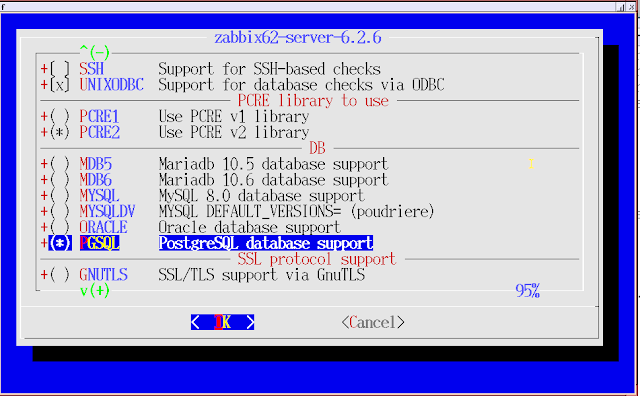

Screenshot of Zabbix install, with PostgreSQL highlighted. Other databases not highlighted.


Voila (I particularly like the new built-in map feature)


TRAIL HEAD

Out of the box, I already had a local agent (v5) running on the server, but it did not connect cleanly to the server. Minor adjustments and then the "Zabbix server values per second" went from under 1 to around 10, which is what I've seen in a home grid with roughly a dozen nodes.

The primary imports from running Zabbix systems included templates and hosts, in the required dependency order. I'd already set up shared folders with prior configuration migrations among other systems, making this exercise more familiar thus quicker.

Probably an opportunity for some refactoring.

The Zabbix server emitted messages warning about poller usage, indicating tuning needed on process counts in the zabbix_server.conf file.

> # Wed Jan 11 13:00:29 UTC 2023
> # 1:
> # StartPollers=10
> # 2:
> StartPollers=20
236a244,245
> # Wed Jan 11 13:00:55 UTC 2023
> StartPollersUnreachable=2

I bumped StartPollers first to 10, and then to 20, which at least made the messages stop.

ISSUES

pi slices

The message "mmcblk0: Disk read/write request responses are too high" is back. I found that on earlier installs as a result of running on SD cards rather than spinning disk or SSD. Funny enough, when I looked for the fix, I found my earlier post with the suggestion of where these macros are found.
 
A "CPU is throttling" message is also back on the Pi 3 (no fan); not yet on a Pi 4 (has fan). I researched this error message and believe it is misleading. The code "0x80000" from what I've read means the CPU had been throttled but is not now. I think I have 3 choices: (1) ignore this error; (2) correct the code; (3) add a fan to the Pi.

Red light/green light. Or grey light/green light.


middle

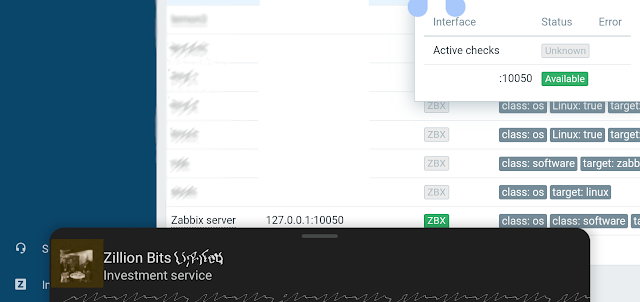
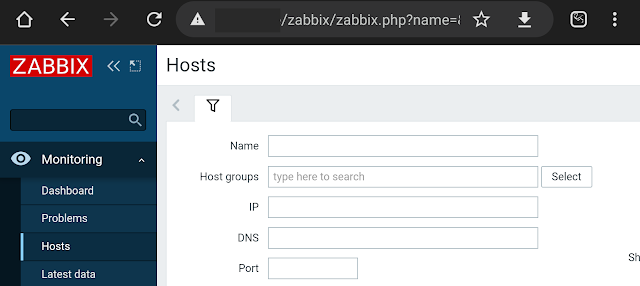
Above, a 3 piece snapshot of the Zabbix dashboard after loading a dozen or so nodes. A primary devolution is that host connections do not show as green except where there are no active checks. In that case, the "ZBX" icon is grey; hovering over it produces a pop-up with two status boxes. Active checks shows status "Unknown" and the host check shows "Available". Which is less helpful than earlier versions that simply showed green or red for connected or not.

The funny part here is that highlight the 3 letters triggered goog to display completely unrelated search results on screen.

One dollar gets you two dollars.

"Error $2 on $1"

Known error, "The $1, $2 macros were deprecated,"


Slower hardware (the downgrade)

"slow query"

36582:20230120:032637.691 
slow query: 3.138252 sec, 
"delete from history where itemid=10073 and clock<1673580394"

The first working Zabbix server I set up that stayed running was on FreeBSD using a Raspberry Pi 4 with 4GB RAM. This build is on a Pi 3B with 1GB. The former runs of an SSD while the latter has a micro-SD and a USB-3 for the database files. The 3 only has USB-2 speed.
My user experience is that the new platform feels slower but not maddeningly. If I can avoid adding a plugin interface and drive that would be preferable for look and feel.

MORE TO DO

dashboards

Would like to do more with the supplied features like dashboards, and new features to be discovered. This view of "room light" shows we're in winter with the short days. A health aide to avoid seasonal disorders perhaps?


history data moves


I've cobbled a Perl script to read from one Zabbix server and insert trending for one item into a second server, using a control table of "from" and "to" record IDs. Not bullet-proof but efficient enough even with row level commits to be a breeze. 


benchmark - Two Pi Zeros running NetBSD 10 beta:


There is one visible gap on the node with the troublesome USB to ethernet connectors.


The spike is from an install; working on setting up parallel benchmark tests on these for comparisons.

The bad ethernet behavior is noticeable as gaps in the red line...


Friday, December 9, 2022

Bengies Top 10 2022

 Bengies Top 10 2022

As in past years, I take a look at movies I've watched at the Bengies Drive-In near Baltimore. The theatre is a relic of the post-WW2 U.S. boom years, where cars and movies could live as one. The only drive-in left in Maryland, claiming to be the largest screen in the U.S.A, it can be a welcome escape from the small tube world to sit under the stars looking at the wide screen.

2021 ratings: (the longest season ever)

  1. https://jspath55.blogspot.com/2021/12/2021-longest-bengies-season-ever-part-1.html
  2. https://jspath55.blogspot.com/2021/12/2021-longest-bengies-season-ever-part-2.html

Each pick is one that I saw in person, though in some cases we didn't stay for the whole show/

Marquee with 2 Batmen

March opening.

The marquee picture for 2 completely different Batman movies was taken in last February 2022. I commented at the time that we had only been unable to attend the drive-in in about 2 months, since they operated through December 2021.
I consider the Lego Batman movie as not qualified for the "best of 2022" because it was also the season opener in 2017. (I didn't see it then, apparently, per my best of 2017).

Marquee

May

This marquee shot is misleading since we didn't get to the shows that weekend. I'm only including it because we saw both of the posted shows, just not on the same evening. I kind of liked the shot with the clouds. Doctor Strange was another escapist saga where the few seconds during or at the end of the credits was a memorable as any other segment in the production.

all at once

June

The epic "Everything Everywhere All At Once" almost got by us because we had other plans when it was showing, and then went off the bill. But it came back and I sat through Top Gun to then thoroughly enjoy the bizarrely surrealism of this unique creation. We had to rent it on DVD and watch a few scenes several times each in order to make a bit more sense. Of course, I rate this the top film of the year.

I had to ask Sean of the Bengies staff what was happening with the flipping from wide-screen to ultra-wide screen in different shots of Everything Everywhere; he said that was not a mistake but part of the edit. I guess I need to watch it one more time to try to see if the wide part is real, or fantasy. They got me!

I didn't get a shot of the marquee advertising a new documentary about the drive-in movie industry ("GOING ATTRACTIONS: BACK TO THE DRIVE-IN") though we we fortunate to be able to catch it an a preview. The upswing in outdoor movie attendance triggered by the pandemic allowed a few houses to continue operating, and a few people tried to jump start older or brand new locations. While an uplifting story, the financial realities may poke holes in a few plans. I didn't add this documentary into my "top 10" list as it's more a one-off.


July

Summer blockbuster season does not appear to have gone away due to the pandemic even if many schedules changed drastically. I noted about this marquee how many of the shows are sequels. Hint: 100%.
Thor rocked.
We didn't see the dinosaurs and didn't miss them though we did miss Minions.


September

Fortunately again this season the Bengies hosted the Scouts for a one-night camp-in. A double feature of kid-friendly picks, and good weather for once. One of my favorite events even if exhausting.
My remark a the time was I could not recall seeing a double feature that contained both D.C. and Marvel Comic franchises. Well done, teams.


November

Black Adam was refreshing.
We watched only the first reel of Till. I admit, given what we know of the story, and how times haven't changed enough, was sickening to the stomach. I can be a wincer.

I like the shot as I was able to get most of the rising moon intact if not flared.


December

Global climate change is bad; I try to prevent carbon consumption though am nowhere near 100% renewables. I sigh because it allows a drive-in to operate in these latitudes from March through December rather than the May through September of bygone times. We didn't need to rent an in-car heater and saw people with open hatches watching not through glass.


Drum roll for the top 10.

  1. Everything Everywhere All At Once
  2. Strange World
  3. The Woman King
  4. Black Panther Wakanda Forever
  5. Black Adam
  6. Thor (4)
  7. Doctor Strange and the Multiverse of Madness
  8. The Batman
  9. Spider-Man No Way Home
  10. Till
  11. D.C. League of Super-Pets

Yeah, it goes to 11 this year.

The "bottom 10" is pretty short this year. Top Gun takes 2 places, so jingoistic.

Thursday, October 13, 2022

Photo tracker revisited for Scout camp post Panoramio

 When I wrote The Scout reservation photo map tracker in 2010, I was on a roll with the now-closed Panoramio site. I would take pictures, geo-locate them, and share with the world. But Google shut down panoramio.com, hiding many if not most of my contributions. You can see them sometimes with Google maps or Google Earth (pro) if you look in the right places.

Even though I did a Google "takeout" to download my archives, the formerly useful geocodes were cplit from the image, which to be honest, not all even had in the JPEG metadata.

In 2018 I made efforts to re-share my content on another site since I still had the original images as well as lower-resolution ones Google coughed up, but put the project aside after posting one picture. And that image, on closer examination, was not placed in the right spot anyway. Locations can be tricky!

I was pleasantly surprised when searching for one of my original Panoramion shots to discover that the WayBak machine of archive.org had slurped out the Panoramio site, with much useful data, prior to it going away. So in the earlier post, if I shared this image:

  • Camp Saffran - US Mail drop

  • That link will give a "Thanks for stopping by" dead page when accessed. Fortunately, http://www.panoramio.com/photo/25164491 is easily read as including a record ID # ( 25164491 ) that can be used to find the same page as it was, in the archives, like:

    https://web.archive.org/web/20161014002503/http://www.panoramio.com/photo/25164491

    This transforms into:

    https://web.archive.org/web/20161013193141/http://www.panoramio.com/photo/25164491

    Using whatever glue code moves the time machine pointer to the right capture time. Panoramio pages were only archived once, it seems, but as nothing changed after the site freeze the inventory should be valid.


    And ta-da! The USPS ghost truck will be by to pickup those camp post cards home.

    Friday, June 17, 2022

    Zabbix server build trial and error

    After running Zabbix in house for a few months, I thought it prudent to set up a second server as a backup in case the primary system failed, being on a Raspberry Pi 4 with an external SSD drive 

    FreeBSD

    At first I looked at pre-built packages; but found postgres unsupported. As I preferred PostgreSQL I didn't use the package manager

    I built Zabbix 5.4 from source, over a few days. At that time, February 2022, FreeBSD had a port of 5.4 while NetBSD had 5.0. The build was easy enough, though would probably have taken longer if I only used an SD card.

    This system has been working since February; I've added a few targets as well as bringing in outside data such as temperate at the local airport using zabbix_get with traps.

    Original installation/configuration post: jspath55.blogspot.com/2022/02/building-out-intra-home-data-aggregator.html

    Since I've experimented with multiple different OS installs, I didn't have another FreeBSD image running, so looked at alternatives.

    Rock64

    I got this arm64 board via mail order from China, and while I intend to put NetBSD on there, I have not located a usable image. Meanwhile, to check out the performance, I went with a Linux distro; first was old kernel (4.x), second was "almost" good enough (5.x). The HDMI is a little choppy, but at least the headphone jack worked.

     For Zabbix, I again wanted a Postgres database; got that installed.

    rock64:/usr/share/zabbix-server-pgsql$ cat schema.sql  | sudo -u zabbix psql zabbix

    CREATE TABLE

    CREATE INDEX

    CREATE TABLE

    CREATE INDEX

    CREATE INDEX

    ...

     Next, I needed Apache; got that (but config is non-classic).


    The only PHP package available was 8.x

    rock64:/usr/share$ sudo apt install libapache2-mod-php8.1

    Reading package lists... Done

    Building dependency tree... Done

    Reading state information... Done

    libapache2-mod-php8.1 is already the newest version (8.1.2-1ubuntu2).


    And the frontend web backend  parts:

    Congratulations! You have successfully installed Zabbix frontend.

    Configuration file "/etc/zabbix/zabbix.conf.php" created.


     I got the install working up to initial screens; multiple fail messages ensued.

    Jun 14 18:13:35 rock64 apachectl[289859]: [Tue Jun 14 18:13:35.313693 2022] [php:crit] [pid 289859:tid 281472868511776] Apache is running a threaded MPM, but your PHP Module is not compiled to be threadsafe.  You need to recompile PHP.

    The workaround for threadsafe is known, except that didn't matter in the end. I bagged this install as compiling php7 was problematic compared to using an available built package.

    rock64:/etc/apache2/mods-enabled$ ls -l  /usr/lib/apache2/modules/libphp*

    -rw-r--r-- 1 root root 5246072 Apr  7 13:46 /usr/lib/apache2/modules/libphp8.1.so

    Pi 4 Open SUSE Linux

     I tried an install on an OpenSUSE system running on a Raspberry Pi 4. When I looked at the available packages, postgres database looked good. But the only Zabbix server package was 4.x (running 5.4 now, 6.x is available)

     I discarded this option as 4.x seemed a poor starting level, and I trusted pkgsrc given decades of familiarity, over yap or whatever the SUSE package manager is called.

      This was as far as I went:

    $ sudo apt install  zabbix-server-postgresql

    Retrieving: zabbix-server-4.0.39-1.5.aarch64.rpm ...[done]

    Pi 4 running NetBSD

    I had already started using this install with NetBSD-current from early 2022, with built packages. I  decided to build from /usr/pkgsrc if necessary, so did a CVS pull of pkgsrc from this year:

    # cvs checkout -r pkgsrc-2022Q1 -P pkgsrc

    The available Zabbix server package is still 5.0 but not 5.4, went ahead anyway. Hoping 5.4 (or later) is a work in progress.

    The postgres database got built and configured. And I had to reinstall earlier packages that were postgres 11 but not the same patch level. :(

    The program "postgres" was found by "/usr/pkg/bin/initdb" but was not the same version as initdb.

    # pkg_delete postgresql11-server postgresql11-11.12nb1

    The following files should be created for postgresql11-server-11.15:


    Tried to get ahead of myself and run the server with an empty database; that didn't work but the error message was plain enough.

     29883:20220615:154343.702 [Z3005] query failed: [0] PGRES_FATAL_ERROR:ERROR:  relation "users" does not exist

    The timezone error wasn't seen when I did the first install:

    Time zone for PHP is not set (configuration parameter "date.timezone").

    If you notice the times are different on the graphs included at the end of this post, you make notice both a skew in time (possible timezone) but also in the 12 hour versus 24 hour clock. Now that I have both I can decide which I prefer, or if having a discrepancy keeps the base differences more noticeable.

    This parameter is important, particularly if you use the zabbix_send operative to load external data. If not matched to the right timezone, you end up with skewing.

    See blogs.sap.com/2022/04/08/the-abap-detective-gets-their-clock-cleaned/ for more on the timezone for Zabbis database, sever, and data feeds.

    It started working after I configured Apache and PHP.

    [ server log snippet ]

      7166:20220615:155355.128 server #35 started [trapper #5]

      2705:20220615:155355.129 server #37 started [alert syncer #1]

      7015:20220615:155355.299 item "Zabbix server:zabbix[vmware,buffer,pused]" became not supported: No "vmware collector" processes started.

       111:20220615:155401.351 Zabbix agent item "system.cpu.num" on host "Zabbix server" failed: first network error, wait for 15 seconds

    The VMware message makes sense, but the CPU message is one of those works on Linux, maybe on FreeBSD, but not on NetBSD. No matter, as enough CPU and system metrics are being collected for my purposes. The clips below are from the 5.0 and 5.4 systems, with the former including a more readable (to me) font color change between time marks. I suppose that is out-of-the-box behavior since I didn't tweak anything customized for charts.

    I started to set up dual connect agents; realized "zabbix server" was a bad name choice, now. Each agent already is configure to believe the central system has that name, so I can't have 2 of them. I'll need to come up with a naming scheme and update all of the agents. I would have to do that anyway if I wanted to keep dual sources; this just makes it more challenging.


    Wednesday, April 27, 2022

    Raspberry Pi Zero 2 W NetBSD dmesg text

     Raspberry Pi Zero 2 W NetBSD dmesg text

    Installed following brief notes here:

    https://mail-index.netbsd.org/port-arm/2022/02/14/msg007592.html


    Resulting dmesg output:


    dmesg

    [     1.000000] NetBSD 9.2_STABLE (GENERIC) #0: Mon Apr 25 12:39:27 UTC 2022

    [     1.000000]         mkrepro@mkrepro.NetBSD.org:/usr/src/sys/arch/evbarm/compile/GENERIC

    [     1.000000] total memory = 448 MB

    [     1.000000] avail memory = 433 MB

    [     1.000000] timecounter: Timecounters tick every 10.000 msec

    [     1.000000] running cgd selftest aes-xts-256 aes-xts-512 done

    [     1.000000] armfdt0 (root)

    [     1.000000] simplebus0 at armfdt0: Raspberry Pi Zero 2 W Rev 1.0

    [     1.000000] simplebus1 at simplebus0

    [     1.000000] simplebus2 at simplebus0

    [     1.000000] simplebus3 at simplebus1

    [     1.000000] cpus0 at simplebus0

    [     1.000000] simplebus4 at simplebus0

    [     1.000000] cpu0 at cpus0: 600 MHz Cortex-A53 r0p4 (Cortex V8A core)

    [     1.000000] cpu0: DC enabled IC enabled WB enabled EABT branch prediction enabled

    [     1.000000] cpu0: 32KB/64B 2-way L1 VIPT Instruction cache

    [     1.000000] cpu0: 32KB/64B 4-way write-back-locking-C L1 PIPT Data cache

    [     1.000000] cpu0: 512KB/64B 16-way write-through L2 PIPT Unified cache

    [     1.000000] vfp0 at cpu0: NEON MPE (VFP 3.0+), rounding, NaN propagation, denormals

    [     1.000000] cpu1 at cpus0

    [     1.000000] cpu2 at cpus0

    [     1.000000] cpu3 at cpus0

    [     1.000000] bcmicu0 at simplebus1

    [     1.000000] bcmicu1 at simplebus1: Multiprocessor

    [     1.000000] bcmcprman0 at simplebus1: BCM283x Clock Controller

    [     1.000000] fclock0 at simplebus2: 19200000 Hz fixed clock (osc)

    [     1.000000] bcmaux0 at simplebus1

    [     1.000000] fclock1 at simplebus2: 480000000 Hz fixed clock (otg)

    [     1.000000] gtmr0 at simplebus0: Generic Timer

    [     1.000000] gtmr0: interrupting on local_intc irq 3

    [     1.000000] armgtmr0 at gtmr0: Generic Timer (19200 kHz, virtual)

    [     1.000000] timecounter: Timecounter "armgtmr0" frequency 19200000 Hz quality 500

    [     1.000003] plcom0 at simplebus1: ARM PL011 UART

    [     1.000003] plcom0: txfifo disabled

    [     1.000003] plcom0: interrupting on icu irq 185

    [     1.000003] com0 at simplebus1: BCM AUX UART, working fifo

    [     1.000003] com0: console

    [     1.000003] com0: interrupting on icu irq 157

    [     1.000003] usbnopphy0 at simplebus0: USB PHY

    [     1.000003] /soc/thermal@7e212000 at simplebus1 not configured

    [     1.000003] /soc/dsi@7e209000 at simplebus1 not configured

    [     1.000003] bcmgpio0 at simplebus1: GPIO controller

    [     1.000003] bcmgpio0: pins 0..31 interrupting on icu irq 177

    [     1.000003] bcmgpio0: pins 32..54 interrupting on icu irq 178

    [     1.000003] gpio0 at bcmgpio0: 54 pins

    [     1.000003] /soc/firmware/gpio at simplebus3 not configured

    [     1.000003] bcmdmac0 at simplebus1: DMA0 DMA2 DMA4 DMA5 DMA6 DMA7 DMA8 DMA9 DMA10

    [     1.000003] /soc/power at simplebus1 not configured

    [     1.000003] mmcpwrseq0 at simplebus0autoconfiguration error: : couldn't get reset GPIOs

    [     1.000003] bsciic0 at simplebus1: Broadcom Serial Controller

    [     1.000003] iic0 at bsciic0: I2C bus

    [     1.000003] bcmpmwdog0 at simplebus1: Power management, Reset and Watchdog controller

    [     1.000003] bcmmbox0 at simplebus1: VC mailbox

    [     1.000003] bcmmbox0: interrupting on icu irq 193

    [     1.000003] vcmbox0 at bcmmbox0

    [     1.000003] bcmsdhost0 at simplebus1: SD HOST controller

    [     1.000003] bcmsdhost0: interrupting on icu irq 184

    [     1.000003] bsciic1 at simplebus1: Broadcom Serial Controller

    [     1.000003] iic1 at bsciic1: I2C bus

    [     1.000003] /soc/pwm@7e20c000 at simplebus1 not configured

    [     1.000003] sdhc0 at simplebus1: SDHC controller

    [     1.000003] sdhc0: interrupting on icu irq 190

    [     1.000003] bsciic2 at simplebus1: Broadcom Serial Controller

    [     1.000003] iic2 at bsciic2: I2C bus

    [     1.000003] /soc/vec@7e806000 at simplebus1 not configured

    [     1.000003] /soc/hdmi@7e902000 at simplebus1 not configured

    [     1.000003] dwctwo0 at simplebus1: USB controller

    [     1.000003] dwctwo0: interrupting on icu irq 137

    [     1.000003] /soc/gpu at simplebus1 not configured

    [     1.000003] genfb0 at simplebus1: switching to framebuffer console

    [     1.000003] genfb0: framebuffer at 0xde402000, size 1920x1080, depth 32, stride 7680

    [     1.000003] wsdisplay0 at genfb0 kbdmux 1: console (default, vt100 emulation)

    [     1.000003] wsmux1: connecting to wsdisplay0

    [     1.000003] wsdisplay0: screen 1-3 added (default, vt100 emulation)

    [     1.000003] vchiq0 at simplebus1: BCM2835 VCHIQ

    [     1.000003] armpmu0 at simplebus0: Performance Monitor Unit

    [     1.000003] gpioleds0 at simplebus0: ACT

    [     1.000003] /soc/timer@7e003000 at simplebus1 not configured

    [     1.000003] /soc/txp@7e004000 at simplebus1 not configured

    [     1.000003] bcmrng0 at simplebus1: RNG

    [     1.000003] timecounter: Timecounter "clockinterrupt" frequency 100 Hz quality 0

    [     1.000003] cpu1: 600 MHz Cortex-A53 r0p4 (Cortex V8A core)

    [     1.706895] cpu1: DC enabled IC enabled WB enabled EABT branch prediction enabled

    [     1.736896] cpu1: 32KB/64B 2-way L1 VIPT Instruction cache

    [     1.776900] cpu1: 32KB/64B 4-way write-back-locking-C L1 PIPT Data cache

    [     1.806906] cpu1: 512KB/64B 16-way write-through L2 PIPT Unified cache

    [     1.846909] vfp1 at cpu1: NEON MPE (VFP 3.0+), rounding, NaN propagation, denormals

    [     1.876912] cpu2: 600 MHz Cortex-A53 r0p4 (Cortex V8A core)

    [     1.916916] cpu2: DC enabled IC enabled WB enabled EABT branch prediction enabled

    [     1.946920] cpu2: 32KB/64B 2-way L1 VIPT Instruction cache

    [     1.986925] cpu2: 32KB/64B 4-way write-back-locking-C L1 PIPT Data cache

    [     2.016928] cpu2: 512KB/64B 16-way write-through L2 PIPT Unified cache

    [     2.056933] vfp2 at cpu2: NEON MPE (VFP 3.0+), rounding, NaN propagation, denormals

    [     2.096938] cpu3: 600 MHz Cortex-A53 r0p4 (Cortex V8A core)

    [     2.126941] cpu3: DC enabled IC enabled WB enabled EABT branch prediction enabled

    [     2.166945] cpu3: 32KB/64B 2-way L1 VIPT Instruction cache

    [     2.196950] cpu3: 32KB/64B 4-way write-back-locking-C L1 PIPT Data cache

    [     2.236954] cpu3: 512KB/64B 16-way write-through L2 PIPT Unified cache

    [     2.276958] vfp3 at cpu3: NEON MPE (VFP 3.0+), rounding, NaN propagation, denormals

    [     2.426974] sdmmc0 at bcmsdhost0

    [     2.426974] sdhc0: SDHC 3.0, rev 153, platform DMA, 200000 kHz, HS 3.3V, re-tuning mode 1, 1024 byte blocks

    [     2.437171] sdmmc1 at sdhc0 slot 0

    [     2.437171] dwctwo0: Core Release: 2.80a (snpsid=4f54280a)

    [     2.437171] usb0 at dwctwo0: USB revision 2.0

    [     2.477042] armpmu0: interrupting on local_intc irq 9

    [     2.487042] uhub0 at usb0: NetBSD (0000) DWC2 root hub (0000), class 9/0, rev 2.00/1.00, addr 1

    [     2.487042] uhub0: 1 port with 1 removable, self powered

    [     2.527046] IPsec: Initialized Security Association Processing.

    [     2.547047] sdmmc0: direct I/O error 5, r=6 p=0xa541bf2c write

    [     2.617057] sdmmc1: sdmmc_mem_enable failed with error 60

    [     2.627056] sdmmc1: autoconfiguration error: couldn't enable card: 60

    [     2.647059] sdmmc0: SD card status: 4-bit, C4

    [     2.657189] ld0 at sdmmc0: <0x03:0x5344:SS16G:0x80:0xa5864a9d:0x115>

    [     2.657189] ld0: 15193 MB, 7717 cyl, 64 head, 63 sec, 512 bytes/sect x 31116288 sectors

    [     2.697067] ld0: 4-bit width, High-Speed/SDR25, 50.000 MHz

    [     3.207111] WARNING: 2 errors while detecting hardware; check system log.

    [     3.217113] boot device: ld0

    [     3.217113] root on ld0a dumps on ld0b

    [     3.247116] root file system type: ffs

    [     3.257117] kern.module.path=/stand/evbarm/9.2/modules

    [     3.267117] vchiq0: interrupting on icu irq 194

    [     3.267117] vchiq: vchiq_init_state: slot_zero = 0xa5880000, is_master = 0

    [     3.267117] vchiq: local ver 8 (min 3), remote ver 8.

    [     3.267117] vcaudio0 at vchiq0: auds

    [     3.267117] WARNING: no TOD clock present

    [     3.277120] WARNING: using filesystem time

    [     3.284972] WARNING: CHECK AND RESET THE DATE!

    [     3.297122] audio0 at vcaudio0: playback

    [     3.297122] audio0: slinear_le:16 -> slinear_le:16 2ch 48000Hz, blk 7680 bytes (40ms) for playback

    [     3.307121] spkr0 at audio0: PC Speaker (synthesized)

    [     3.307121] wsbell at spkr0 not configured

    [     5.787575] wsdisplay0: screen 4 added (default, vt100 emulation)

    [     9.788463] uhub1 at uhub0 port 1: vendor 05e3 (0x5e3) USB2.0 Hub (0x608), class 9/0, rev 2.00/9.01, addr 2

    [     9.798471] uhub1: single transaction translator

    [     9.798471] uhub1: 4 ports with 4 removable, self powered

    [    11.108627] ure0 at uhub1 port 2

    [    11.118623] ure0: Realtek (0xbda) USB 10/100/1000 LAN (0x8153), rev 2.10/31.00, addr 3

    [    11.128628] ure0: RTL8153 unknown ver 6010

    [    11.198637] rgephy0 at ure0 phy 0: RTL8251 1000BASE-T media interface, rev. 0

    [    11.198637] rgephy0: 10baseT, 10baseT-FDX, 100baseTX, 100baseTX-FDX, 1000baseT-FDX, auto

    [    11.218636] ure0: Ethernet address 00:00:00:00:00:00

    [    12.308752] uhidev0 at uhub1 port 3 configuration 1 interface 0

    [    12.308752] uhidev0: Logitech (0x46d) USB Receiver (0xc52b), rev 2.00/12.11, addr 4, iclass 3/1

    [    12.378765] ukbd0 at uhidev0

    [    12.788796] wskbd0 at ukbd0: console keyboard, using wsdisplay0

    [    12.788796] uhidev1 at uhub1 port 3 configuration 1 interface 1

    [    12.798925] uhidev1: Logitech (0x46d) USB Receiver (0xc52b), rev 2.00/12.11, addr 4, iclass 3/1

    [    12.978946] uhidev1: 8 report ids

    [    12.978946] ums0 at uhidev1 reportid 2: 16 buttons, W and Z dirs

    [    12.978946] wsmouse0 at ums0 mux 0

    [    12.990544] uhid0 at uhidev1 reportid 3: input=4, output=0, feature=0

    [    12.990544] uhid1 at uhidev1 reportid 4: input=1, output=0, feature=0

    [    13.013252] uhid2 at uhidev1 reportid 8: input=1, output=0, feature=0

    [    13.013252] uhidev2 at uhub1 port 3 configuration 1 interface 2

    [    13.022501] uhidev2: Logitech (0x46d) USB Receiver (0xc52b), rev 2.00/12.11, addr 4, iclass 3/0

    [    13.112515] uhidev2: 33 report ids

    [    13.112515] uhid3 at uhidev2 reportid 16: input=6, output=6, feature=0

    [    13.112515] uhid4 at uhidev2 reportid 17: input=19, output=19, feature=0

    [    13.125073] uhid5 at uhidev2 reportid 32: input=14, output=14, feature=0

    [    13.142920] uhid6 at uhidev2 reportid 33: input=31, output=31, feature=0

    [    13.152996] uhub0: autoconfiguration error: illegal enable change, port 1

    [  2146.262218] audio0(vcaudio0): setting play.port=0 failed: errno=22

    [  2146.262218] audio0(vcaudio0): setting play.port=0 failed: errno=22

    [  2391.675509] audio0(vcaudio0): setting play.port=0 failed: errno=22

    [  2391.685588] audio0(vcaudio0): setting play.port=0 failed: errno=22

    [  2731.793669] audio0(vcaudio0): setting play.port=0 failed: errno=22

    [  2731.793669] audio0(vcaudio0): setting play.port=0 failed: errno=22


    Thursday, April 21, 2022

    Defenders Trail, Day Three

     Over a decade ago, I walked most of the "Defenders Trail" around North Point, in Baltimore County. I posted 2 summaries of those hikes as "Day One" and "Day Two", so though there is a big jump in elapsed time, this is "Day Three".

    Looking back at the images I captured and the notes I took, a bit has changed, in particular Google shut down the Panoramio web site. The images I and others uploaded, were mostly retained by Google, except the former URLs are broken and are now harder to find. For a while, I could not find any of the thousands of geo-tagged photos I contributed, but at some point, they showed up in Google Earth Pro when you select "show photo layers". Fortunately I was able to pull down my contributions and spent a little time recovering shots from the first 2 posts to make them readable again.

    Methodist Meeting House


    Nothing is left of the original building, though this substantial marker should last a few centuries, above or below the water line. There are no sidewalks or paths leading to this fenced-off area, so you'd need to park on a nearby street and wander around. 

    Nearby is the Bread & Cheese Creek streambed, where there are high water markers for times when upstream runoff rushes into a constricted area. Needless to say, don't walk on North Point Road past the narrowing.


    North Point Battlefield


    When I hiked these trails in 2011, the North Point Battlefield Park did not exist in the condition that it does in 2022.


    "State."

    It's flat, and wet. I hope enough people use these trails to keep back the phragmites. But the wetlands are pervasive, and invasive.


    North Point 


    One site mentioned in the old trail guide was "Cooks Tavern". That's long gone, replaced by a variety of shopping center buildings. This view shows North Point Boulevard, the Beltway, and in the distance, a road sign commemorating the battle of North Point.


    Speaking of signs, here's two.


    No giant flags here, just swamp and stickerbushes.


    Friday, February 18, 2022

    Building out an intra-home data aggregator

     After I put a couple Raspberry Pi environment monitoring devices into my shopping cart and pile of unconnected devices, I looked around for a central data aggregator that would be a step up from individual cron jobs and RRD repositories. The open source platform Zabbix looked interesting, as it was noted in online posts about pulling data from remote devices. Around the end of January, as the weather pushed me to inside projects, I started figuring out the moving parts.

    My first thought was I'd like to run the database and system on NetBSD, but after looking at the state of Zabbix server and agent version availability, I found FreeBSD has an advantage in having better coverage. I thought I could put the server processes on one node and the database itself on a different node, since I already had working PostgreSQL systems. Trying to activate NetBSD packages on the arm Pi systems ended up with a battle between mysql and mariadb, meaning the package wouldn't use postgreSQL as I wanted.

    The package version of Zabbix for FreeBSD, is also pre-configured for MySQL, despite the configuration file indicating that a few tweaks could alter the database connection. I tried several permutations of ports and other values before coming to the realization that if I wanted a different database I'd need to build the application from sources. But running both a binary package repository and one from source on one node can be problematic, leading me to start from scratch with a fresh FreeBSD system.

    After a few feints, I was able to get FreeBSD 13 set up on an SSD drive connected through USB to a Pi 4. Turns out, that was the easy part. I tried to find the least common denominator of underlying libraries to minimize the time spent watching auto-configure and make run through huge software stacks. I was expecting there might be several days worth of churn ahead but was pleasantly surprised as I watched the component parts get laid down.

    Somewhere around Groundhog Day, I had the Zabbix server working, along with at least one other agent, and proceeded to deploy the front end. Fortunately, I had a working httpd server on another FreeBSD on Pi, so adding the php code was a minor hassle.

    In a prior life, I worked with enterprise scale software/hardware/application monitoring software, from PMC Patrol/Enterprise Manager, to HP OpenView, to Computer Associates tools, and finally, to the now-tainted SolarWinds. Much of the design of Zabbix, as well as the agent technologies, looked pretty familiar. After the web front end was running, it looked very clean and modern, with menus and paths that looked straightforward.

    [

     43331:20220204:013743.375 cannot send list of active checks to "x.x.x.x": host [Name] not found

    ]

    (04 February 2022)

    Alas, not everything was as simple as it appeared. The learning curve was not too steep, though it involved translating a few terms into understandable chunks. Like "not supported" as a state for a monitoring element. On the surface, that would mean to me that the combination was just not going to work, as opposed to a condition where an element went offline or was unreachable for some reason. There were more subtleties under the surface as I'd learn by trial and error.

    The first hurdle was the nomenclature of server and agent, where you could put a label on something that matched a DNS entry, or didn't match. I knew that once I started making configuration choices (like short name or long name), I'd probably be stuck with that decision once the beast took on a life of its own.

    [

     85706:20220205:173436.157 resuming Zabbix agent checks on host "sample": connection restored

    ]

    (05 February 2022)


    Finally, with database, server, agents, and the web front-end connected and working properly, it was time to examine the contents and see what hath been wrought.


    Total disk space on "/" and Free disk space on "/" are shown on the graphic above, with 115 and 85 GB, roughly, or 100% and 74%. But wait, that red pie slice doesn't occupy 100% of a circle, it's only 26% (more or less). A graphic that "works" but is wrong.


    This is good. Gold, even.


    (07 February 2022)

    Here, I noticed a large network stream to/from one device, which was apparently running an audio program that no one was listening to. It happens. So, the Zabbix charts revealed useful information within a couple days.

    Back to the Raspberry Pi tuning tweaks. I found several examples of adding monitoring to Zabbix, and started with 2 of them. One has a bash script with over a dozen metrics included, and the other has 4 metrics contained within one add-on.

    I learned the basic add-on set includes an XML or other defined method of setting up configuration, and a set of commands, usually shell scripts (but could be other languages if wrapped correctly).


    Derived metrics

    Obviously, with chips made these days, temperatures would be reported in Celsius not Fahrenheit, but as an American, I'm more conversant with the latter. So it would make sense to calculate a derived value inside the monitoring suite, as good practice for learning how to build and deploy future readings from wherever (home thermostat/outside weather/noise levels). Let's see: nine-fifths pus thirty-two, in words, works out to this in configure-speak:

    (32+((9/5)*last(//raspberrypi.sh[temperature])))*1000

    Wait, where did the 1000 come from?
    Er, turns out the Raspberry Pi user interface reports temperatures with up to 3 digits, like this:

     $ cat /sys/class/thermal/thermal_zone0/temp
    41856


    $ vcgencmd measure_temp

    temp=41.9'C

    This measurement is 41 degrees, plus a fraction. Depending on how the data are pulled, the decimal points might get shifted around.

    This chart shows the derived "Betriebstemperatur" in Fahrenheit. Errors in getting the formula correct caused the first several numbers to be incorrect, rather than simply missing. I expect the impact of this will diminish over time. I couldn't find a quick way to purge old data (yet).


    (08 February 2022)

    ZBX_NOTSUPPORTED: Invalid item key format.
    ZBX_NOTSUPPORTED: Unsupported item key.

    In checking out one metric, I noticed the above 2 message look similar, particularly the identical all-upper case intro, but invalid is not unsupported. The former looks more fixable on the surface; looking for the root cause would ascertain for sure

    Now it's the 11th, after a week or so of building, deploying, configuring, troubleshooting, tuning, and rebuilding. I think this was worth it just to show the capability of a $100 Raspberry Pi + SSD combo with FreeBSD.

    Issues and Fixes


    [3.] Add zabbix user to video group
       $ sudo usermod -a -G video zabbix

    This is necessary based on the default command permissions. Adjust based on user prefences.


    In earlier Raspberry Pi versions, apparently the command to interrogate internal counters and more (vcgencmd) was installed under the directory /opt/vc/bin/. The "opt" directory is one of those UNIX relics like "/usr/local/" where custom software might be installed outside the base release. But, as happens, that location became obsolete when the newer versions but vcgencmd into /usr/bin which would be in a typical PATH search.  With the nature of some google searches leading to older code based on hit counts, you might be trying to run something that isn't there, with the resulting obscure side effects.

    [
     85684:20220205:013853.811 item "pi.net:rpi.cpuVoltage" became not supported: Value of type "string" is not suitable for value type "Numeric (float)". Value "sh: 1: /opt/vc/bin/vcgencmd: not found"
    ]

    So, I saw 2 obvious ways to fix this. First, alter the script to the correct path; second, put a link into the old location pointing to the new location. I chose the latter as having fewer steps, though purists may prefer to alter the source.

    [
    pi@pi:/opt/vc/bin $ sudo ln -s /usr/bin/vcgencmd vcgencmd
    ] 

    More  issues and fixes


    [
    zabbix_agentd [7518]: cannot create locks: cannot create semaphore set: [28] No
                            space left on device
    ]

    This bug stumped me for a little while. On another node that was already running postgreSQL before adding a Zabbix agent, I was getting errors showing "no space left on device", despite having a nearly empty 500GB SSD. If I stopped the database, the agent would launch. But both would not run at the same time (on NetBSD 9.x).

    Locks and semaphores are another obscure UNIX facility, going back to the early AT&T System V releases. I fortunately was experiences with configuring shared memory for large Oracle database deployments, so even though that was decades ago, the seeds are still there. Looking at the error message, it's unclear which memory parameter might be limiting, as several settings have very similar names mentioning semaphores and shared memory.

    SHMMNI  Maximum number of shared memory segments system-wide 
    SEMMNI  Maximum number of semaphore identifiers (i.e., sets)  
    SEMMNS  Maximum number of semaphores system-wide  

    The ipcs command will show the current state.

    $ ipcs -a
    IPC status from <running system> as of Mon Feb  7 02:04:06 2022


    And the sysctl command will show kernel and other settings on BSD.

    Before:

    kern.ipc.semmni = 10
    kern.ipc.semmns = 60
    kern.ipc.semmnu = 30

    After:

    kern.ipc.semmni = 100
    kern.ipc.semmns = 600
    kern.ipc.semmnu = 300


    I could have tried to optimize these settings one by one using small increments, but knowing that these default values date back decades to much less capable systems, I increased each of them by a factor of 10. I speculated that any wasted resources would be minimal, and was rewarded by both processes starting and running without errors.

    ALSO: swap


    pid 92246 (c++), jid 0, uid 0, was killed: out of swap space

    I had tried to build an X Windows program after getting Zabbix working, but the compile failed with obscure "internal errors". Later I found the more succinct root cause of the failure: out of swap space. Wow, also an old timey issue on virtual memory systems from the 1980s like DEC VMS.

    On a Pi Zero 2 W:

    $ swapon --show
    NAME      TYPE SIZE  USED PRIO
    /var/swap file 100M 97.9M   -2

    then, later:

    $ sudo swapon
    NAME           TYPE  SIZE USED PRIO
    /var/swapfile2 file 1024M   0B   -2

    For FreeBSD/NetBSD, swap metrics are tricky with Zabbix. I used the FreeBSD template to connect to NetBSD nodes as Zabbix only includes FreeBSD and OpenBSD (pity). The FreeBSD nodes reported swap issues different than the Linux conditions noted above, while the NetBSD swap metrics failed most likely due to syntax Babel amongst the BSD descendants. Though not directly Zabbix related, I wanted to address the out-of-the-box swap configuration, at least to have a learning experience, with the added risk factor of wiping an entire installation with an errant format command.

    At first, it didn't appear that FreeBSD supported swap files but only devices. And as I didn't want to go back and try to repartition a running system I was leaning toward adding a USB memory dongle for swap when I dug deeper into the manual pages. My initial surmise was incorrect, I could build a swap file (if I wanted) in a manner very similar to the Linux steps, which makes future build errors less likely.
    Initially, no swap on a FreeBSD Pi build:

    []# dd if=/dev/zero of=/var/swapfile2 bs=1024k count=16384
    []# chmod 0600 /var/swapfile2


    /etc/rc.conf: 26 lines, 511 characters
    swapfile="/var/swapfile2"   # Set to name of swapfile if desired.

    []# mdconfig -a -t vnode -f /var/swapfile2 -u 0 && swapon /dev/md0
    []#

    Swap: 16G Total, 16G Free

    warning: total configured swap (4194304 pages) exceeds maximum recommended amount (3928456 pages).
    warning: increase kern.maxswzone or reduce amount of swap.
    []$

    OK, I overdid it, but now I have the classic swap at > 2 times physical memory, ha!


    The top command reports:

    Swap: 16G Total, 11M Used, 16G Free

    and then, with a big compile running:

    Swap: 16G Total, 4770M Used, 11G Free, 29% Inuse, 18M In, 2124K Out


    And: CPU Throttling


    Initially, this metric failed with an error saying something obscure, then disabling later readings with the "not supported" declaration. Hitting the link changes the item to disabled, hitting it again enables the readings to be tried again. Of course, if the underlying glitch isn't fixed the result is again not supported/out of service on the next cycle.

    Problem: find(/Raspberry Pi/rpi.cpuThrottled,,"iregexp","\\b(0x0)\\b")=0
    Recovery: find(/Raspberry Pi/rpi.cpuThrottled,,"iregexp","\\b(0x0)\\b")=1


    Here, the root cause of this issue was self-inflicted, somehow, in pulling down the configuration and transferring into the Zabbix server some kind of code page shift occurred, adding bogus text into the trigger definitions. Right out of the box, this failed with little fanfare. I researched the supplied functions and suspected the fault lie within.

    Once I found the configuration details and could save them as above, I edited the parameters to more cogently reflect the expected function output. The output is normally "0x0", meaning zero, and higher hex values have specific meanings. Since the first pattern match always failed, the CPU always appeared throttled incorrectly.

    New values:


    Disk I/O


    min(/pi/vfs.dev.read.await[mmcblk0],15m) > {$VFS.DEV.READ.AWAIT.WARN:"mmcblk0"} or
    min(/pi/vfs.dev.write.await[mmcblk0],15m) > {$VFS.DEV.WRITE.AWAIT.WARN:"mmcblk0"}

    Ending up setting the write time to 50ms to avoid pesky un-addressable errors; a future workaround might be to set up storage device classes so that SSD and SD cards are treated individually in terms of known capabilities.

    "Linux block devices by Zabbix agent" is the template that contains macros where the above thresholds can be edited.


    SNMP

    Gah. I tried it out and Zabbix can go down that net walk with the best. I didn't find anything spectacular or dismal to report on, so this section will be brief.


    These temperature values are reported without decimals, so the graph jumps in digital hops rather than spreading around in an analog sweeps. I wasn't that interested in finding out why system temperature was reported and not CPU. There were other temperature values that I'd investigate further once more trends age in place as it were.


    Agent "2"


    ./configure --enable-agent2

    Go errors

    go: downloading github.com/mattn/go-sqlite3 v1.14.8
    package zabbix.com/cmd/zabbix_agent2
            imports zabbix.com/plugins: build constraints exclude all Go files in /u
    sr/local/src/zabbix/zabbix-5.4.9/src/go/plugins
    *** Error code 1

    Stop.
    make[3]: stopped in /usr/local/src/zabbix/zabbix-5.4.9/src/go
    *** Error code 1


    Works on Windows 32/64.


    Last thoughts

    After letting things settle for a few days, I must say I admire the completeness of the installation, the vision, and the big things that cover the small mistakes. Without reading too many manuals, I was able to set up a variety of monitoring collections that help more than they hinder. The controls to display charts are intuitive, quick, and quite legible. I even found that zooming in on a time segment was as easy as highlighting a period with the pointer (though this action didn't work on an Android device for me).

    This chart includes values from 2 sensors on one Raspberry Pi hats, which report in degrees Centigrade. Given the sensors are close enough to be affected by heat from the Pi itself, I added a calculation to return a value as close to ambient as I could manage using a reference thermometer and readings over a period of time. Since the sensor base readings differ, no wonder the results also don't coincide. But they are within one or two degrees (Fahrenheit) and produce useful information. ("Hey, close the door, do you live in a barn?")