Wednesday, April 9, 2025

Food Service Mapping

Food banks run by charitable organizations are a public service where private entities fill in where government runs short. Picking up, storing, and sharing food throws lifelines to those in need. I volunteered to create updated maps for Scouting America and decided to use QGis and related software tools.

(1) OSM

Going from the lowest level up, I added OpenStreetMaps (OSM). This is an easy drag-and-drop from the base QGIS sources into the current project. Depending on the desired result, I change the transparency from none to 50% more or less.

The standard OSM layer sources from openstreetmap.org. I've found, using tools like Viking, that variations on the main source can be used, and I prefer to try the Humanitarian one. Eventually I found the wiki page which let me set the feed, like this:

https://wiki.openstreetmap.org/wiki/Raster_tile_providers

https://a.tile.openstreetmap.fr/hot/{z}/{x}/{y}.png

(2) Org

The second layer is the organization table. These have street addresses in the source, so I geo-located them with a Census Bureau tool that works via command line.

Once located, the QGIS data are converted to geometry. In a PostgreSQL database, I imported organization details, which had only street addresses not geo-data. To convert from the address to a lat/lon point I found a Census page that I could script.


$ lynx -dump "https://geocoding.geo.census.gov/geocoder/locations/address?street=10001%20Bird%20River%20Rd&state=md&zip=21220&benchmark=2020"  | grep Interpolate
   Interpolated Longitude (X) Coordinates: -76.432431362395
   Interpolated Latitude (Y) Coordinates: 39.356117523642

Ran the conversion steps and viewed points and polygons.  Once the latitude and longitude are set, the PostGIS function to make this into valid point(s) I used is:

UPDATE org.org SET geom = ST_SetSRID(ST_MakePoint(lng, lat), 4326);

(3) Tract shapes

Next level layer shows US Census tracts. I found a couple sources of these shape files, and used the Maryland State data.

https://www.census.gov/cgi-bin/geo/shapefiles/index.php?year=2020&layergroup=Census+Tracts


[omitting how to add this layer from ZIP or shape files]

To match the boundaries of the local district I wrote a filter, first including only Baltimore County tracts and next excluding specific tracts not in scope.

QGIS lets me save and load a filter definition, more or less a SQL code snippet.

<Query>"COUNTYFP"='005' and "tractce"  NOT IN (
        '400100',
        '400200',
        '400400',
[...]
        '494201',
        '494202',
        '980000',
        '980100',
        '980200',

        '9999999999'
)
</Query>

The blank line prior to the query end lets me run a unique sort to more quickly find gaps and add or subtract tracts.

(4) Unit Tracts Coverage

The coverage mapping uses a simple table with tract and unit/organizations. In order to connect these to the tracts I created a view.

Sunday, March 9, 2025

The tertiary phase: 3 Maps in One Vehicle

osm-and-auto-map

New to me EV has built-in GPS and navigation system. Android phone in car has GPS, and google map navigation routing system. Phone cannot access car GPS, to avoid duplication of effort. Car navigation map data might be aging, no updates without manual effort. Google maps keep personal placemarks, intentional or not.

Aim

Create a list of nearby charging stations with ratings, cost, owner/operator.

  1. Just use Google
  2. Use Google as little as possible (on an Android phone with GPS switched on)

For Option 2 I got 2 suggestions:

  1. - OSMand
  2. - @jspath55 Tried `Organic Maps`? @organicmaps 
    1. Uses OpenStreetMaps: https://organicmaps.app/

I could not get  Organic Maps to do Android Auto, so OSMand was left to try.

https://osmand.net/docs/technical/osmand-file-formats/osmand-kml/ shows the general path I took using Google Earth and QGIS as alternate ways to produce a set of points.


Web site said $40US to connect to Android Auto. 3 tiers: free, one-time, subscription. Free version could only load a limited number of "offline" local maps (which has not been my experience so far).

Details

Use Viking and/or QGIS to record my points of interest (charging spots).

  • Keep data in PostgreSQL database.
  • Edit/view via LibreOffice.
  • Export KML from QGIS, import to OSMand.

It has been a (rough) year since I worked on a town map, pulling in layers of county land info. Points and lines in a SQL structured database with QGIS access (R/W). First table create showed up a "non-geo". Icon was a table/sheet instead of dots, lines, or blobby GIS areas.

Second try was no better success than the first.

On the third try, I copied a table definition from an exported table that had geo-goo.

                        Table "public.chargers"

    Column    |         Type          | Collation | Nullable | Default

--------------+-----------------------+-----------+----------+---------

 station_id   | integer               |           | not null |

 address      | character varying(40) |           |          |

 zipcode      | integer               |           |          |

 brand        | character varying(40) |           |          |

 vendor_id    | integer               |           |          |

 grade        | character varying(12) |           |          |

 price        | double precision      |           |          |

 visited      | date                  |           |          |

 updated      | date                  |           |          |

 lat          | double precision      |           |          |

 lon          | double precision      |           |          |

 the_geometry | geometry(Point,4326)  |           |          |

 kwh          | double precision      |           |          |

 name         | character(40)         |           |          |

 note         | character(80)         |           |          |

Indexes:

    "chargers_pkey" PRIMARY KEY, btree (station_id)

Check constraints:

    "chargers_geometry_point_chk" CHECK (st_geometrytype(the_geometry) = 'ST_Point'::text OR the_geometry IS NULL)

Finally able to add points and see them on the map. So far, no dice adding data points from LO that show on the map.

Next step: export map layer of points as a KML file.

First import to test on Google Earth showed every location called "noname".

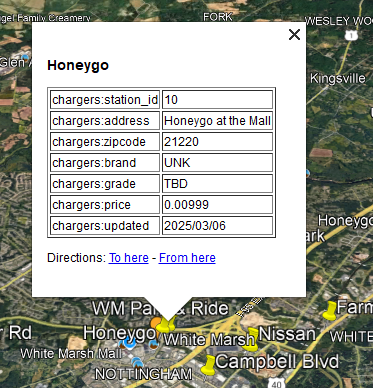
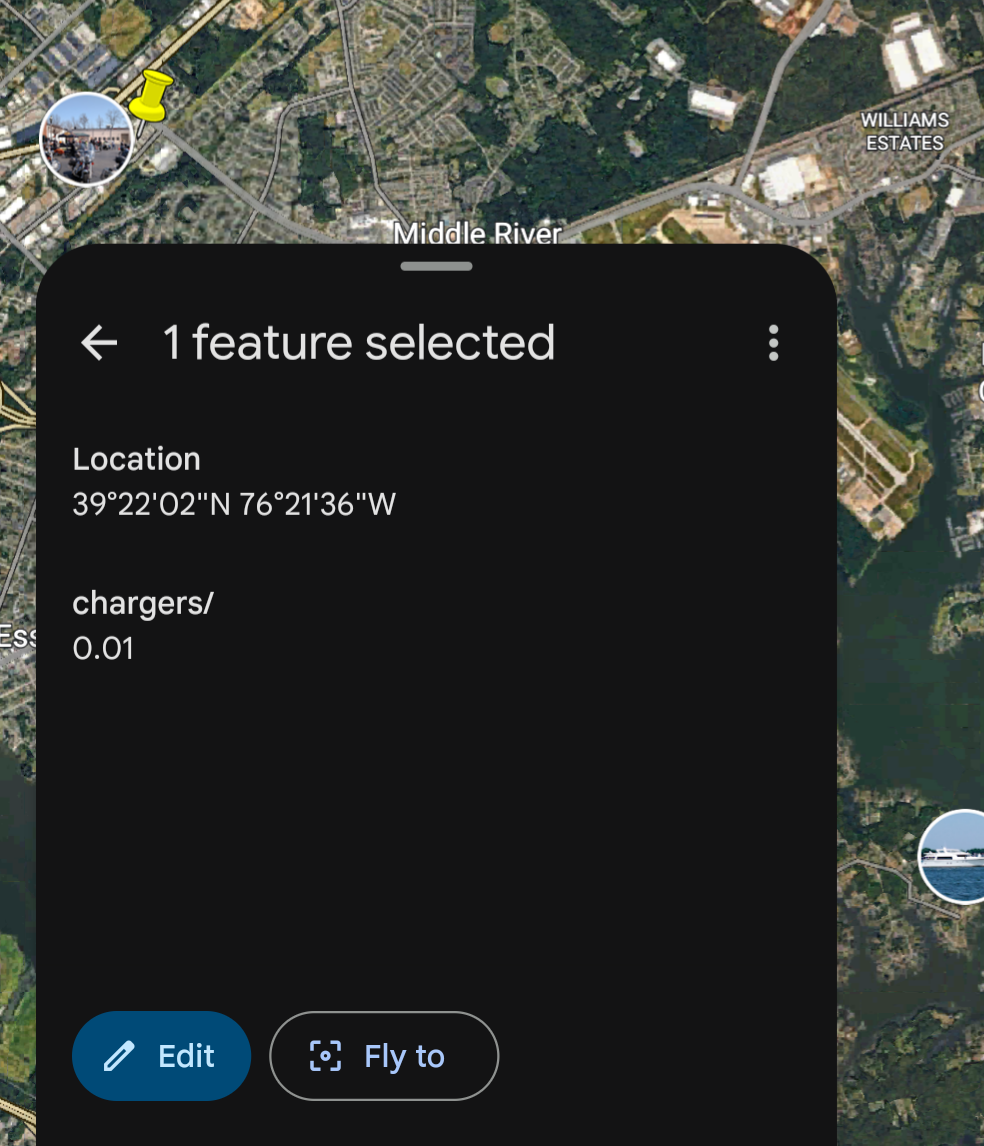
Some data fields peeked through as table-like sheets in Google Earth on a PC, but less structured on a tablet:


Load into OSMand from a network drive, and yes, places show up under my favorites. Added a "name" column to the underlying table fixed the "noname" issue.

Using the OSMand app as a driving map is slightly different than the car map or the Google map. The colors and details are clearer. Startup is more complex, but does work.


Oddities:

  1. Route going through driveways
  2. Non-connected road shows as "take the left fork"
  3. Stream flow direction


The above stream shows 2 directions, as if at the top of a hill, or mound (blue arrows on blue dashed line).

Next question(s)

Use OSM data format instead of KML.

Is location data still going off-device? Will this option change that (limit or redirect)? Seems a lot of on-device processing based on battery drain (or charge slipperiness) and heat.


Wednesday, December 25, 2024

Not the Top Ten Bengies List You're Looking For


The top ten list is traditional, though not guaranteed, as I learned this year. In prior years there were plenty of shows to see so the picking of the top 10 was challenging. I would know which movies I enjoyed and the others. 2024, though, was a challenge to find 10 movies we saw at the Drive-In. 

The list that follows is basically in chronological order, running from March to December,  practically 10 full months. We skipped the dusk-to-dawn shows, or we could have added another 8 or so to the list.


MARCH
Bob Marley One Love


JUNE
INVASION OF the body SNATCHERS. 


INVASION OF THE BODY SNATCHERS (1956)
THE MAN WHO KNEW TOO MUCH


Scooby-Doo Doo and the BARCS


JULY
LION KING 1994
Inside Out 2


SEPTEMBER
Scout Drive In Camp In


BEETLEJUICE BEETLEJUICE
LITTLE SHOP of HORRORS


DECEMBER
Wicked
RED one


In retrospect, One Love was a standout; Red One was better than anticipated, and Little Shop of Horrors survived the test of time. I saw BEETLEJUICE twice, almost 3 times., but missed the original when it ran. See you next year!


Sunday, November 3, 2024

Third and inches

 The football expression is fourth and inches, so this is not a sport tale. Making a loom required 3 teeth per inch to get 19 across a 7 inch span conforming to the available loops. Imperial scale rules don't help, and rather than get out the metric equivalent I drew a quick sketch in LibreOffice then exported to PNG and PDF.

ODG:

And the works-in-progress at camp:


4-sided loom:
Hammering teeth


Teeth on edge


Two sided loom:


The finish line.


Lining up for pre-drilling in clamp. 

Saturday, September 28, 2024

Flipping Zabbix from NetBSD to FreeBSD

 I wanted to upgrade my Zabbix server running on a NetBSD amd64 host and at almost the same time install NetBSD on an NVME card instead of SSD. The mainboard has no graphics, so I played hit-or-miss with cheap-ish cards, getting NetBSD 9 to run but then not, and using FreeBSD under low-res VGA mode. Anyway, to avoid missing data in case the reinstall had surprises I decided to clone the running Zabbix system to a FreeBSD host on a recycled laptop.

NetBSD pkgsrc has Zabbix 6.0, which I'm running, with 6.4 in the work-in-progress prep area, that I have tested but not deployed. FreeBSD has 6.4 in ports, with the modules I've used so the copy would also test the auto-upgrade.

Export and import with PostgreSQL was quick and tidy once I set up the target with an empty database and the necessary glue. The export file was just over 1GB, and imported with no (visible) errors. Starting up the 6.4 server triggered upgrade steps, also showing no noticeable gaffes.

 75396:20240925:142052.283 hosts_name_upper_update trigger for table "hosts" already exists, skipping patch of adding "name_upper" column to "hosts" table


 75396:20240925:142052.877 completed 99% of database upgrade

 75396:20240925:142052.890 completed 100% of database upgrade

 75396:20240925:142052.891 database upgrade fully completed

 75406:20240925:142053.025 starting HA manager

 75406:20240925:142053.056 HA manager started in active mode

Then a bunch of agent connection errors since I was going to configure them after rather than before. Next, install of the front end pieces, and http server, and the PHP bits and pieces to access the console. Happily no unsurmountable hurdles, made easier by having a running system to compare against.

IMAGE 1


Yay, history moved over intact. The dashboard shown was defined to show NetBSD Rasberry Pi wi-fi and that definition also survived the transfer.

IMAGE 2


The down-time, which wasn't optimized as I was not in a hurry. A few hours max. 

IMAGE 3


Because this was a new server, the out-of-the box poller configuration needed a little tweaking, handled over the shakedown phase as agent loads increased.

IMAGE 4


The first unexpected result was having empty Zabbix Server dashboard panels. There should be charts on each of those sub-frames, and also a log of messages near the top.

IMAGE 5

The prior widget definitions had pointed to "Zabbix Server" or a specific hostname. A definition distinction I didn't fathom until forced to repair the above. Doing a web search for terms "zabbix", "server" and "dashboard" was a time-waster given their generality.


The other built-in dashboard revealed the source hostname instead of the target. I scratched my head, read the docs, and left un-illuminated. I forced a fix by updating the various panels to point to the new server, knowing that the next move will trap me the same way.

IMAGE 6


Once I have set up a valid "Zabbix Server" target I can go back to the red loading zone and re-patch.

IMAGE 7

Once the gap was ID'd I set up a couple then completed the remaining sub-panels.


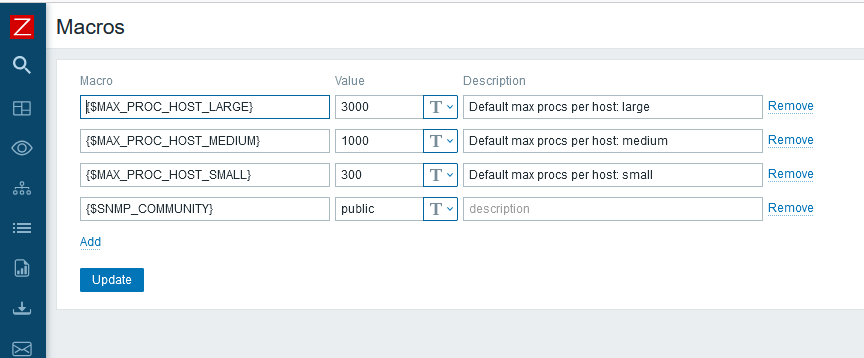
Initially, a valid working alert came out, leading to a side-bar investigation of kernel process limits.

IMAGE 8


Zabbix predefines macros that appear tilted to modern system eyes.

IMAGE 9


Colors and numbers and pop-ups oh my! The next question is which NVME board for NetBSD 10?


Monday, July 29, 2024

Zabbix Front End Realignment After Downtime

Typical summer thunderstorms cause occasional power grid outages, some short, some long. With a battery backup a blip can have minimal repercussions, longer down times are opportunities to move hardware around, rewire, etc. A recent gap of several hours revealed one of my in-house Zabbix front-ends unusable. Probably self-inflicted by updating packages somewhere, and not having the database, server and front end web pieces all on one image.

I tried a few things, and among other errors, was told PostgreSQL was unsupported.

Configuration file error DB type "POSTGRESQL" is not supported by current setup.

A different fix path led to "almost" but no banana on the Pi, trying to set up 6.0 and 6.4 frontends on the same FreeBSD Pi.

The Zabbix database version does not match current requirements. Your database version: 6000000. Required version: 6040000. Please contact your system administrator.

Sigh. I tried to repair this on a NetBSD system, failed to launch there, then tried a full install on a Raspberry Pi OS, which stumbled around the Apache-PHP-SQL-HTTP part, and ended up promoting a Raspberry Pi 3 running NetBSD with a clean slate off front end whirly-gigs.

(0)

"The Zabbix database version does not match current requirements. Your database version: 6000000. Required version: 6040000. Please contact your system administrator."

(1)

 PHP Fatal error:  Uncaught Error: Call to undefined function mb_check_encoding() in /usr/pkg/share/httpd/htdocs/zabbix/include/validate.inc.php:234

\n

Stack trace:\n#0 /usr/pkg/share/httpd/htdocs/zabbix/include/validate.inc.php(356): check_type()\n#1 /usr/pkg/share/httpd/htdocs/zabbix/include/validate.inc.php(438): check_field()\n#2 /usr/pkg/share/httpd/htdocs/zabbix/include/validate.inc.php(462): check_fields_raw()\n#3 /usr/pkg/share/httpd/htdocs/zabbix/setup.php(72): check_fields()\n

#4 {main}\n  thrown in /usr/pkg/share/httpd/htdocs/zabbix/include/validate.inc.php on line 234, referer: http://am4.home/zabbix/setup.php


(2) 

$ pkgin in ap24-php83

  ap24-php83-8.3.8nb11 gimp-2.10.38nb1 ncurses-6.5 p5-DBD-SQLite-1.74nb1 p5-DBI-1.643nb5 pdal-lib-2.7.1nb4 py311-httpx-0.27.0

  php-8.2.20

  php82-bcmath-8.2.20 php82-gd-8.2.20nb8 php82-gettext-8.2.20 php82-ldap-8.2.20nb2 php82-mbstring-8.2.20 php82-sockets-8.2.20 php82-sysvsem-8.2.20

(yeah, wrong PHP version 8.2 != 8.3)
ERROR: Package accepts PHP8.2, but a different version is installed


(3)

 apt install zabbix-server-mysql zabbix-frontend-php zabbix-apache-conf zabbix-sql-scripts zabbix-agent

wrong

 apt install zabbix-server-pgsql zabbix-frontend-php zabbix-apache-conf zabbix-sql-scripts zabbix-agent

right?

After apache-2.4.3, --enable-mpms-shared='event worker prefork' is
passed to configure script, then these multi-process model is built
and you can select the model in configuraton file.

and


The mod_cgi.so module conflicts with non-prefork multi-process model,
and mod_cgi.so module is not built anymore.
You can use mod_cgid.so module instead.

yeah, fix that too.

(4)

Fourth times a charm

 pkgin in zabbix-frontend-postgresql

calculating dependencies...done.

1 package to refresh: [...]

12 packages to install:

  gd-2.3.3nb13 libimagequant-4.3.1 oniguruma-6.9.9 ... php82-ldap-8.2.20nb2 ...

  php82-mbstring-8.2.20 ... zabbix-frontend-postgresql-6.0.24nb1


Fix these once you get past the first checks:
    Minimum required size of PHP post is 16M (configuration option "post_max_size").
    Minimum required limit on execution time of PHP scripts is 300 (configuration option "max_execution_time").
    Minimum required limit on input parse time for PHP scripts is 300 (configuration option "max_input_time").
    At least one of MySQL, PostgreSQL or Oracle should be supported.

php82-pgsql-8.2.20: copying /usr/pkg/share/examples/php/pgsql.ini to /usr/pkg/etc/php.d/pgsql.ini

Save it as "/usr/pkg/share/httpd/htdocs/zabbix/conf/zabbix.conf.php"


/etc/rc.d/apache restart

References:


Smoke test:

http[s]://example.com/zabbix/zabbix.php?action=dashboard.view


Final checks: windshields up!

The gap on all charts was the local grid down; other holes are locally induced. Looking at you FIOS.


Monday, June 17, 2024

Wifi Coverage on BSD Raspberry Flavour

Now that NetBSD 10 is released (for a few weeks) I have been reviewing tests I ran, benchmarking and other studies, trying to fix the dangling problem reports I opened, and mainly using the OS for as many daily tasks as feasible. In that context are wireless network connections to the somewhat closed but open Raspberry Pi network drivers, as replicated in the BSD space instead factory-floor Linux.

When I checked the FreeBSD page, wifi shows as "unsupported", listing some chip or board IDs that must mean something ('brcmfmac43455-sdio").

Based on : https://wiki.freebsd.org/arm/Raspberry%20Pi we see:WiFi/Unsupported on the Pi series, including the 4, which would be the best available, until the 5 has been encompassed. Understood that wiki page documentation may lag development, and I haven't dug to far to see what is newer than the doc. To research one of the above bugs (overflow arithmetic) I installed a recent FreeBSD image on a Pi0W, only to find it crash hard with "unresolved symbols" or other architecture clashes as soon as I tried any command. So my hands-on with Pi and FreeBSD is limited to Pi3 and Pi4 models at hand. None of them show "bw" interfaces.

NetBSD can see the "bw" interface on the Pi4, and I definitely had that working during the long beta campaign. Except now I can't get it to work on the 10.0 release for reasons yet to be found. It would show up in ifconfig output:


bwfm0: flags=0x8c43<UP,BROADCAST,RUNNING,OACTIVE,SIMPLEX,MULTICAST> mtu 1500
        ssid "" nwkey *****
        powersave off
        address: __:...
        media: IEEE802.11 autoselect (DS1 mode 11g)
        status: no network
        inet6 ...%bwfm0/64 flags 0x8<DETACHED> scopeid 0x3

On the Pi3, NetBSD works great:

bwfm0: flags=0x8843<UP,BROADCAST,RUNNING,SIMPLEX,MULTICAST> mtu 1500
        ssid wIfI nwkey *****
        powersave off
        bssid ... chan 11
        address: __:...
        media: IEEE802.11 autoselect (HT mode 11ng)
        status: active
        inet6 ...%bwfm0/64 flags 0 scopeid 0x2
        inet .../24 broadcast ... flags 0

I can stream audio, at least locally. Video on the lower end systems is problematic.

On the Pi0 (W and 2W) I have mixed results with NetBSD. The Pi0W is working on wireless, but I've lost whatever mojo I had for the 2W before the beta ended.

bwfm0: flags=0x8843<UP,BROADCAST,RUNNING,SIMPLEX,MULTICAST> mtu 1500
        ssid wIfI nwkey *****
        powersave off
        bssid __:... chan 4
        address: __:...
        media: IEEE802.11 autoselect (HT mode 11ng)
        status: active
        inet6 ...%bwfm0/64 flags 0 scopeid 0x3
        inet .../24 broadcast ... flags 0


A recent list thread shared poor performance on the NetBSD wireless drivers, as presented on the Pi platform. I have not run stress or volume tests beyond listening to KALX Berkeley streaming radio.
Earlier beta images (or 9x) would block on audio processing at times, which I have not experienced on the 10 release. Some audio or video formats don't work with VLC as built, which is another kettle of babel fish.

Beta test view (3A/3B/4, no 0):

Post-Beta (and a little pre):

Seeing any color indicates *some* traffic on the wireless interface. The scale shows some large and some small throughputs, as if a trickle by mistake.

Chart, like the FreeBSD feature supported on Pi linked above:

Chart of Pi bake-off