Friday, February 18, 2022

Building out an intra-home data aggregator

 After I put a couple Raspberry Pi environment monitoring devices into my shopping cart and pile of unconnected devices, I looked around for a central data aggregator that would be a step up from individual cron jobs and RRD repositories. The open source platform Zabbix looked interesting, as it was noted in online posts about pulling data from remote devices. Around the end of January, as the weather pushed me to inside projects, I started figuring out the moving parts.

My first thought was I'd like to run the database and system on NetBSD, but after looking at the state of Zabbix server and agent version availability, I found FreeBSD has an advantage in having better coverage. I thought I could put the server processes on one node and the database itself on a different node, since I already had working PostgreSQL systems. Trying to activate NetBSD packages on the arm Pi systems ended up with a battle between mysql and mariadb, meaning the package wouldn't use postgreSQL as I wanted.

The package version of Zabbix for FreeBSD, is also pre-configured for MySQL, despite the configuration file indicating that a few tweaks could alter the database connection. I tried several permutations of ports and other values before coming to the realization that if I wanted a different database I'd need to build the application from sources. But running both a binary package repository and one from source on one node can be problematic, leading me to start from scratch with a fresh FreeBSD system.

After a few feints, I was able to get FreeBSD 13 set up on an SSD drive connected through USB to a Pi 4. Turns out, that was the easy part. I tried to find the least common denominator of underlying libraries to minimize the time spent watching auto-configure and make run through huge software stacks. I was expecting there might be several days worth of churn ahead but was pleasantly surprised as I watched the component parts get laid down.

Somewhere around Groundhog Day, I had the Zabbix server working, along with at least one other agent, and proceeded to deploy the front end. Fortunately, I had a working httpd server on another FreeBSD on Pi, so adding the php code was a minor hassle.

In a prior life, I worked with enterprise scale software/hardware/application monitoring software, from PMC Patrol/Enterprise Manager, to HP OpenView, to Computer Associates tools, and finally, to the now-tainted SolarWinds. Much of the design of Zabbix, as well as the agent technologies, looked pretty familiar. After the web front end was running, it looked very clean and modern, with menus and paths that looked straightforward.

[

 43331:20220204:013743.375 cannot send list of active checks to "x.x.x.x": host [Name] not found

]

(04 February 2022)

Alas, not everything was as simple as it appeared. The learning curve was not too steep, though it involved translating a few terms into understandable chunks. Like "not supported" as a state for a monitoring element. On the surface, that would mean to me that the combination was just not going to work, as opposed to a condition where an element went offline or was unreachable for some reason. There were more subtleties under the surface as I'd learn by trial and error.

The first hurdle was the nomenclature of server and agent, where you could put a label on something that matched a DNS entry, or didn't match. I knew that once I started making configuration choices (like short name or long name), I'd probably be stuck with that decision once the beast took on a life of its own.

[

 85706:20220205:173436.157 resuming Zabbix agent checks on host "sample": connection restored

]

(05 February 2022)


Finally, with database, server, agents, and the web front-end connected and working properly, it was time to examine the contents and see what hath been wrought.


Total disk space on "/" and Free disk space on "/" are shown on the graphic above, with 115 and 85 GB, roughly, or 100% and 74%. But wait, that red pie slice doesn't occupy 100% of a circle, it's only 26% (more or less). A graphic that "works" but is wrong.


This is good. Gold, even.


(07 February 2022)

Here, I noticed a large network stream to/from one device, which was apparently running an audio program that no one was listening to. It happens. So, the Zabbix charts revealed useful information within a couple days.

Back to the Raspberry Pi tuning tweaks. I found several examples of adding monitoring to Zabbix, and started with 2 of them. One has a bash script with over a dozen metrics included, and the other has 4 metrics contained within one add-on.

I learned the basic add-on set includes an XML or other defined method of setting up configuration, and a set of commands, usually shell scripts (but could be other languages if wrapped correctly).


Derived metrics

Obviously, with chips made these days, temperatures would be reported in Celsius not Fahrenheit, but as an American, I'm more conversant with the latter. So it would make sense to calculate a derived value inside the monitoring suite, as good practice for learning how to build and deploy future readings from wherever (home thermostat/outside weather/noise levels). Let's see: nine-fifths pus thirty-two, in words, works out to this in configure-speak:

(32+((9/5)*last(//raspberrypi.sh[temperature])))*1000

Wait, where did the 1000 come from?
Er, turns out the Raspberry Pi user interface reports temperatures with up to 3 digits, like this:

 $ cat /sys/class/thermal/thermal_zone0/temp
41856


$ vcgencmd measure_temp

temp=41.9'C

This measurement is 41 degrees, plus a fraction. Depending on how the data are pulled, the decimal points might get shifted around.

This chart shows the derived "Betriebstemperatur" in Fahrenheit. Errors in getting the formula correct caused the first several numbers to be incorrect, rather than simply missing. I expect the impact of this will diminish over time. I couldn't find a quick way to purge old data (yet).


(08 February 2022)

ZBX_NOTSUPPORTED: Invalid item key format.
ZBX_NOTSUPPORTED: Unsupported item key.

In checking out one metric, I noticed the above 2 message look similar, particularly the identical all-upper case intro, but invalid is not unsupported. The former looks more fixable on the surface; looking for the root cause would ascertain for sure

Now it's the 11th, after a week or so of building, deploying, configuring, troubleshooting, tuning, and rebuilding. I think this was worth it just to show the capability of a $100 Raspberry Pi + SSD combo with FreeBSD.

Issues and Fixes


[3.] Add zabbix user to video group
   $ sudo usermod -a -G video zabbix

This is necessary based on the default command permissions. Adjust based on user prefences.


In earlier Raspberry Pi versions, apparently the command to interrogate internal counters and more (vcgencmd) was installed under the directory /opt/vc/bin/. The "opt" directory is one of those UNIX relics like "/usr/local/" where custom software might be installed outside the base release. But, as happens, that location became obsolete when the newer versions but vcgencmd into /usr/bin which would be in a typical PATH search.  With the nature of some google searches leading to older code based on hit counts, you might be trying to run something that isn't there, with the resulting obscure side effects.

[
 85684:20220205:013853.811 item "pi.net:rpi.cpuVoltage" became not supported: Value of type "string" is not suitable for value type "Numeric (float)". Value "sh: 1: /opt/vc/bin/vcgencmd: not found"
]

So, I saw 2 obvious ways to fix this. First, alter the script to the correct path; second, put a link into the old location pointing to the new location. I chose the latter as having fewer steps, though purists may prefer to alter the source.

[
pi@pi:/opt/vc/bin $ sudo ln -s /usr/bin/vcgencmd vcgencmd

More  issues and fixes


[
zabbix_agentd [7518]: cannot create locks: cannot create semaphore set: [28] No
                        space left on device
]

This bug stumped me for a little while. On another node that was already running postgreSQL before adding a Zabbix agent, I was getting errors showing "no space left on device", despite having a nearly empty 500GB SSD. If I stopped the database, the agent would launch. But both would not run at the same time (on NetBSD 9.x).

Locks and semaphores are another obscure UNIX facility, going back to the early AT&T System V releases. I fortunately was experiences with configuring shared memory for large Oracle database deployments, so even though that was decades ago, the seeds are still there. Looking at the error message, it's unclear which memory parameter might be limiting, as several settings have very similar names mentioning semaphores and shared memory.

SHMMNI  Maximum number of shared memory segments system-wide 
SEMMNI  Maximum number of semaphore identifiers (i.e., sets)  
SEMMNS  Maximum number of semaphores system-wide  

The ipcs command will show the current state.

$ ipcs -a
IPC status from <running system> as of Mon Feb  7 02:04:06 2022


And the sysctl command will show kernel and other settings on BSD.

Before:

kern.ipc.semmni = 10
kern.ipc.semmns = 60
kern.ipc.semmnu = 30

After:

kern.ipc.semmni = 100
kern.ipc.semmns = 600
kern.ipc.semmnu = 300


I could have tried to optimize these settings one by one using small increments, but knowing that these default values date back decades to much less capable systems, I increased each of them by a factor of 10. I speculated that any wasted resources would be minimal, and was rewarded by both processes starting and running without errors.

ALSO: swap


pid 92246 (c++), jid 0, uid 0, was killed: out of swap space

I had tried to build an X Windows program after getting Zabbix working, but the compile failed with obscure "internal errors". Later I found the more succinct root cause of the failure: out of swap space. Wow, also an old timey issue on virtual memory systems from the 1980s like DEC VMS.

On a Pi Zero 2 W:

$ swapon --show
NAME      TYPE SIZE  USED PRIO
/var/swap file 100M 97.9M   -2

then, later:

$ sudo swapon
NAME           TYPE  SIZE USED PRIO
/var/swapfile2 file 1024M   0B   -2

For FreeBSD/NetBSD, swap metrics are tricky with Zabbix. I used the FreeBSD template to connect to NetBSD nodes as Zabbix only includes FreeBSD and OpenBSD (pity). The FreeBSD nodes reported swap issues different than the Linux conditions noted above, while the NetBSD swap metrics failed most likely due to syntax Babel amongst the BSD descendants. Though not directly Zabbix related, I wanted to address the out-of-the-box swap configuration, at least to have a learning experience, with the added risk factor of wiping an entire installation with an errant format command.

At first, it didn't appear that FreeBSD supported swap files but only devices. And as I didn't want to go back and try to repartition a running system I was leaning toward adding a USB memory dongle for swap when I dug deeper into the manual pages. My initial surmise was incorrect, I could build a swap file (if I wanted) in a manner very similar to the Linux steps, which makes future build errors less likely.
Initially, no swap on a FreeBSD Pi build:

[]# dd if=/dev/zero of=/var/swapfile2 bs=1024k count=16384
[]# chmod 0600 /var/swapfile2


/etc/rc.conf: 26 lines, 511 characters
swapfile="/var/swapfile2"   # Set to name of swapfile if desired.

[]# mdconfig -a -t vnode -f /var/swapfile2 -u 0 && swapon /dev/md0
[]#

Swap: 16G Total, 16G Free

warning: total configured swap (4194304 pages) exceeds maximum recommended amount (3928456 pages).
warning: increase kern.maxswzone or reduce amount of swap.
[]$

OK, I overdid it, but now I have the classic swap at > 2 times physical memory, ha!


The top command reports:

Swap: 16G Total, 11M Used, 16G Free

and then, with a big compile running:

Swap: 16G Total, 4770M Used, 11G Free, 29% Inuse, 18M In, 2124K Out


And: CPU Throttling


Initially, this metric failed with an error saying something obscure, then disabling later readings with the "not supported" declaration. Hitting the link changes the item to disabled, hitting it again enables the readings to be tried again. Of course, if the underlying glitch isn't fixed the result is again not supported/out of service on the next cycle.

Problem: find(/Raspberry Pi/rpi.cpuThrottled,,"iregexp","\\b(0x0)\\b")=0
Recovery: find(/Raspberry Pi/rpi.cpuThrottled,,"iregexp","\\b(0x0)\\b")=1


Here, the root cause of this issue was self-inflicted, somehow, in pulling down the configuration and transferring into the Zabbix server some kind of code page shift occurred, adding bogus text into the trigger definitions. Right out of the box, this failed with little fanfare. I researched the supplied functions and suspected the fault lie within.

Once I found the configuration details and could save them as above, I edited the parameters to more cogently reflect the expected function output. The output is normally "0x0", meaning zero, and higher hex values have specific meanings. Since the first pattern match always failed, the CPU always appeared throttled incorrectly.

New values:


Disk I/O


min(/pi/vfs.dev.read.await[mmcblk0],15m) > {$VFS.DEV.READ.AWAIT.WARN:"mmcblk0"} or
min(/pi/vfs.dev.write.await[mmcblk0],15m) > {$VFS.DEV.WRITE.AWAIT.WARN:"mmcblk0"}

Ending up setting the write time to 50ms to avoid pesky un-addressable errors; a future workaround might be to set up storage device classes so that SSD and SD cards are treated individually in terms of known capabilities.

"Linux block devices by Zabbix agent" is the template that contains macros where the above thresholds can be edited.


SNMP

Gah. I tried it out and Zabbix can go down that net walk with the best. I didn't find anything spectacular or dismal to report on, so this section will be brief.


These temperature values are reported without decimals, so the graph jumps in digital hops rather than spreading around in an analog sweeps. I wasn't that interested in finding out why system temperature was reported and not CPU. There were other temperature values that I'd investigate further once more trends age in place as it were.


Agent "2"


./configure --enable-agent2

Go errors

go: downloading github.com/mattn/go-sqlite3 v1.14.8
package zabbix.com/cmd/zabbix_agent2
        imports zabbix.com/plugins: build constraints exclude all Go files in /u
sr/local/src/zabbix/zabbix-5.4.9/src/go/plugins
*** Error code 1

Stop.
make[3]: stopped in /usr/local/src/zabbix/zabbix-5.4.9/src/go
*** Error code 1


Works on Windows 32/64.


Last thoughts

After letting things settle for a few days, I must say I admire the completeness of the installation, the vision, and the big things that cover the small mistakes. Without reading too many manuals, I was able to set up a variety of monitoring collections that help more than they hinder. The controls to display charts are intuitive, quick, and quite legible. I even found that zooming in on a time segment was as easy as highlighting a period with the pointer (though this action didn't work on an Android device for me).

This chart includes values from 2 sensors on one Raspberry Pi hats, which report in degrees Centigrade. Given the sensors are close enough to be affected by heat from the Pi itself, I added a calculation to return a value as close to ambient as I could manage using a reference thermometer and readings over a period of time. Since the sensor base readings differ, no wonder the results also don't coincide. But they are within one or two degrees (Fahrenheit) and produce useful information. ("Hey, close the door, do you live in a barn?")


Monday, January 10, 2022

NetBSD on a Raspberry Pi 4, Current 2022

After more than one flub, I've gotten through the hoops to make NetBSD run on a Raspberry Pi 4. I had already gotten 2 different working versions on a Pi 3, but the 4 was giving me fits.

All credit goes to the very clear directions from Astro:

https://astr0baby.wordpress.com/2021/05/23/netbsd-current-on-rpi4-model-b-8gb-ram/

Those instructions are reasonably recent, 6 months or so, and the version I pulled down is NetBSD-current from just after New Year's 2022.

Pictures are at the end, as I've given up trying to make google-blogspot do the thing right.

UEFI Boot

I went through several passes of getting UEFI boot-code onto a micro-SD card that would then allow NetBSD install and reboot onto something other than the limited lifetime SD chip a few months back. OK, it was 2020, but probably also later.

Re: NetBSD/aarch64 on 8 GB Raspberry Pi 4B?

FreeBSD/ARM on the Raspberry Pi familyPi

This time for sure, Rocky.

=

user@pi:~ $ sudo mkfs.vfat /dev/sdb1 -n UEFI

mkfs.fat 4.2 (2021-01-31)

Install Source

user@pi:~/iso $ sudo dd if=NetBSD-9.99.93-evbarm-aarch64.iso  of=/dev/sda

Worked fine. In the past I've used the die-hard method of burning a CD-RW (or DVD-RW) from the ISO image, and finally evolved to using a USB stick. Alas, when I shopped for SD boot chips, I could not find anything smaller than 32GB, and that was the exact size of the source USB stick I picked out for this attempt. As mentioned in the instructions referenced above, different size devices make the steps easier. Otherwise, you'll do what I did and try to write the OS onto the install device.

I had a 128GB USB micro-stick (about as big as my thumbnail) ready for NetBSD but somewhere along the way that device had been partitioned or initialized in a way the install could not detect it. So, in a shortcut to avoid another shopping trip (or delay for shipping) I connected a 500GB SSD. The adapter is nice in that no extra power is needed, and the Pi supplies enough.

But, the Pi does not supply enough power for an SSD and a spinning external USB-powered CD drive; I saw overcurrent messages on the install startup. Also, don't try to plug in the CD drive after the install has started. It might work, but it might also generate spurious on-screen messages, fouling up the normal curses menu.


-rw-r--r--  1 me   users    11500 Jan  2 23:55 dmesg-netbsd-1.txt

[     1.000000] Copyright (c) 1996, 1997, 1998, 1999, 2000, 2001, 2002, 2003, 2004, 2005,
[     1.000000]     2006, 2007, 2008, 2009, 2010, 2011, 2012, 2013, 2014, 2015, 2016, 2017,
[     1.000000]     2018, 2019, 2020, 2021, 2022
[     1.000000]     The NetBSD Foundation, Inc.  All rights reserved.
[     1.000000] Copyright (c) 1982, 1986, 1989, 1991, 1993
[     1.000000]     The Regents of the University of California.  All rights reserved.

[     1.000000] NetBSD 9.99.93 (GENERIC64) #0: Sun Jan  2 23:46:21 UTC 2022
[     1.000000]         mkrepro@mkrepro.NetBSD.org:/usr/src/sys/arch/evbarm/compile/GENERIC64
[     1.000000] total memory = 2967 MB
[     1.000000] avail memory = 2863 MB
[     1.000000] entropy: ready
[     1.000000] timecounter: Timecounters tick every 10.000 msec
[     1.000000] Kernelized RAIDframe activated
[     1.000000] armfdt0 (root)
[     1.000000] armfdt0: using EFI runtime services for RTC
[     1.000000] simplebus0 at armfdt0: Raspberry Pi Foundation Raspberry Pi 4 Model B
...
[     1.000000] cpu1 at acpi0: Arm Cortex-A72 r0p3 (v8-A), id 0x1
...
[     1.000003] bcmmbox0 at acpi0 (RPIQ, BCM2849-0): mem 0xfe00b880-0xfe00b8a3 irq 65
[     1.000003] vcmbox0 at bcmmbox0
...
[     1.000003] brgphy0: 10baseT, 10baseT-FDX, 100baseTX, 100baseTX-FDX, 1000baseT, 1000baseT-FDX, auto
...


Tire Kicking

As the doc page mentions, X Windows install is broken in some way, and the workaround of un-tarring the distribution files is clear and unambiguous. 

The bash shell is one of the first packages I install on a new OS, and, surprisingly, this didn't work right, complaining about missing object libraries.

netbsd$ bash
bash: Shared object "libterminfo.so.1" not found

This error points to an evolution of the base OS from a prior release, where code progression may require newer support libraries, even something as anciently proscribed as terminfo. Fortunately, I have NetBSD running on pair of Pi 3s (one 9.2 and one -current) and pulled the missing libraries onto the newer system. I'm sure the technically correct method is to recompile the package from source rather than using pre-rolls. But so far, no bash failures.

Features

The usual apps that can be problematic on a new OS or platform include, or me, Firefox, LibreOffice, and VLC. The first 2 work great on the Pi with NetBSD, and the only fault is I haven't gotten audio to work, either through the HDMI or the audio jack (or even with a USB dongle, oddly, since that works on the Pi3).

Kicking off database interfaces through the OpenOffice/LibreOffice/StarOffice suite worked after a bit of wrestling with PostGreSQL knobs and a Java run-time library path. The screens are quite snappy.

Most application packages I tried to throw on the system worked via the pkg interfaces, after putting in a minimal bootstrap of the pkgsrc stack. 

Performance

I tried a few classic/legacy benchmark programs, after observing the basic capabilities of complex applications such as LibreOffice, browsing, and Audacity.

Byte script forked 8 shell scripts (I think I expected 4 because number of cores) but it cold be 32, I'm not sure.

########################################################
Shell Scripts (8 concurrent) -- 4 copies
 
The machine locked up on this test, where another Pi 4 running FreeBSD didn't glitch. I started looking at the Run script, which led to Perl scripts, and many many other dependencies. I like running these for historic reference ("this would take 4 hours on a Sparc 2"). And it confirms the look and feel of the interface.  On a second test, I got an error message and the chance to take the xload screenshot while the Pi was running.

Real world tests are kicking off YouTube or just browsing stack exchange for answers to questions at hand:


bash-5.1$ time /usr/pkg/java/openjdk8/bin/java jnt.scimark2.commandline

SciMark 2.0a

Composite Score: 13.172917614747846
FFT (1024): 5.155837817236967
SOR (100x100):   23.99097379633297
Monte Carlo : 2.0763881384178022
Sparse matmult (N=1000, nz=5000): 15.568224761205355
LU (100x100): 19.07316356054613

java.vendor: Oracle Corporation
java.version: 1.8.0_292-internal
os.arch: aarch64
os.name: NetBSD
os.version: 9.99.93

real    0m23.936s
user    0m22.768s
sys     0m0.101s

For comparison, a 6-core AMD amd64 system has much higher values on this ancient ruler [SciMark 2 from NIST].


$ time /usr/pkg/java/openjdk11/bin/java jnt.scimark2.commandline
Composite Score: 2676.381811111611
FFT (1024): 1141.1453612165665
SOR (100x100):   2196.586040880107
Monte Carlo : 1731.8416382934442
Sparse matmult (N=1000, nz=5000): 2580.1573979710483
LU (100x100): 5732.178617196888

I could not find a newer Java run engine higher than 8 for this base, so it isn't an exact test comparison.

Compiling


Some old-school trees didn't build but others dropped and ran with non-critical warnings.

...
cc  -o wermit  ckcmai.o ckclib.o ckutio.o ckufio.o  ckcfns.o ckcfn2.o ckcfn3.o ckuxla.o  ckcpro.o ckucmd.o ckuus2.o ckuus3.o  ckuus4.o ckuus5.o ckuus6.o ckuus7.o  ckuusx.o ckuusy.o ckuusr.o ckucns.o  ckudia.o ckuscr.o ckcnet.o ckusig.o  ckctel.o ckcuni.o ckupty.o ckcftp.o  ckuath.o ck_crp.o ck_ssl.o -lcurses -lcrypt -lm 
ld: ckcmai.o: in function `main':
ckcmai.c:(.text+0x1c6c): warning: warning: reference to compatibility time(); include <time.h> for correct reference
ckcpro.o: in function `wart':
ckcpro.c:(.text+0x8604): relocation truncated to fit: R_AARCH64_LDST64_ABS_LO12_NC against symbol `dest' defined in .bss section in ckcmai.o
ld: ckuusx.c:(.text+0x2548): warning: one possible cause of this error is that the symbol is being referenced in the indicated code as if it had a larger alignment than was declared where it was defined
*** Error code 1
Stop.
make[1]: stopped in /src/kermit
*** Error code 1
make: stopped in /home/jim/src-local/kermit
       88.93 real        81.54 user         5.50 sys

Kermit compiled partway through on FreeBSD on a Pi 4 in 2 minutes 14 seconds, and failed later in the make on the NetBSD Pi 4 in 89 seconds (45 seconds diff). The former still has a micro-SD but the latter benefits from SSD. As the failure was almost at the end, the time comparison is fair to me. If the install moves on, the wermit executable is renamed to be kermit.

/src/smpfbench/smpfbench
bash-5.1$ bin/smpfbench -n 4
smpfbench 0.5.12:
using 4 fork(s) and 10000 * 10000 loops, run each test 7 times
executing float_div: ....... Approx: 1.138 secs, loops/s: 351571878


ld: /tmp//cceUJ8Lh.o: in function `main':
dhry_1.c:(.text+0x2da): warning: warning: reference to compatibility time(); include <time.h> for correct reference


The temperature readings I found on the Pi 3 with earlier NetBSD kernels has doubled (from 1 metric to 2), as seen in the dmesg text above. The last 2 images below show these track pretty closely, maintaining a small delta.

I still like the bash scripts to create and view data via RRDtool, like this:

TEMP_READING=$(/usr/sbin/envstat -d acpitz0|/usr/bin/tail -1|/usr/bin/awk '{print $3}') ### netbsd

The X ScreenSaver app works on most of the bundled hacks, and is a noticeable load which I shut off when running benchmarks. 

I always think I should benchmark the hacks themselves, as sometimes the heat maps show one doing more CPU work than another. One day.

Java running under the project management suite GanttProject started up and ran without a hitch. Can't wait to see this on a large monitor and build out more details than the old monitor I used to get going.

To Do

  • Figure out font paths in VNC (works from an x86 system but not arm64)
  • Unpeel the perl onion surrounding the Byte benchmark and get valid results
  • Try 2 monitors. I guess you need to buy them in pairs now.
  • Locate a functional USB wi-fi dongle (have one on the 3)
  • Open problem reports if it seems fixable and/or important
  • Refactor shell scripts to perl/python
  • find the "Limit RAM to 3 GB" option and disable it.


END CRAWL


Figure 0: boot screen


Figure 1 and 2: photos of the Pi 4, external SSD and X on-screen, plus a USB receptacle.

Figure 1

Figure 2


Figures 3 and 4 are screenshots from the Pi4

Figure 3 via xpaint


Figure 4 xload

Figure 5: Ganttproject 2.x


 Figure 6 and 7 are RRD views of CPU metrics (vcmbox0 and acpitz0).

6
7


Friday, December 31, 2021

2021 The Longest Bengies Season Ever, Part 2

Follow-up to Part 1, which covered the winter months from January through March 2021, where the Bengies Theatre season opened months earlier than normal, leading to the longest season. In fact, probably the longest possible season given the drive-in would not operate on a New Years or Christmas week in the beginning or end of the year. How many weeks did they operate? Close to 50, I'd have to think.


April - December


  1. Free Guy
  2. Shang Chi and the Legend of the Ten Rings
  3. Suicide Squad 2021
  4. Ghostbusters Afterlife
  5. Eternals
  6. Respect
  7. No Time To Die
  8. Ron's Gone Wrong
  9. Clifford The Big Red Dog
  10. Space Jam: A New Legacy / The Mask (1994)

That's my top eleven for half (or 3/4) of 2021, in a fairly representative based on my recollections of the film slightly biased by weather, food intake, and crowdedness. 

The top two were shown at the Scout camp-in, our tenth so far. It was great to see first-run features, and other than The Mask, all on this list are new releases (whether planned for 2020 I am unsure). Of the two, I favored Free Guy for the special features and plot twists more than acting or directing.

Suicide Squad had the most imaginative scope even more than a James Bond or the 10 Rings, even. Brutal, and only cathartic if you have the stomach. For drive-in fare: perfect.

The last film we saw in 2021 was the newest Ghostbusters. As a late in life sequel, it had an uphill climb to be digestible, and with the least amount of the old crew as possible, a good tale. I was particularly moved by the many homages and nods to Harold Ramis, even with the modern studio bent to put virtual words and motions into the late population.

Eternals; spouse loved it. Will watch again on blu-ray.

The story of Respect was more hard-hitting than a run-of-the-mill biopic, and I'd have enjoyed it more in an indoor setting for some reason. Maybe not a big-screen epic, a big heart reveal.


Bond. 007. Still going. Great escapism. Expected chases and explosions, not disappointed. Daniel Craig is aging slowly, but I think he's close to done with the franchise.

I would not have included Ron's Gone Wrong if it didn't have that yippie streak of revolt and independence that so reminds me of the 60s. A kids picture with an adult moral. On the surface, about social media and technology, but underneath human social challenges exemplified by loneliness and exclusion.

Clifford, likewise, was adorable enough without major sweetness to quality for inclusion. I needed to get to 10 on the list only for my internal goal. Stretching the year into 2 separate "Top 10" lists required viewing more than (or at least as many as) twenty films through. Leaving 10 minutes into the start doesn't qualify either.

Space Jam hits at the buzzer.

Misses

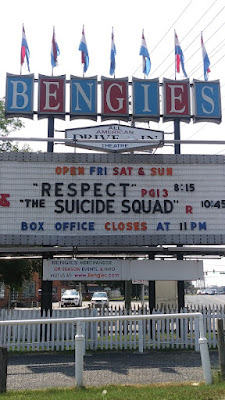
Dune shows up on the marquee photo below in mid-November and I flinched and didn't go then. The bill wasn't held over to the next week, and I regret my call. Sigh. Good or bad, would have stayed through the end.

We saw trailers for Spider-Man which didn't show at the end of the year. Holiday classics took hold, which makes sense given there would be fewer than 100 customers by my guess. 

No images from April through June even though the Bengies didn't close more than a handful of scheduled dates through the whole year. I have the pictures, we just didn't go to those for whatever reason (don't like horror, too much animation, and yes, hard rain).


07-Jul-2021


10-Aug-2021


15-Sep-2021


12-Oct-2021


02-Nov-2021


18-Nov-2021


01-Dec-2021


Thursday, December 30, 2021

2021 The Longest Bengies Season Ever, Part 1


In part 1, I want to share what attending the Bengies Drive-In during the winter was like, typifying the post-pandemic can-do attitude of the management and staff. At the end of the December 2020, the Bengies was one of the few attractions for entertainment, indoors theaters being dark for months. We attended end-of-year shows, I wrote a year-end review, and thought the drive-in experience was stopping until spring. But the show must go on.


Winter Shows

As there was again minimal snow, the theater could book showings. But, there was minimal new content and oldies were getting stale. The Bengies worked with another group to schedule films that would have been shown at The Charles if their house was open.

January 4


The first double bill in 2021 went from sublime to ridiculous; we stayed through intermission and into a few minutes of Borat 2 before heading out.

One Night In Miami we'd watched as a play at Baltimore's Center Stage; the movie version came out broader and to me less intense.


January 24th I messaged that there would be two Fellini Films [La Strada and Juliet Of The Spirits. New restorations--in Italian with--English subtitles. Alas, incorrect information.


January 24

"Eight cars on the field so far"

"And the evening ends early since the films have no subtitles."

A Fellini film is often surreal; seeing it at the drive-in in January was also. Almost seeing a restored print was sublimely surreal.

February


Hitchcock I can watch any time, any number of times. Maybe not all perfection, never disappoints.


The marquee street view of the Hitchcock bill [Vertigo and Rear Window] is seen below in a "coming soon" crawl for the Revival Sunday; I got this double feature of classics on a bright February morning.


Ghost / When Harry Met Sally


I had seen the second a few times and the first none I could remember. I liked both even on re-run. The winter temperatures and humidity didn't fog up the car windows. We were inside for all these features, with plenty of blankets. Not a pleasant time for everyone though!


The next double feature, on February 16, was 42 (The Jackie Robinson Story), and Judas and The Black Messiah. Judas would be my number one movie choice for 2021. Amazing story, and true to the times as I can recall them.


March

The third month stayed on the warm side, no snow, and moderate rain. The partial marquee image shows Tom & Jerry alongside Wonder Woman 1984.

We managed to avoid seeing any of T&J, while enjoying every moment of Wonder Woman. Excellent escapism for the one-year anniversary of the pandemic outbreak. 

This recap doesn't have a Letterman-style top 10 countdown, as I already picked number one and everything else is number two. Though the 10 minutes of Italian was almost a zero.


Thursday, June 3, 2021

Had at first one Raspberry Pi, now at four

 I started with one Raspberry Pi, now at four and counting. After I had the first one in 2019, a Pi 4 with 4GB, I ran only the vendor encouraged Raspian OS. After getting the second Pi 4 in 2020 (hey--8GB!) and reading docs on both NetBSD and FreeBSD I picked the latter as having made more progress in the install phase, if not more user friendliness.

[Previously:

https://jspath55.blogspot.com/2019/08/48-hours-with-raspberry-pi-4-4gb.html

https://jspath55.blogspot.com/2019/08/raspberry-pi4-quick-cooling-test.html

]

Pi4 running FreeBSD


I had used the first Pi for LibreOffice, VLC audio, web browsing, a bit of python, and at least 2 database platforms. The postgreSQL was my primary interest after not being as familiar as the gamut from Oracle to SQLServer to mysql with a smattering of DB2, Progress, and the OpenOffice-bundled HyperSQL. But I've been running NetBSD for decades, starting before that with 386BSD, and occasional FreeBSD, SUSE, and RedHat open source deployments.

As I moved from one OS to the next, backup and restore along with deploy from scratch techniques often changed incrementally. Honestly, the first 386BSD and NetBSD installations I brought up via floppy disk transfers. I've toasted more than one SSD drive, and struggled with boot sectors on some hand-me-down machines as I like to see how to bring a cast-off back into service. The last 2 major machines I used for NetBSD were an appliance-size 386 class, which has gone down “soft” due to fan noises that predict a future “hard” down. The newer platform is an AMD 64 bit NetBSD, last at 9.1; meanwhile I set up a NAS to keep backups and share a few file sets.

Back to the Pi story. FreeBSD 13, which was in "current" status when I first got it installed, started up on the Pi 4. It can access hardware primitives such as CPU clock frequency, and core temperature. Over the past year or so since I had the 2 pi 4s, FreeBSD has run with a growing set of apps, and is now at the 13-Release level. Each time I reinstalled the OS and deployed various packages, keeping note of the process (as Linux, NetBSD and FreeBSD use different deploy steps), and resolving conflicts whenever possible. 

One such conflict involves mysql and LibreOffice (which I use instead of OpenOffice for docs, sheets, and database access panels). BSD would not handle both in the package matrix, but could deal with the alternate mariadb.


# pkg_delete mysql-client
Package `mysql-client-5.7.34' is still required by other packages:
        libreoffice-7.1.2.2nb6

[4/11] Installing mysql57-client-5.7.32...

pkg: mariadb105-client-10.5.8 conflicts with mysql57-client-5.7.32 (installs files into the same place).  Problematic file: /usr/local/bin/mysql

Installed packages to be REMOVED:

        libreoffice6: 6.4.7_2

        mysql57-client: 5.7.32


Reading up on NetBSD, I decided perhaps the Pi 3 series would work best (in early 2021) so I got 2 of them, hoping to have one wired and one wireless, perhaps relegating FreeBSD from Pi 4 to the Pi 3 level if I could get NetBSD to run.

Pi3 running NetBSD wireless


I'll skip the dead end installs other than to acknowledge how complex the stack is, and how an alternate OS could even boot on the machine much less get to the point of running Firefox and even xscreensaver. Meanwhile as I was burning microSD cards and watching boot light shows, NetBSD 9.2 came out. My successful installs of NetBSD were from the -current code base, and as it turns out, a few tweaks there aren't yet in the 9.x path. Will have to wait for 10 it seems.


What tasks did I put these machines to?


A primary use is database servers, clients, and SQL data crunchers. I put household projects on one, and nutrition views in another. Even recipes, though that doesn't use a mainstream database. Secondary use is music track storage and display, after converting decades of CD collections to either MP3 or Itunes file. Spreadsheets with LibreOffice is a change of pace from MS Office or the borg-ish Google calc.


FreeBSD


One limit that's documented is the lack of "native" audio output. To me, that means I would have an audio server (minidlna) run on that pi but not use it for playback. I've learned DLNA players may be found in Roku sticks, BluRay/DVD players, and even on my Android phone and tablet. The phone has foobar2000 while the tablet can handle the perennial favorite VLC.


LibreOffice installs easily (other than the mysql conflict I found) and behaves well enough but as speedily as I'd like. Response time is good but startup, save, and shutdown not so good. Admittedly this is partly due to using an SD card only other than, so far, only NAS with slow but large spinning disks.


Hardware wise, I only played around a bit with connecting external disks through USB until I fried one SSD drive somehow. NFS makes that less of a local plug-in problem. I added a fan after looking at the temperature charts on the pi 4. When I tested FreeBSD on the pi 3, I saw a little heat relief with the case lid off, but as both of the pi 3 machines are now running NetBSD I left off getting more fans for the older and hopefully cooler boards,


I don't think there are drivers for the built-in Pi wifi yet, either 3 or 4. As I've gotten wireless to work on the pi3 with NetBSD, I didn't go further yet testing USB wifi on FreeBSD. I did get a couple USB sound "cards", one of which, happily, has a chip set that FreeBSD recognizes and I think it was the more expensive of the 2 ($25 instead of $10).

X11


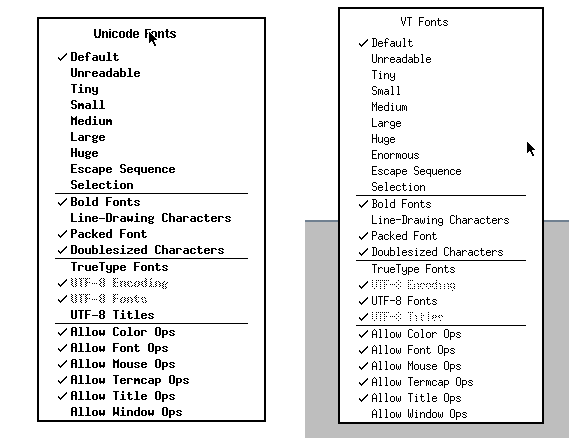
FreeBSD X Windows works just like earlier versions of X11, other than I have not been able to alter any fonts on xterm. In the NetBSD X11 connections, they work fine, even adding a new size in the menus (“Enormous”). One has Unicode, the other VT, probably because of the windows manager (/usr/X11R7/bin/ctwm versus twm)


Audio

I have 2 primary music source: an MP3/M4A library, and streaming source URLs (or XMLs). These depend on the audio hardware working, which on Linux is assumed but on BSD not so much. As I have audio output working on both BSD flavors, one control of interest is the route, whether HDMI or the 1/8 inch (3.5mm) jack. For NetBSD, I did this:

mixerctl -w outputs.select=headphones

On FreeBSD with an external USB audio dongle:

$ cat /dev/sndstat
Installed devices:
pcm0: <USB audio> (play/rec) default
No devices installed from userspace.

"Jazz hands":

> cvlc kcsm.xspf 
VLC media player 3.0.11.1 Vetinari (revision 3.0.11.1-0-g52483f3ca2)
[0000f03ec6b84380] dummy interface: using the dummy interface module...
[0000f03ec5d430c0] mpeg4audio demux packetizer: AAC channels: 1 samplerate: 22050


Packages


Bootstrapping pkg from pkg+http://pkg.FreeBSD.org/FreeBSD:13:aarch64/quarterly, please wait…


# pkg install mariadb105-server

# pkg install scribus

# pkg install xscreensaver


https://www.davidschlachter.com/misc/freebsd-usb-audio


https://wiki.freebsd.org/Sound


NetBSD


My main stumbling block has been getting the right install image for the machines I have. In one case (9.2), I burned the compressed OS image onto the microSD card, using the Raspberry Pi install software on Windows. It happily recognizes .gz install files as viable, even if the code won't boot up that way. I only speculate this based on a few failures of other NetBSD images, including ebijun’s and at least one -current. I even managed to get one as far as noting that X was not there, making a valiant effort to build it from pkgsrc, and giving up after too many swap failures.

Pi3 wired running NetBD


Swap is apparently pretty important for doing any complex compute work on the Pi 3. (1GB main memory rather than the 4 or 8GB on the Pi 4). The good news is with an external drive, even though USB-connected, greater things are possible For example, running minidlna for the first time pointing at an audio library takes some time (reading the files, associating album artwork if found, and writing a usable sqlite3 database). Without swap defined, in 9.2, the library build only made it to the "B"s.


[ 244273.226534] UVM: pid 16739 (minidlnad), uid 0 killed: out of swap
Jun  2 18:22:56 nib /netbsd: [ 558967.3390542] UVM: pid 12874 (dymaxionmap), uid 1000 killed: out of swap

After I started this post I decided I would try to add a swap device or file, then consulted https://www.netbsd.org/docs/misc/index.html#swap and decided to reuse a 2GB microSD card and a small USB adapter. I formatted it on the PC as FAT32, then added a disklabel, changing the type from MSDOS to swap, and then adding an entry in /etc/fstab. If that chip fails or gets pulled out I'm not sure the system will come up, but will deal with it then.


> swapctl -l
no swap devices configured

<fiddling occurs> 

> swapctl -l
Device      1K-blocks     Used    Avail Capacity  Priority
/dev/sd0e     1931196    35064  1896132     2%    0


For the -current image, I was pleasantly surprised to find that audio output works (but it doesn't directly in 9.2). I put the cheaper USB sound chip in the Pi with 9.2, and a USB wifi chip in the -current board.


# pkg_add mysql-server

# pkg_add mariadb-server

# pkg_add rrdtool

# pkg_add xli


> pkg_add raspberrypi-userland

pkg_add: no pkg found for 'raspberrypi-userland', sorry.

pkg_add: 1 package addition failed


uaudio0: <Antlion Audio Antlion USB adapter, class 0/0, rev 1.10/1.00, addr 2> on usbus0


After adding an SSD disk with a SATA/USB adapter to the first NetBSD system I got running, I put the pkg and pkgsrc directories there, then started adding other directories that would benefit from the faster I/O (and larger headroom). A home directory was easy enough, so I also created db, log, run, and tmp folders. To get builds to use the tmp directory there, rather than the one on SD card, I set TMPDIR to /usr/pkgsrc/tmp/. And put into a dot profile for persistence.

I took a chance to re-host the SSD drive with an "unpowered" USB adapter. For spinning disks, there is unlikely to be sufficient power without a separate feed besides the Pi, but that adds hardware and wires. The SSD has been fine so far, though I had a few mysterious halts prior to setting up swap on the external drive.

wifi - ifconfig

urtwn0: flags=0x8843<UP,BROADCAST,RUNNING,SIMPLEX,MULTICAST> mtu 1500
        ssid ""
        powersave off
        address: 98:48:xx:xx:xx:xx
        media: IEEE802.11 autoselect (DS1)
        status: no network

See: wla_supplicant in the manuals.


[     6.972019] ugen0: Realtek (0x2357) 802.11ac NIC (0x0138), rev 2.10/2.10, addr 5

[     6.992442] urtwn0: Realtek (0x0bda) 802.11n NIC (0x8179), rev 2.00/0.00, addr 5

In order to have the Pi recognized correctly on wireless after connecting by wire, I ended up modifying the DHCP configuration. In the past, I switched from dhcpcd to dhclient, partly because I was more familiar, but to some degree, it's easier to type correctly.

In the dhcpcd.conf man page, the stanza per interface lets you pass DHCP a host name:

< # Wed May 26 00:59:54 UTC 2021
< interface meu0
< hostname arm64
< #
< interface urtwn0
< hostname arm64a
< #
< interface bwfm0
< hostname arm64b
< #

The "meu0" interface is wired, the "urtwn0" is wireless on a USB plug-in, and the "bwfm0" is the built-in Broadcom device. In testing, that last connection seemed to work partway yet not completely sane. 

top

Each OS has a top command, and while pretty similar, switching to view all 4 CPUs has different methods, or just didn't work for me.


By the way, I've only been able to build/compile/run "catclock" on NetBSD. It's a wily one.


Stock Linux Pi4


dmesg

While each of the running systems has a dmesg command, the contents, order, and usefulness are distinct. Like baby ducks, you imprint the first one you come across, and variations or rewrites seem odd. I've plucked out basic data such as CPU type, memory, and network circuitry, whether wired or wireless. As noted above, the standard Pi OS is wireless, as is one of the NetBSD boards. I've left off many details around USB, video, and disk specifics, though I wish "boot from USB/SSD disk" was easier to pull off.

All emphases mine.

NetBSD: (pi 3; wireless)

[     1.000000] NetBSD 9.99.82 (GENERIC64) #0: Tue Apr 27 05:40:29 UTC 2021
[     1.000000] total memory = 930 MB
[     1.000000] avail memory = 897 MB
[     1.000000] simplebus0 at armfdt0: Raspberry Pi 3 Model B Plus Rev 1.3
[     1.000000] cpu0 at cpus0: Arm Cortex-A53 r0p4 (v8-A), id 0x0
[     6.978679] urtwn0 at uhub1 port 2
[     6.988681] urtwn0: Realtek (0x0bda) 802.11n NIC (0x8179), rev 2.00/0.00, addr 5
[     8.028819] mue0 at uhub2 port 1
[     8.038821] mue0: vendor 0424 (0x0424) product 7800 (0x7800), rev 2.10/3.00, addr 6
[     8.318858] mue0: LAN7800 id 0x7800 rev 0x2
[     8.328860] ukphy0 at mue0 phy 1: OUI 0x00800f, model 0x0013, rev. 2
[     8.338861] ukphy0: 10baseT, 10baseT-FDX, 100baseTX, 100baseTX-FDX, 1000baseT, 1000baseT-FDX, auto

NetBSD: (pi 3; wired)

[     1.000000] NetBSD 9.2 (GENERIC64) #0: Wed May 12 13:15:55 UTC 2021
[     1.000000] total memory = 933 MB
[     1.000000] avail memory = 900 MB
[     1.000000] simplebus0 at armfdt0: Raspberry Pi 3 Model B Plus Rev 1.3
[     1.000000] cpu0 at cpus0: Cortex-A53 r0p4 (Cortex V8-A core)
[    11.479420] mue0: vendor 0424 (0x424) product 7800 (0x7800), rev 2.10/3.00, addr 8
[    11.769459] mue0: LAN7800 id 0x7800 rev 0x2
[    11.779461] ukphy0 at mue0 phy 1: OUI 0x00800f, model 0x0013, rev. 2
[    11.779461] ukphy0: 10baseT, 10baseT-FDX, 100baseTX, 100baseTX-FDX, 1000baseT, 1000baseT-FDX, auto

FreeBSD (pi4; wired)

FreeBSD 13.0-RELEASE #0 releng/13.0-n244733-ea31abc261f: Fri Apr  9 06:06:55 UTC 2021
real memory  = 4147916800 (3955 MB)
avail memory = 4023050240 (3836 MB)
CPU  0: ARM Cortex-A72 r0p3 affinity:  0
genet0: <RPi4 Gigabit Ethernet> mem 0x7d580000-0x7d58ffff irq 82,83 on simplebus2
genet0: GENET version 5.0 phy 0x0000
brgphy0: <BCM54213PE 1000BASE-T media interface> PHY 1 on miibus0
brgphy0:  10baseT, 10baseT-FDX, 100baseTX, 100baseTX-FDX, 1000baseT, 1000baseT-master, 1000baseT-FDX, 1000baseT-FDX-master, auto


Linux (Raspios?)

[    0.000000] CPU: ARMv7 Processor [410fd083] revision 3 (ARMv7), cr=30c5383d
[    0.000000] OF: fdt: Machine model: Raspberry Pi 4 Model B Rev 1.4
[    0.000000] Memory: 7800096K/8245248K available (10240K kernel code, 1354K rwdata, 3152K rodata, 2048K init, 890K bss, 183008K reserved, 262144K cma-reserved, 7458816K highmem)
[    1.256495] bcmgenet fd580000.ethernet: GENET 5.0 EPHY: 0x0000

?
[    5.756276] brcmfmac mmc1:0001:1: Direct firmware load for brcm/brcmfmac43455-sdio.raspberrypi,4-model-b.txt failed with error -2

[    9.098683] bcmgenet fd580000.ethernet: configuring instance for external RGMII (RX delay)
[    9.099110] bcmgenet fd580000.ethernet eth0: Link is Down
[   15.358288] IPv6: ADDRCONF(NETDEV_CHANGE): wlan0: link becomes ready

XScreensaver


This doesn't need words; needs to be seen to be believed.

Temperature

After getting the first Pi, I found an online tutorial on measuring (or recording more properly) the Pi CPU temperature. 


The Pi 4 can run hot, and it became quickly clear that more load ran up the heat, which then triggered a CPU slowdown from on-board health controls. I experimented with a couple fans and ending up cooling both Pi 4s. The Pi 3 seemed to be less of a toaster, so I didn't seek the heat values initially. Well, I could not find the correct command as it turns out, so once I did I proceeded to set up cron jobs and local web pages to make history. Yeah, the Pi 3 is also a hot machine, and I'll likely search again for cooling methods. In one experiment, I pushed the clock speed on the NetBSD machines and then discovered overheating as shown on the on-screen "thermometer". Which doesn't help if you don't look at that console, but run remote commands via ssh.


Temperature readings:
Linux
TEMP_READING=$(/opt/vc/bin/vcgencmd measure_temp)

FreeBSD
TEMP_READING=$(/sbin/sysctl dev.cpu.0.temperature)

NetBSD
TEMP_READING=$(/usr/sbin/envstat|/usr/bin/tail -1|/usr/bin/awk '{print $2}') 

The NetBSD command is more complex in 9.2 than in -current, as the latter has an option missing in the former:

$ envstat
                 Current  CritMax  WarnMax  WarnMin  CritMin  Unit
[vcmbox0]
  temperature:    69.832   85.000                             degC

$ envstat -n
72.522


Yes, 72.5 Celsius...


# sysctl -w machdep.cpu.frequency.target=1200
machdep.cpu.frequency.target: 600 -> 1200


Extra hardware

Older and cheaper devices are sometimes better since they more likely may have available open source drivers. It's a gamble. Before tax: $30. Not shown, the $15 USB to SATA adapter.

SKUDescriptionQuantityPrice PerTotal Price
874834TPLINK 150MBPS WRLSN NNO USB ADP
19.999.99
854281ANTLION ANTLION USB SOUND ADAPTER
19.999.99
550509SABRENT USB SOUND ADAPTER CMEDIA
19.999.99

Example links (sometimes you can start further up the tree, sometimes not)

pkg_add http://cdn.netbsd.org/pub/pkgsrc/packages/NetBSD/aarch64/9.0_2020Q4/All/vlc-3.0.11.1.tgz
pkg_add ftp://ftp.netbsd.org/pub/pkgsrc/packages/NetBSD/x86_64/9.0/All/firefox-82.0.2.tgz
pkg_add -v http://cdn.netbsd.org/pub/NetBSD/misc/jun/aarch64/aarch64/2019-06-22/python37


References:


FreeBSD on Pi


NetBSD on Pi 

(apologies for http instead of https on some links)


TO DO:

Besides watching the core temperature with an eye towards better heat dispersal, I'd planning on:

  • Review log file growth, and control with "logrotate"
  • Figure out how to delay starting mindlna until NFS comes online, particularly after a power outage.
  • Wait for NetBSD 10
  • Correlate xscreenxaver hacks with the resultant heat rejected
  • Run benchmarks at different core frequencies
  • Test USB-3 hubs, as even 4 ports fill up